 Zum Inhalt springen








Cloud computing is the delivery of computing services over the internet on a pay-as-you-go basis. Instead of buying, owning, and maintaining physical data centers and servers, you access technology services—like computing power, storage, and databases—on an as-needed basis from a cloud provider.
This aligns with the official definition from the National Institute of Standards and Technology (NIST), which defines the cloud as a model for enabling convenient, on-demand network access to a shared pool of configurable computing resources.
One real-life example
You likely use the cloud multiple times a day. When you stream a movie, check your web-based email, or back up photos from your phone to an online drive, you are using cloud computing. The heavy lifting is not happening on your device; it is happening on servers in the cloud.
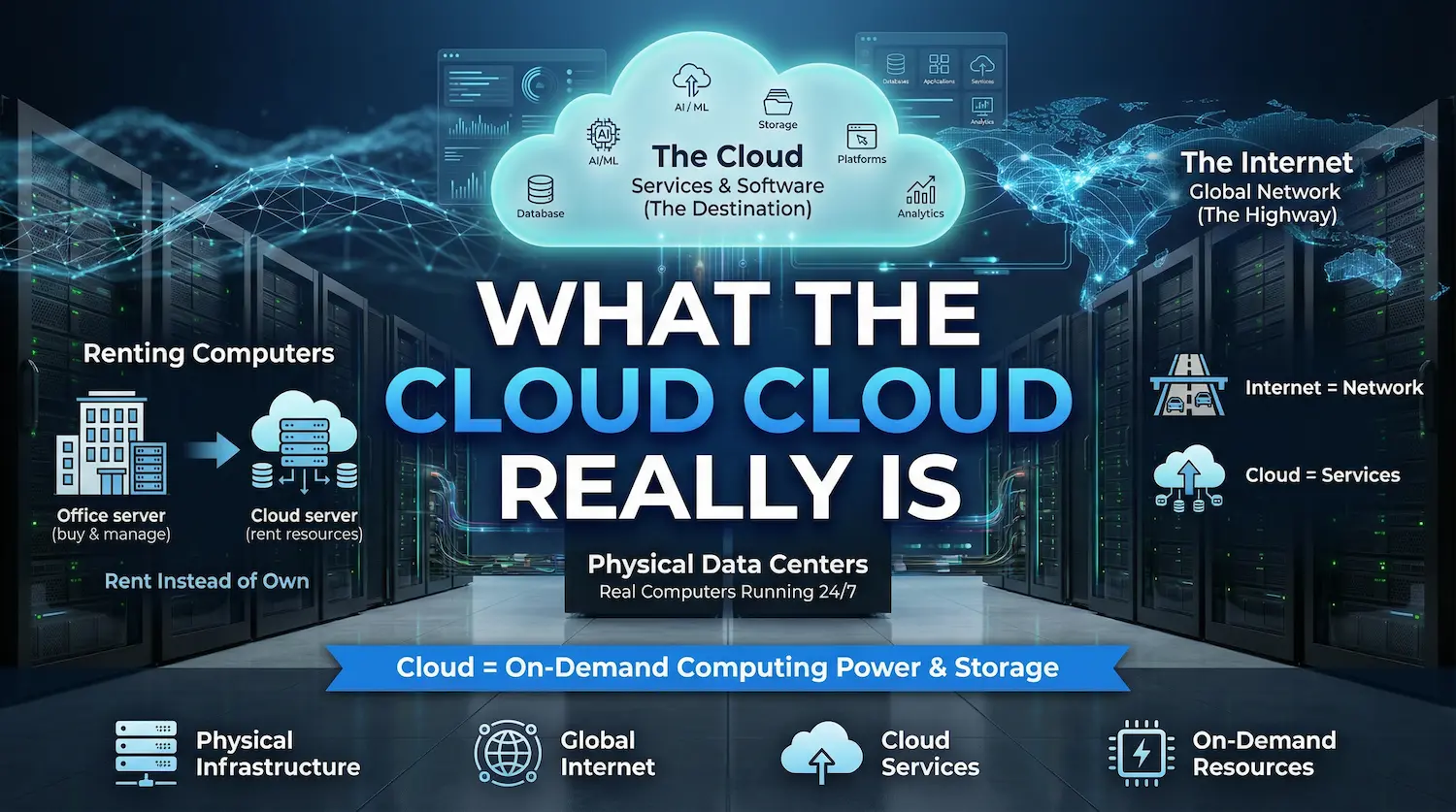
What “the cloud” really is
Cloud vs. internet
The terms “the cloud” and “the internet” are often used interchangeably, but they are different. The internet is the global network of connected computers. The cloud refers to the specific services and software that run on the internet. The internet is the highway; the cloud is the destination.
Data centers
There is nothing floating in the sky. When your data goes to “the cloud,” it is actually traveling to massive, highly secure physical data centers. These facilities are packed with thousands of powerful computers (servers) that run 24/7, managed by providers like Amazon Web Services (AWS), Google Cloud, and Microsoft Azure.
The “Renting computers” idea
If you want to build a website or run software, you could buy a server, put it in your office, pay for the electricity, and fix it when it breaks. Or, you could simply “rent” a slice of a server located in a cloud data center. Cloud computing is essentially renting computing power and storage created by someone else.

How cloud computing works (step by step)
Many guides overcomplicate this process. Here is the exact step-by-step flow of how a standard cloud computing interaction works.
The parts
To make the cloud work, you need five elements: your personal device (phone, laptop, PC), an internet connection, the cloud provider’s “front door” (a web application or API), a control system for security, and the physical servers/software in the data center.
Step-by-step flow
This entire process happens in milliseconds:
- The Request: You click a button on an app or website from your device. This request travels over the internet.
- The Front Door: Your request hits the cloud provider’s system.
- Control and Identity: The provider’s system checks your identity and verifies you have permission to make this request.
- Resource Allocation: The cloud dynamically assigns the exact resource needed—whether that is a server to process a calculation (compute), a hard drive to save a file (storage), or a database to look up a record.
- The Result: The servers complete the task and send the result back to your screen.
- Billing: Simultaneously, the provider’s metering system records exactly how much computing power or storage you used for that specific transaction so you can be billed accurately.
Why it scales
Unlike a traditional computer, cloud resources are “elastic”. If an online store suddenly gets 10,000 visitors at once, the cloud control system automatically spins up extra servers to handle the traffic. When the visitors leave, it shuts those servers down. You only pay for the spike.
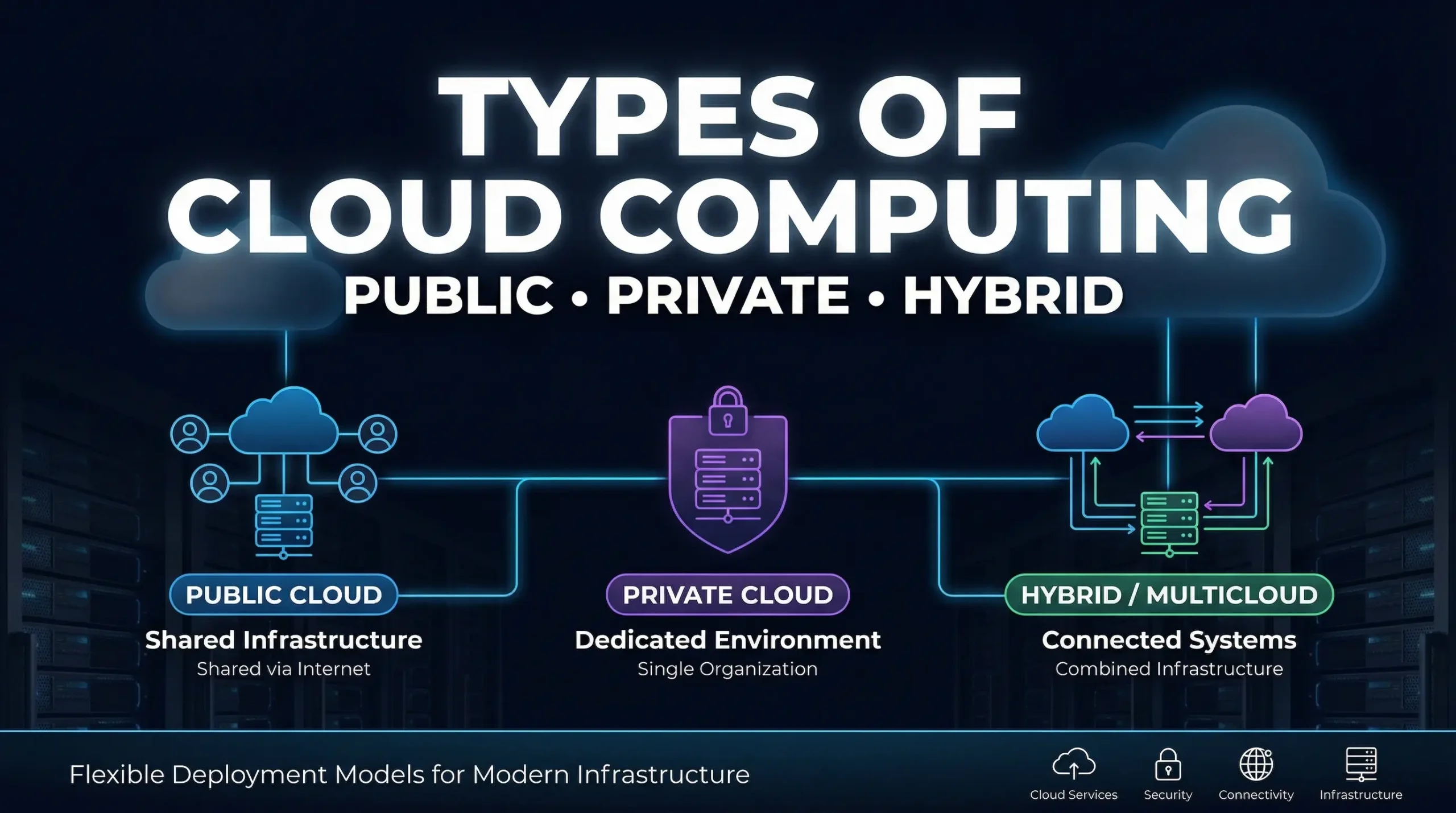
Types of cloud computing (deployment models)
According to NIST and ISO standards, there are three primary ways to deploy cloud resources:
Public cloud
Public clouds are owned and operated by third-party providers. They deliver their computing resources over the public internet. You share the same foundational hardware with other “tenants” (though your data remains completely secure and isolated). This is the most common model.
Private cloud
A private cloud refers to cloud computing resources used exclusively by a single business or organization. It can be physically located at the company’s on-site data center, or hosted by a third party. The infrastructure is maintained on a private network, offering maximum control.
Hybrid and multicloud
A hybrid cloud combines public and private clouds, bound together by technology that allows data and applications to be shared between them. A multicloud approach means an organization is using services from more than one public cloud provider (e.g., using AWS for storage and Google Cloud for machine learning) to avoid relying on a single vendor.
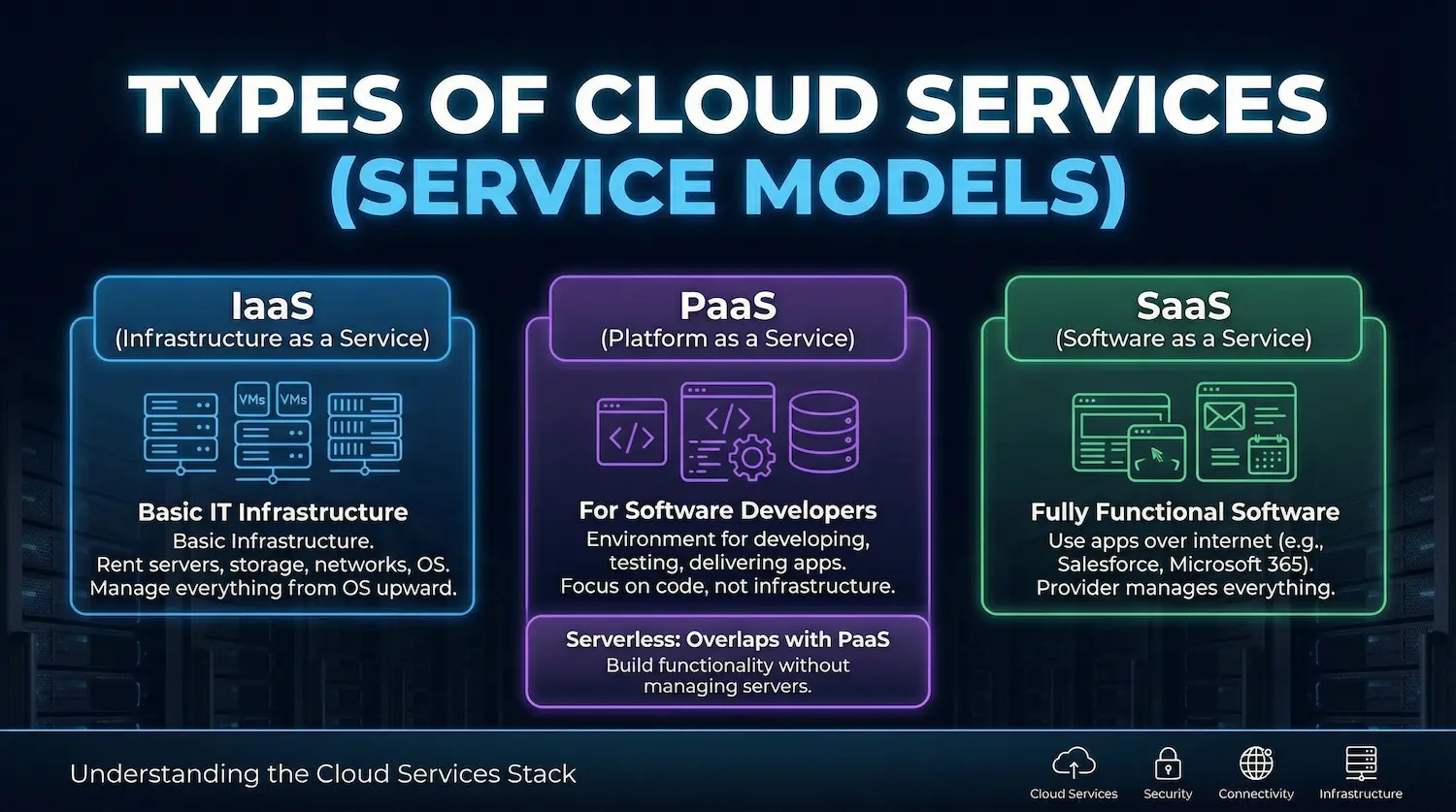
Types of cloud services (service models)
Cloud services are typically stacked into three broad categories. Understanding this stack is critical to understanding what you are actually buying.
IaaS (Infrastructure as a Service)
IaaS is the most basic category. You rent IT infrastructure—servers, virtual machines (VMs), storage, networks, and operating systems—from a cloud provider on a pay-as-you-go basis. You are responsible for installing and managing everything from the operating system upward.
PaaS (Platform as a Service)
PaaS is designed specifically for software developers. It provides an on-demand environment for developing, testing, delivering, and managing software applications. Developers can focus on writing code to create web or mobile apps without worrying about setting up or managing the underlying infrastructure of servers, storage, and databases.
SaaS (Software as a Service)
SaaS is a method for delivering fully functional software applications over the internet, on demand, and typically on a subscription basis. The cloud provider hosts and manages the software application and underlying infrastructure, and handles any maintenance, like software upgrades and security patching. You simply connect to it over the internet, usually with a web browser (e.g., Salesforce, Microsoft 365).
Where “serverless” fits
Serverless computing overlaps with PaaS. It focuses on building app functionality without spending any time continually managing the servers and infrastructure required to do so. The cloud provider handles the setup, capacity planning, and server management invisibly.
Benefits of cloud computing
Why have so many businesses migrated away from their own data centers? The transition offers several distinct advantages.
- Pay only for what you use: You trade capital expenses (buying hardware) for variable expenses (paying only for the computing resources you consume). Example: Shutting down development servers on the weekend so you don’t pay for idle time.
- Fast setup: Massive amounts of computing resources can be provisioned in minutes, typically with just a few mouse clicks. Example: Launching a new database instantly without waiting weeks for IT to order and rack a physical server.
- Scale up and down: You can scale elastically. That means delivering the right amount of IT resources exactly when needed. Example: Adding massive server capacity automatically on Black Friday, and shrinking it on Saturday.
- Reliability + backup + disaster recovery: Cloud computing makes data backup, disaster recovery, and business continuity easier and less expensive because data can be mirrored at multiple redundant sites on the cloud provider’s network.
- Security can improve (with caveats): Many cloud providers offer a broad set of policies, technologies, and controls that strengthen your overall security posture, helping protect data, apps, and infrastructure from potential threats.
- Work from anywhere: Because data and software are hosted remotely, teams can collaborate and access their tools from anywhere in the world with an internet connection.

Risks and limits
To fully understand cloud computing, you must understand the tradeoffs. Moving to the cloud solves many problems, but it introduces new ones.
Shared responsibility (who secures what)
Cloud security is a partnership. Providers operate on a “Shared Responsibility Model”. AWS, Azure, and Google Cloud are responsible for the security of the cloud (the physical buildings, the network hardware, the core compute infrastructure). However, you (the customer) are responsible for security in the cloud. This means you must secure your own passwords, set the correct access permissions on your files, and secure your own application code.
Cost surprises and FinOps
Because the cloud makes it so easy to spin up new resources with a few clicks, it is incredibly easy to overspend. Developers may forget to turn off testing servers, resulting in “cloud waste.” Managing this requires strict cost tracking, often governed by a discipline known as FinOps (Cloud Financial Operations) to ensure you are maximizing value.
Vendor lock-in and switching costs
Once you build your company’s software deeply into the specific tools of one provider (like AWS), moving all that data and rewriting the code to work on a competitor (like Google Cloud) is incredibly expensive, time-consuming, and technically difficult.
Häufig gestellte Fragen
What is cloud computing in simple words?
Cloud computing is the delivery of computing services—such as servers, storage, databases, networking, and software—over the internet. Instead of keeping files on a local hard drive or managing physical servers in an office, you rent these services on-demand from a cloud provider.
How does cloud computing work step by step?
When you request a task from your device, it travels via the internet to a cloud provider’s system. The system verifies your access, utilizes its massive data center servers or storage to complete the task, sends the result back to your device instantly, and meters the specific amount of resources you used for billing.
What are the main benefits of cloud computing?
The primary benefits include cost savings (paying only for what you use instead of buying hardware), agility (setting up infrastructure in minutes), scalability (adding or removing power as demand changes), and increased reliability for disaster recovery.
What is the difference between public, private, and hybrid cloud?
A public cloud is owned by a third-party provider and shared among many customers over the internet. A private cloud is infrastructure dedicated solely to one organization. A hybrid cloud combines the two, allowing data and apps to move between public and private environments for maximum flexibility.
What is the difference between IaaS, PaaS, and SaaS?
IaaS (Infrastructure as a Service) lets you rent the raw servers and storage. PaaS (Platform as a Service) provides a ready-made framework for developers to build apps without managing the underlying servers. SaaS (Software as a Service) delivers a complete, finished software application directly to your web browser.
Is cloud computing secure? Who is responsible for security?
Cloud computing is highly secure, but it relies on a “Shared Responsibility Model.” The cloud provider is responsible for securing the physical data centers and underlying network hardware. The customer is strictly responsible for securing their own data, configuring access controls, and protecting their account passwords.
How do cloud costs work (pay-as-you-go)?
Unlike traditional IT where you buy hardware upfront as a capital expense, cloud computing is an operational expense. You are billed on a utility model (like water or electricity)—you pay exclusively for the exact amount of server time, database lookups, or gigabytes of storage you consume each month.