 Zum Inhalt springen







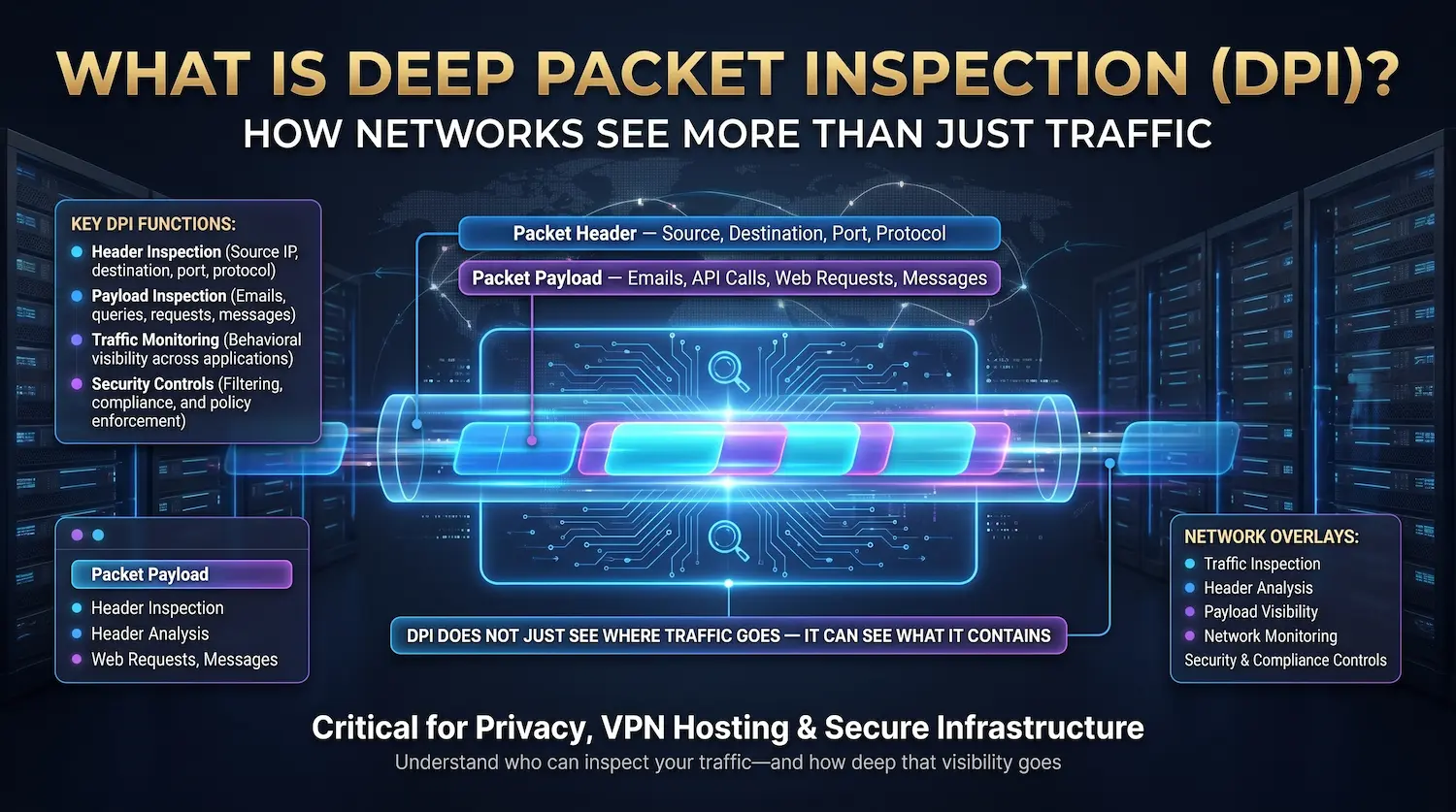
Quick Definition: Deep packet inspection (DPI) is a network traffic analysis method that reads both the header and the full data payload of every packet passing through a network checkpoint. It operates at Layer 7 of the OSI model — the application layer — and gives network operators complete visibility into what is moving across their infrastructure in real time.
Most network security tools read only the label on a package. DPI opens the package and reads what is inside.
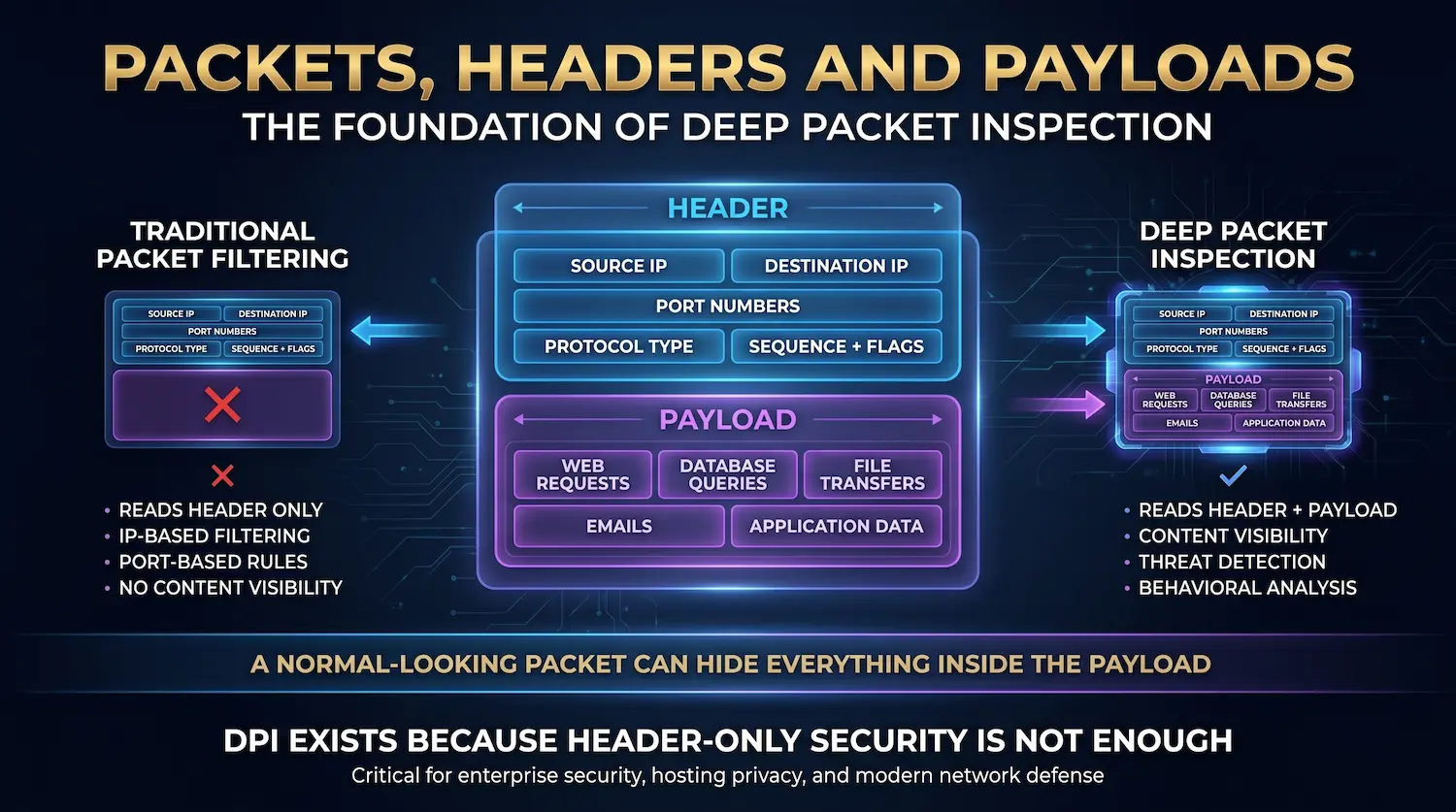
Every piece of data traveling across a network moves as a packet — a small bundle of information with a routing label (header) and a data content section (payload). Traditional firewalls look only at the routing label. They check where the packet is going and where it came from. That is all.
DPI goes further. It reads the actual content inside the packet. This capability is how modern infrastructure detects hidden malware, stops DDoS attacks, enforces data policies, and manages network performance at scale.
Atal Networks operates DPI across 213+ data centers in 196+ countries. Our network-level DDoS protection—which shields more than 35,000 dedicated server and VPS clients—runs on DPI as its primary detection engine. This article explains exactly how it works, why it matters, and what it means for your infrastructure.
Inhaltsverzeichnis
- Packets, Headers, and Payloads: The Foundation
- How Deep Packet Inspection Works
- DPI vs. Stateful Packet Inspection: A Direct Comparison
- DPI and the OSI Model
- The Three DPI Analysis Techniques
- Six Real-World DPI Use Cases
- DPI on Dedicated Servers vs. VPS: A Critical Difference
- DPI and Encrypted Traffic: The TLS Challenge
- DPI and BGP: How Network-Level Attack Mitigation Works
- DPI and VPNs: Both Sides of the Relationship
- Privacy, Legal Standing, and Net Neutrality
- DPI Advantages and Disadvantages
- DPI Tools: The Technology Stack
- What DPI Means for Your Server Security
- Frequently Asked Questions About Deep Packet Inspection
Packets, Headers, and Payloads: The Foundation
A data packet is the basic unit of communication across any IP network. Every packet has two parts: a header that carries addressing information and a payload that carries the actual data being transmitted.
Understanding this structure is essential before explaining what DPI does differently from older methods.
Die header contains:
- Source IP address (where the packet came from)
- Destination IP address (where it is going)
- Source and destination port numbers
- Protocol type (TCP, UDP, ICMP, etc.)
- Packet sequence number and flags
This is the envelope. It tells the network where to deliver the packet. Traditional packet filtering and early stateful firewalls read only this envelope. They make allow-or-block decisions based on IP addresses and port numbers alone.
Die payload is the content inside the envelope. It contains the actual data — a webpage request, a database query, a file being transferred, a video stream, a command-and-control instruction from malware, or data being exfiltrated from your network.
When a security system reads only the header, it is operating blind to the payload. A packet with a perfectly normal-looking header can carry ransomware. It can carry stolen credit card numbers heading to an attacker’s server. It can carry a botnet command disguised as browser traffic.
DPI solves this blind spot. It reads the payload.
How Deep Packet Inspection Works
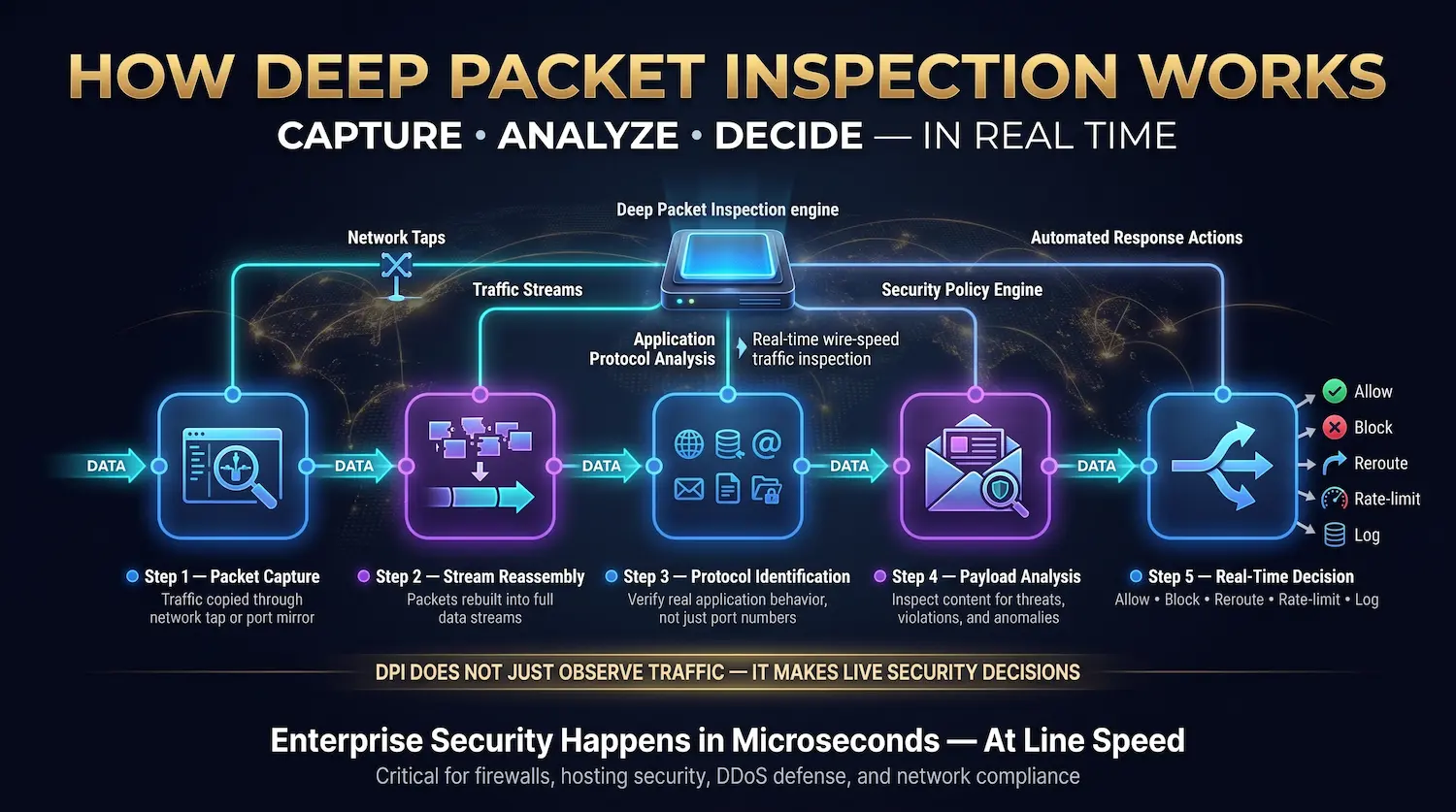
Deep packet inspection works by intercepting packets at a network checkpoint, reassembling them into data streams, identifying the application protocol in use, and analyzing the payload content against a set of detection rules — all in real time, at wire speed.
Here is the full process, step by step:
Step 1 — Packet Capture
Packets enter the DPI device through a network tap or port mirror. A network tap passively copies traffic from a link. A port mirror (sometimes called a SPAN port) duplicates traffic from a switch to a monitoring port. Either method gives the DPI engine access to every packet without disrupting the flow.
Modern purpose-built DPI hardware processes traffic at 10Gbps to 100Gbps without adding measurable latency. Software-based DPI running on general-purpose servers can handle lower volumes but may introduce latency under heavy load.
Step 2 — Stream Reassembly
Many attacks split their payload across multiple packets to evade detection. A malware signature spread across 10 separate packets looks clean when examined packet by packet. DPI reassembles related packets into their complete data stream before analysis. This step is critical for catching fragmentation-based evasion techniques.
Step 3 — Protocol Identification
The DPI engine identifies the application protocol being used. This goes far beyond checking the port number. Port 443 is supposed to carry HTTPS traffic, but DPI verifies that the traffic actually behaves like HTTPS. It can detect when a peer-to-peer application is disguising itself as web traffic on port 80 or when malware is using DNS (port 53) to tunnel data outbound.
According to NIST Special Publication 800-41, accurate protocol identification at the application layer is a core requirement for next-generation firewall effectiveness. DPI delivers this identification reliably, even when attackers try to disguise traffic.
Step 4 — Payload Analysis
The engine analyzes the payload content against three types of rules (detailed in the next section). This analysis checks for known threat signatures, protocol rule violations, and behavioral anomalies—simultaneously.
Step 5 — Real-Time Decision
Based on the analysis result, the DPI engine takes one of five actions:
| Aktion | Description |
| Allow | The packet passes through normally |
| Block | Packet is dropped; connection terminated |
| Reroute | Packet redirected to quarantine or scrubbing center |
| Rate-limit | Packets are allowed, but the bandwidth to that flow is throttled |
| Log and alert | The packet passes; the administrator is notified for review |
The entire process — capture, reassembly, identification, analysis, decision — takes microseconds. At our data centers, this happens at line speed without interrupting your server’s network performance.
DPI vs. Stateful Packet Inspection: A Direct Comparison
Stateful packet inspection (SPI) tracks the state of active network connections and filters traffic based on header data at Layers 3 and 4. Deep packet inspection reaches Layer 7 and reads the actual payload content, giving it application-level visibility that SPI cannot provide.
This is the most common confusion in network security. Both methods inspect packets, but they operate at very different depths.
| Feature | Stateful Packet Inspection (SPI) | Deep Packet Inspection (DPI) |
| OSI Layers | 3–4 (Network + Transport) | 3–7 (up to Application) |
| Reads | Header only (IP, port, protocol state) | Header + full payload content |
| Application awareness | Nein | Ja |
| Can identify specific apps | Nein | Ja |
| Detects malware in the payload | Nein | Ja |
| Catches protocol disguise attacks | Nein | Ja |
| SSL/TLS inspection | Nein | Yes (with decryption) |
| Performance cost | Niedrig | Higher (offset by dedicated hardware) |
| Best for | Basic firewall rules, NAT, and connection tracking | Advanced threat detection, QoS, DDoS mitigation, DLP |
SPI was the industry standard through the 1990s and 2000s. It works for basic perimeter control. The problem is that modern threats do not reveal themselves in packet headers. Ransomware, data theft tools, and advanced persistent threats (APTs) all exploit the payload blind spot that SPI leaves open.
DPI closes that blind spot entirely.
DPI and the OSI Model
Deep packet inspection operates primarily at Layer 7 of the OSI model — the application layer — though it also processes data at Layers 3 through 6 during its analysis. This Layer 7 reach is what separates DPI from every earlier packet inspection method.
Die OSI model defines seven layers of network communication:
| OSI Layer | Name | What It Handles |
| Layer 7 | Application | User-facing protocols: HTTP, HTTPS, DNS, SMTP, FTP, VoIP |
| Layer 6 | Presentation | Encryption, compression, data formatting (TLS/SSL lives here) |
| Layer 5 | Session | Session management, authentication handshakes |
| Layer 4 | Transport | TCP/UDP, port numbers, segmentation |
| Layer 3 | Network | IP addresses, routing |
| Layer 2 | Data Link | MAC addresses, switch-level forwarding |
| Layer 1 | Physical | Cables, signals, hardware |
Traditional packet filtering works at Layers 3 and 4. It reads IP addresses and port numbers. Stateful inspection adds connection tracking at Layer 4 but goes no further.
DPI reaches Layer 7. At this layer, the system can see:
- The specific application generating the traffic (Chrome, Firefox, Slack, BitTorrent)
- The exact content of the HTTP request or DNS query
- The command is being executed over an SSH session
- The file is being transferred via FTP
- The codec used by a VoIP application
This is why DPI-enabled systems can identify a BitTorrent transfer disguised as HTTP traffic on port 80 or a DNS tunneling attack exfiltrating data one small query at a time. Neither of these attacks is visible below Layer 7.

The Three DPI Analysis Techniques
DPI uses three core analysis methods: signature-based detection for known threats, protocol anomaly detection for rule violations, and heuristic or behavioral analysis for unknown patterns. Modern enterprise DPI systems run all three simultaneously.
Signature-Based Detection
The system maintains a continuously updated database of known threat signatures. Each signature is a precise pattern — a byte sequence, string, or behavioral marker — tied to a specific malware family, exploit kit, or attack tool.
Every packet payload is compared against this database in real time. When a match is found, the DPI engine acts immediately. Signature databases from vendors like Snort and Suricata contain tens of thousands of signatures covering malware, exploits, protocol abuses, and data leakage patterns.
Strength: Very fast and accurate for known threats. False positive rates are low because signatures are specific.
Limitation: Only detects threats already in the database. A brand-new attack with no prior signature passes through undetected until the database is updated.
Protocol Anomaly Detection
This technique does not look for bad things by name. It defines what “correct” looks like for each protocol — based on official standards like RFC 791 for IP und RFC 1122 for Internet standards — and flags anything that deviates.
An HTTP packet that violates the HTTP/1.1 specification gets flagged. A DNS response that is larger than the 512-byte limit set by the original DNS standard gets flagged. A TCP handshake that does not follow the standard SYN-SYN/ACK-ACK sequence gets flagged.
The approach follows what security teams call “default deny” — only traffic that conforms completely to its stated protocol is allowed to pass without scrutiny.
Strength: Catches zero-day attacks and new exploit techniques because no prior knowledge of the threat is required. Any malformed or out-of-spec behavior triggers a flag.
Limitation: Higher configuration complexity. Requires well-maintained protocol definition rules to avoid excessive false positives.
Heuristic and Behavioral Analysis
Modern DPI systems add a third layer: machine learning models that analyze traffic patterns across entire sessions and flows — not individual packets.
A single outbound DNS query to an unknown domain is normal. Two hundred DNS queries per minute to dozens of rotating domains is a textbook sign of DNS-based botnet command-and-control traffic. A single file upload is expected behavior. A machine uploading 40GB to an external IP at 3:00 AM is a data exfiltration event.
Heuristic analysis identifies these patterns even when every individual packet is well-formed and would pass signature and protocol checks alone.
Strength: Catches novel attacks, insider threats, and low-and-slow data theft that evade both signature and protocol analysis.
Limitation: Higher computational requirements. Requires training data and tuning to minimize false positives in production environments.

Six Real-World DPI Use Cases
1. DDoS Attack Detection and Mitigation
DDoS attacks generate malicious traffic at high volume to overwhelm a server. DPI detects attack patterns at the packet level and blocks them before they reach your infrastructure — filtering out attack traffic while allowing legitimate users through.
This is the most direct application of DPI for our clients at Atal Networks. DDoS attacks have grown in scale dramatically: according to the CISA 2024 Threat Report, volumetric DDoS attacks now routinely exceed 1 Tbps. No server can absorb that volume without upstream protection.
DPI identifies DDoS patterns at the network edge:
- Volumetric attacks: Sudden spikes from thousands of source IPs, often using UDP flood or ICMP flood techniques
- Protocol attacks: SYN floods that exploit the TCP handshake, consuming connection state on the target server
- Application-layer attacks: HTTP floods that send valid-looking requests to exhaust server resources
- Amplification attacks: DNS or NTP reflection attacks that use legitimate protocols to generate massive traffic volume
Our DPI systems at each of our 213+ points of presence identify these patterns in real time and drop attack traffic at the network edge, before it reaches your dedizierter Server oder VPS. This is how we maintain a 99.99% uptime SLA even during active attack campaigns.
2. Network Traffic Prioritization and QoS
DPI enables Quality of Service (QoS) management by identifying exactly what application is generating each traffic flow and applying priority rules that ensure latency-sensitive applications always get the bandwidth they need.
Without DPI, a network treats all packets equally. A file backup transfer competes for bandwidth with a live video call. A peer-to-peer download consumes resources that should go to a business-critical database transaction.
With DPI, the network knows the difference. It can:
- Prioritize VoIP and video conferencing packets to minimize call quality issues
- Guarantee consistent bandwidth allocation for real-time applications
- Rate-limit peer-to-peer and bulk transfer traffic during peak hours
- Ensure SaaS application traffic gets low-latency delivery
For clients running trading platforms, live streaming services, or real-time analytics on our Bare-Metal-Server, QoS management through DPI is what makes those applications perform reliably under load.
3. Malware Detection and Intrusion Prevention
DPI is the detection engine inside every modern Intrusion Detection System (IDS) and Intrusion Prevention System (IPS). It catches malware that has already breached the perimeter by reading the content of active network sessions.
A perimeter firewall stops threats at the door. But threats that get through the door — phishing payloads, drive-by downloads, compromised credentials — need a different detection layer. DPI provides it by analyzing all internal and outbound traffic, not just inbound traffic.
It detects:
- Malware beaconing to command-and-control servers on external IPs
- Ransomware encrypting files and generating abnormal internal traffic volumes
- Credential-stealing tools sending authentication data to external destinations
- Worms moving laterally across internal network segments
Open-source tools like Suricata and Snort power DPI-based intrusion detection for organizations of all sizes. Enterprise environments layer these on top of proprietary DPI hardware for high-throughput environments. Suricata, for example, supports multi-threaded inspection at 100Gbps with the right hardware configuration.
4. Data Loss Prevention (DLP)
DPI-based data loss prevention detects sensitive data patterns in outbound traffic and blocks transfers before they complete. It catches data theft in real time, not after a breach has occurred.
Organizations handling credit card data (PCI DSS scope), patient records (HIPAA scope), or trade secrets configure DPI rules to detect specific data patterns in outbound traffic:
- Payment card numbers (16-digit sequences matching PAN formats)
- Social Security numbers and national identification formats
- Patient health record identifiers
- Database record dumps with structured data patterns
When a DPI system sees these patterns in an outbound connection — especially to unfamiliar external IP addresses — it blocks the transfer and alerts the security team. This is how organizations catch insider data theft and malware-driven exfiltration before a small incident becomes a reportable breach.
5. Regulatory Compliance Monitoring
DPI provides the continuous traffic monitoring and logging that HIPAA, PCI DSS, GDPR, and SOC 2 compliance frameworks require for organizations handling sensitive data in transit.
GDPR (Article 32) requires appropriate technical measures to ensure the security of personal data in processing, including during transmission. HIPAA requires covered entities to implement technical security measures that guard against unauthorized access to electronic protected health information over networks. PCI DSS Requirement 10 mandates logging and monitoring of all access to network resources and cardholder data.
DPI generates the packet-level logs and alerts these frameworks need. It provides evidence that traffic containing sensitive data was monitored, that unauthorized transfers were blocked, and that the organization can detect and respond to data-handling policy violations in real time.
At Atal Networks, our infrastructure supports GDPR and HIPAA-compliant dedicated server deployments. Our network security stack — including DPI-based traffic monitoring — is part of the compliance posture we deliver to clients in regulated industries.
6. Bandwidth Management for Hosting Providers
Hosting providers and ISPs use DPI to identify which clients and applications are consuming disproportionate bandwidth, apply fair use policies, and protect shared infrastructure from being overwhelmed by a single source.
This is a direct operational reality for us. When one client’s application generates a traffic spike, DPI lets us identify the source precisely and take targeted action without affecting other clients on the same network infrastructure.
Without DPI, a network administrator sees only aggregate traffic volumes. They cannot tell whether a 40Gbps spike is a legitimate traffic surge, a DDoS attack, or a misconfigured application. DPI resolves this ambiguity in seconds.
DPI on Dedicated Servers vs. VPS: A Critical Difference
On VPS infrastructure, DPI runs at the hypervisor layer with shared inspection resources across all virtual machines on the same host. On dedicated (bare metal) servers, DPI runs on a dedicated network port with configurations specific to your workload. The dedicated model provides stronger security and custom policy options.
This distinction is not covered elsewhere, and it matters directly for clients choosing between our VPS-Hosting und dedizierter Server plans.
VPS environment:
DPI inspection happens at the host level, applied to all virtual machines on the physical server simultaneously. The inspection policies are standardized across tenants. You share inspection bandwidth with other VMs. Custom DPI rules specific to your application are not generally available. Protection is broad but not tailored.
Dedicated server environment:
Your server has a dedicated physical network port. DPI operates on that port alone. Inspection bandwidth is not shared with other tenants. Our network engineering team can configure DPI rules specific to your application type — for example, stricter outbound filtering for a financial application, or application-aware QoS for a gaming server. Protection is deep and tailored to your workload.
For high-security applications — financial services, healthcare platforms, e-commerce stores processing card data, government workloads — dedicated servers with dedicated DPI configurations provide the strongest available protection. The investment in dedicated hardware pays for itself in breach prevention and compliance assurance.
DPI and Encrypted Traffic: The TLS Challenge
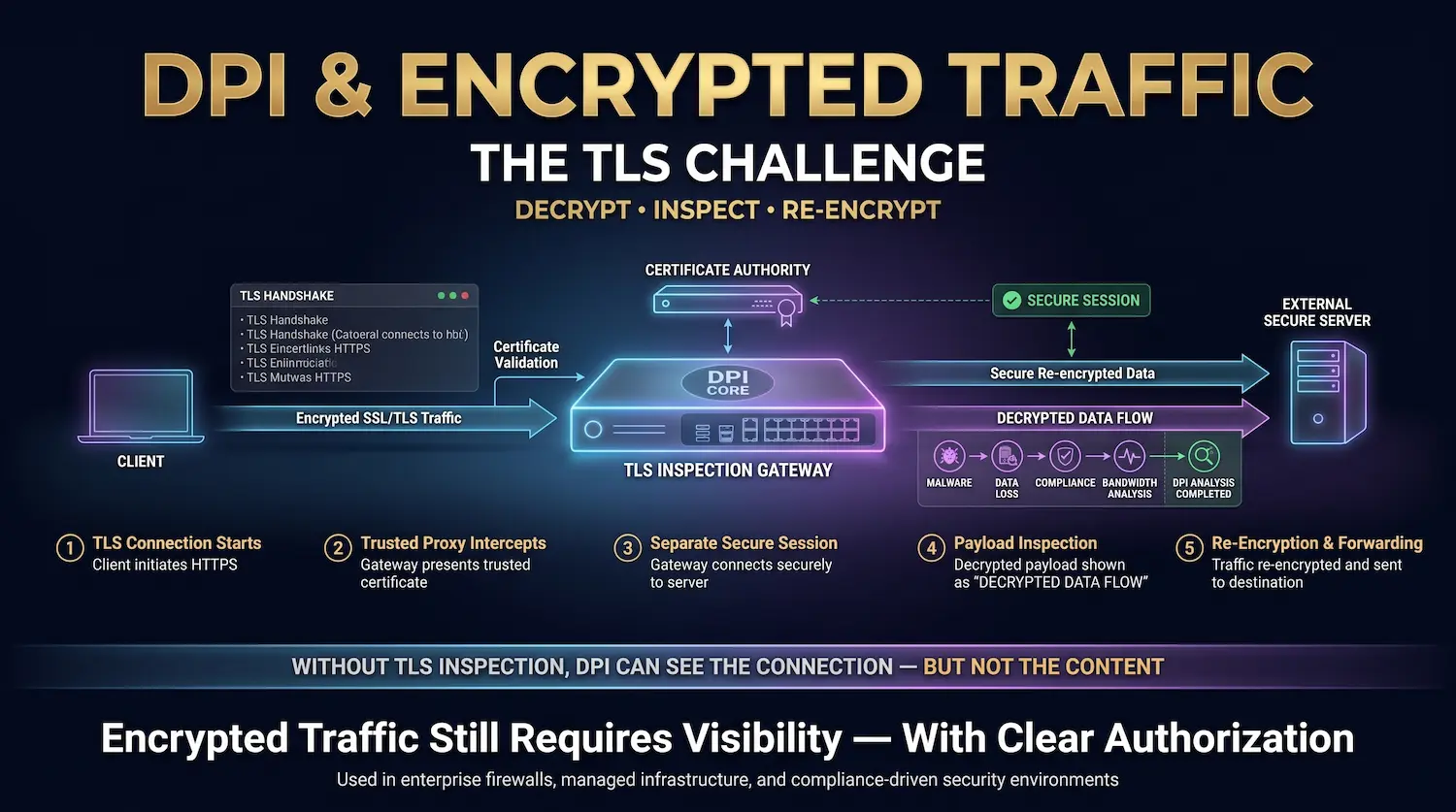
Standard DPI cannot inspect the content of TLS-encrypted traffic without decryption. SSL/TLS inspection (also called SSL decryption or TLS interception) addresses this by decrypting traffic at the inspection point, analyzing the payload, and re-encrypting before forwarding. This restores DPI’s full effectiveness in HTTPS-dominant environments.
As of 2026, over 95% of web traffic is encrypted using TLS, according to Google’s Transparency Report. This creates a major challenge for DPI: the payload that DPI needs to read is hidden behind encryption.
A DPI system without SSL inspection sees only the TLS handshake parameters — which server the client is connecting to and which cipher suite was negotiated. It cannot see the HTTP request, the response body, or any malware payload traveling inside the encrypted channel.
SSL/TLS inspection process:
- The client initiates a TLS connection to an external server.
- The DPI device (acting as a trusted proxy) intercepts the connection and presents its own certificate to the client.
- The device establishes a separate TLS connection to the actual external server on the client’s behalf.
- Traffic between the client and the device is decrypted. The DPI engine inspects the plaintext payload.
- Traffic is re-encrypted before forwarding to the external server.
This restores complete DPI coverage in encrypted environments. SSL inspection is standard in enterprise security stacks, next-generation firewalls from vendors like Palo Alto Networks and Cisco Firepower, and in data center security appliances.
The privacy consideration is real. SSL inspection requires the inspection device to hold a trusted certificate authority. Users whose traffic is inspected should be informed. For enterprise networks, this is standard policy. For consumer ISPs, performing SSL inspection on user traffic without disclosure is a significant privacy violation and may breach applicable laws.
Our data centers perform SSL inspection only for traffic coming from within managed infrastructure where clients have explicitly opted into deep traffic monitoring. We do not inspect encrypted traffic to or from client machines without clear authorization.
DPI and BGP: How Network-Level Attack Mitigation Works
DPI integrates with BGP (Border Gateway Protocol) routing to enable remotely triggered blackhole (RTBH) routing — a technique that redirects attack traffic to a scrubbing center where DPI filters out malicious packets and returns clean traffic to the target server.
Our network at Atal Networks is 100% multihomed. Every route is available through multiple upstream providers simultaneously via BGP. This architecture is not just about redundancy — it is essential for how our DPI-based DDoS protection actually works during an active attack.
Here is the sequence during a large-scale DDoS event:
- Our DPI systems at the network edge detect attack characteristics — source IP distribution, packet rates, protocol signatures consistent with a volumetric or application-layer attack.
- The DPI system signals our routing infrastructure to update BGP announcements via RTBH or Flowspec (RFC 5575), redirecting attack traffic toward a scrubbing facility.
- The scrubbing facility applies additional DPI rules to separate malicious traffic from legitimate traffic in the same flow.
- Clean traffic is returned to the client’s dedicated server through a separate forwarding path.
- The entire process happens in under 30 seconds for most attack types.
BGP alone cannot do this. It manages routing paths — it has no concept of “malicious” traffic. DPI provides the intelligence that tells the BGP system exactly which traffic to redirect and when. These two technologies together are what makes network-level DDoS mitigation possible at scale.
DPI and VPNs: Both Sides of the Relationship
A VPN encrypts your traffic before it leaves your device, which prevents DPI from reading the payload content. However, advanced DPI systems can still identify VPN protocols through traffic pattern analysis, protocol fingerprinting, and flow timing analysis — even without reading the encrypted content.
VPNs and DPI have a complex relationship. Understanding both sides matters for network administrators and security teams.
From a privacy protection perspective: A VPN creates an encrypted tunnel from your device to a VPN server. A DPI system at your ISP or a government gateway sees the encrypted tunnel — not your browsing activity inside it. The payload content is protected by the VPN’s encryption layer (TLS for OpenVPN, the Noise Protocol Framework for WireGuard, or IPSec for traditional VPN implementations).
This is why VPNs protect users from ISP-level DPI throttling and from government content filtering systems that rely on DPI to block specific websites or services.
From a detection perspective: Advanced DPI systems can identify VPN traffic even without reading its content:
- Protocol fingerprinting: OpenVPN, WireGuard, and IPSec each have distinct handshake patterns and packet structure characteristics that DPI recognizes.
- Traffic flow analysis: VPN traffic has characteristic flow patterns — sustained connections to a single IP, specific packet size distributions — that differ from normal browsing behavior.
- Port usage patterns: Most VPN protocols use specific port ranges or unusual port combinations that DPI can flag.
Some governments and corporate networks use this capability to block VPN usage entirely. In response, VPN providers like Mullvad and ProtonVPN deploy obfuscation layers that disguise VPN traffic as regular HTTPS traffic, making protocol fingerprinting significantly harder.
For clients running VPN or proxy servers on our infrastructure, our network-level DPI protects the server itself regardless of the encryption protocols your clients use to connect to it.
Privacy, Legal Standing, and Net Neutrality
DPI is legal in most jurisdictions when used for network security, DDoS mitigation, and traffic management. It becomes a legal and ethical problem when used for mass surveillance, content censorship, or behavioral profiling without user consent.
The legal status of DPI depends entirely on its purpose and the jurisdiction where it is applied.
Clearly permitted uses (in most jurisdictions, including EU and US):
- Network security monitoring on infrastructure you own or manage
- DDoS detection and mitigation
- QoS traffic management
- Compliance-required traffic logging (HIPAA, PCI DSS)
- Corporate security monitoring on corporate networks (with proper employee disclosure)
Legally contested or restricted uses:
- ISP use of DPI to throttle competing streaming services (net neutrality violations in EU, restricted in several US states)
- Government use of DPI for mass population surveillance without legal authority
- Collection and sale of traffic behavioral data without user consent (GDPR Article 6 requires a lawful basis)
- DPI for targeted advertising without disclosure (violated by multiple ISPs in FTC enforcement actions)
GDPR is particularly clear on this. Personal data collected through network monitoring — including traffic metadata — is subject to data minimization requirements, purpose limitation, and subject-access rights. Organizations using DPI for anything beyond security operations need a documented lawful basis and a data retention policy that matches their stated purpose.
At Atal Networks, our DPI use is strictly bounded to network security and traffic management. We do not analyze client traffic for advertising or behavioral profiling purposes. We do not share DPI-derived data with third parties.
DPI Advantages and Disadvantages
DPI provides complete Layer 7 traffic visibility that no earlier inspection method matches. Its primary trade-offs are higher hardware requirements and privacy considerations that must be managed carefully in any deployment.
| Advantage | Detail |
| Complete traffic visibility | Reads header and payload at Layer 7 for full application awareness |
| Detects payload-hidden threats | Catches malware, data theft, and exploits invisible to header-only inspection |
| Enables application-aware QoS | Prioritizes traffic by application type, not just port number |
| Powers real-time DDoS mitigation | Identifies attack patterns and triggers BGP-level response in under 30 seconds |
| Supports regulatory compliance | Provides the traffic logging required by HIPAA, PCI DSS, GDPR, and SOC 2 |
| Detects data exfiltration | Catches sensitive data leaving the network before a breach is complete |
| Zero-day coverage | Protocol anomaly detection catches new attacks without prior signatures |
| Disadvantage | Detail |
| Higher hardware requirements | Processing payloads at wire speed requires dedicated hardware for high-throughput environments |
| SSL inspection privacy concerns | Decrypting TLS traffic for inspection requires careful governance and user disclosure |
| Encrypted traffic limitation | Without SSL inspection, payload analysis is blocked by TLS encryption |
| Evasion techniques exist | Packet fragmentation, timing attacks, and protocol obfuscation reduce DPI accuracy |
| Configuration complexity | Protocol anomaly rules require expert tuning to minimize false positives |
| Legal and ethical boundaries | Misuse for surveillance or profiling creates legal liability and trust damage |
DPI Tools: The Technology Stack
DPI capability is available through open-source network analysis tools, commercial next-generation firewalls, and purpose-built data center hardware. The right choice depends on traffic volume, inspection depth requirements, and operational context.
Open-source tools:
- Wireshark: Industry-standard network protocol analyzer with deep packet dissection for hundreds of protocols. Used for troubleshooting, forensic analysis, and security research. Not built for real-time production blocking, but essential for analysis and verification.
- Suricata: High-performance open-source IDS, IPS, and network security monitoring engine. Supports multi-threaded DPI inspection, Lua scripting for custom rules, and integration with threat intelligence feeds. Widely deployed in production ISP and hosting environments.
- Snort: The original open-source IDS. Extensive rule ecosystem, long production track record. Suricata has largely superseded it for performance-critical deployments, but Snort remains widely used in enterprise environments.
- Zeek (formerly Bro): Network analysis framework focused on behavioral and protocol-level analysis. Generates structured logs of all network activity rather than blocking traffic. Excellent for threat hunting and forensic investigation.
Commercial enterprise solutions:
- Palo Alto Networks NGFW: Next-generation firewall built around App-ID — a DPI engine that identifies over 3,000 applications by behavior, not by port number. Industry benchmark for Layer 7 firewall performance.
- Cisco Firepower: Integrated threat defense platform combining DPI, IPS, malware protection, and URL filtering in a single system.
- Fortinet FortiGate: High-performance NGFW with custom ASIC hardware for DPI at multi-gigabit speeds.
Data center hardware:
For inspection at 40Gbps to 100Gbps without software-induced latency, purpose-built SmartNIC and FPGA-based DPI hardware from vendors like Napatech and Stamus Networks runs inspection closer to the physical network layer.
What DPI Means for Your Server Security
DPI is not optional for any organization running infrastructure that handles real user data, processes payments, or serves latency-sensitive applications.
At Atal Networks, every server we provision sits behind our DPI-powered network security stack. Our DDoS protection filters attack traffic at the network edge before it reaches your machine. Our QoS system ensures your application’s traffic gets priority on our 10Gbps ports. Our traffic monitoring provides the logging baseline needed for HIPAA and PCI DSS compliance deployments.
You do not configure any of this yourself — it runs automatically, 24 hours a day, across our entire global infrastructure.
Clients with advanced requirements — custom DPI policies, application-layer filtering rules, or SSL inspection for compliance — work directly with our network engineering team to configure these at the port level on their dedicated server plan.
Our team has deployed and managed DPI infrastructure across 213+ data centers for 15+ years. We run this technology in production every day for 36,000+ businesses worldwide.
Ready to deploy a server with network-level DPI protection?
Explore our dedicated server plans with built-in DDoS protection and QoS management — currently 70% OFF for new deployments.
Frequently Asked Questions About Deep Packet Inspection
Is deep packet inspection legal?
Deep packet inspection is legal in most countries when used for network security, DDoS mitigation, traffic management, or compliance monitoring purposes. Legal restrictions apply when DPI is used for mass surveillance, content censorship, or behavioral profiling without user consent. In the EU, GDPR Article 6 requires a lawful basis for processing personal data derived from network traffic inspection. In the US, legal requirements vary by sector — healthcare organizations must comply with HIPAA, financial organizations with GLBA, and payment processors with PCI DSS.
Does deep packet inspection slow down network performance?
Modern purpose-built DPI hardware processes traffic at 10Gbps to 100Gbps without measurable latency impact on correctly configured infrastructure. Performance degradation from DPI typically comes from underpowered software-based implementations running on general-purpose CPUs, or from poorly tuned rule sets that generate excessive processing overhead. On our dedicated server infrastructure, DPI runs on purpose-built network hardware with no performance impact on your server’s throughput or latency.
Can a VPN block deep packet inspection?
A VPN encrypts your traffic payload, which prevents DPI from reading the content of your network sessions. However, advanced DPI systems can still identify VPN protocols through protocol fingerprinting, flow analysis, and timing pattern analysis — without reading the encrypted content. Some VPN services use obfuscation to disguise their traffic as standard HTTPS, which makes protocol identification harder but not impossible for sophisticated DPI systems.
How is DPI different from a firewall?
A traditional firewall filters traffic using header information — IP addresses, port numbers, and connection state. DPI reads the full packet payload and identifies traffic by application behavior, not just header data. Modern next-generation firewalls (NGFWs) from vendors like Palo Alto Networks and Cisco integrate DPI as their primary inspection engine. So a firewall is a device, DPI is the inspection technique, and NGFWs combine both into a single platform.
Can DPI inspect HTTPS and encrypted traffic?
Standard DPI cannot inspect the payload of TLS-encrypted HTTPS traffic without decryption. SSL/TLS inspection (also called deep SSL inspection or TLS interception) addresses this by decrypting traffic at the inspection point, analyzing the payload, and re-encrypting before forwarding. This approach is used in enterprise security environments and data centers where compliance and security requirements justify it. It requires proper certificate management and clear user disclosure in most jurisdictions.
Can DPI detect zero-day attacks?
Signature-based DPI cannot detect zero-day attacks because no signature exists for them yet. However, protocol anomaly detection catches many zero-day threats by flagging behavior that deviates from established protocol standards — even when no prior signature exists. Heuristic and behavioral analysis adds another detection layer by identifying unusual traffic patterns that indicate attack behavior, regardless of whether the specific attack is known. Layered DPI systems combining all three techniques provide the strongest coverage against both known and unknown threats.
Does Atal Networks use DPI to protect dedicated servers?
Yes. Our network-level DDoS protection uses DPI to identify and filter attack traffic across all our data centers globally, automatically, for every client. Our QoS system uses DPI to prioritize traffic for latency-sensitive applications running on your server. We also configure custom DPI policies for clients with advanced security or compliance requirements. Contact our team at atalnetworks.com/contact to discuss the right configuration for your use case.
Is DPI used by internet service providers?
ISPs use DPI widely for traffic management, DDoS mitigation, and compliance with lawful interception requirements. Controversial ISP applications of DPI include throttling traffic to competing video streaming services (a net neutrality issue) and behavioral advertising (using traffic analysis data without user consent). The Federal Communications Commission and EU regulators have taken enforcement action against both practices. Legitimate ISP uses — security monitoring, attack mitigation, and QoS management — remain broadly accepted.