 跳至内容
跳至内容 








Last Updated: April 2026 | 10-Minute Read
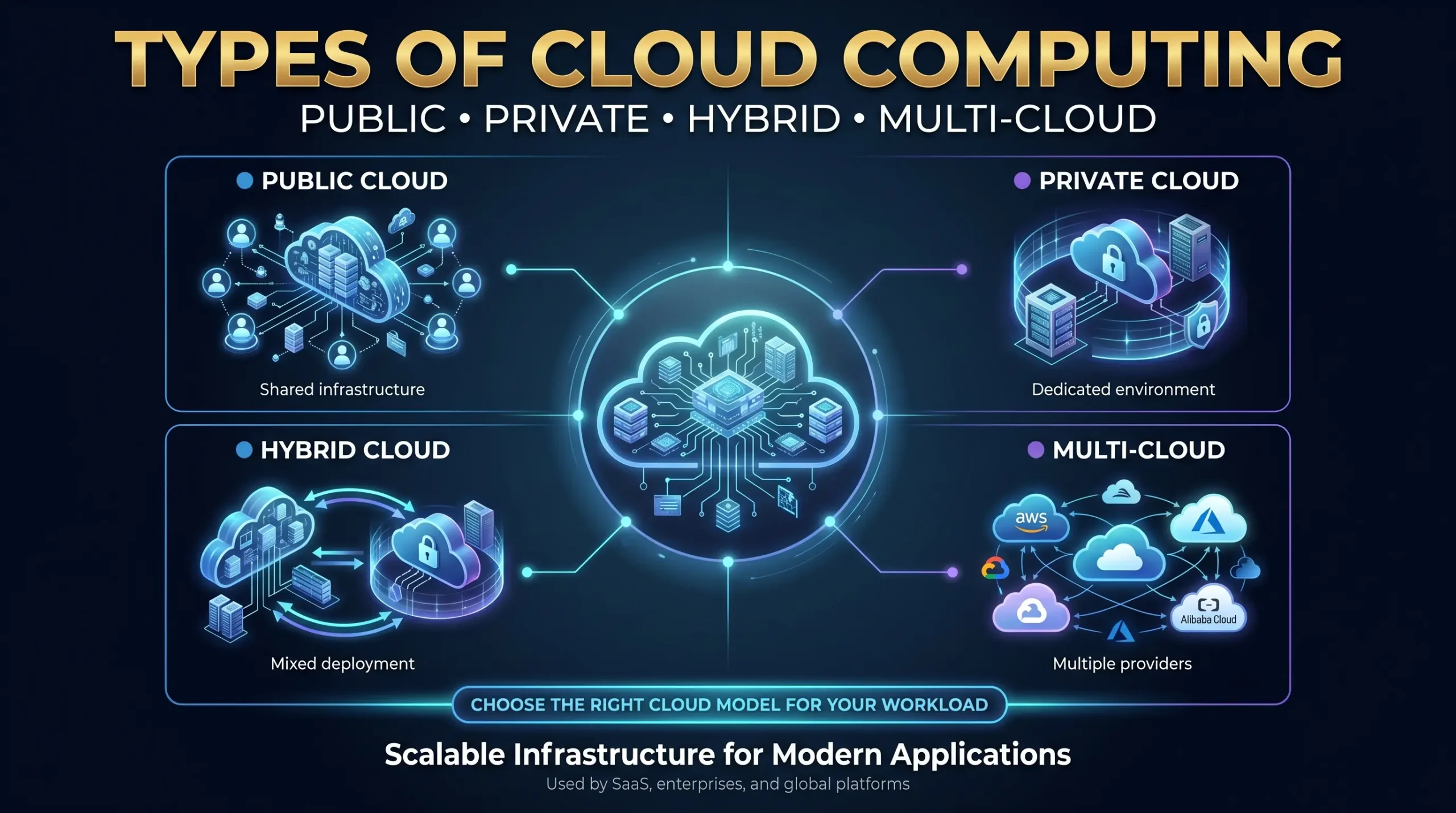
| ⚡ Key Takeaways• Public cloud (AWS, Azure, GCP) delivers on-demand infrastructure over the internet — ideal for variable workloads and fast scaling. • Private cloud provides single-tenant, dedicated infrastructure for regulated industries requiring full control. • Hybrid cloud bridges both environments, letting organizations burst to public cloud while keeping sensitive data on-premises. • Multi-cloud uses two or more public cloud providers simultaneously to avoid vendor lock-in and access best-of-breed services. • Community cloud shares infrastructure among organizations with common compliance or regulatory requirements — such as government or healthcare consortia. • The global cloud market reached $781 billion in 2025 and is on track to exceed $947 billion in 2026 (Gartner/Statista). |
目录
- What Is Cloud Computing — and Why Do Deployment Models Matter?
- Public Cloud — Scalable, Pay-as-You-Go, and Built for Speed
- Private Cloud — Maximum Control for Security-Critical Workloads
- Hybrid Cloud — The Flexible Bridge Between Control and Scale
- Multi-Cloud — Reducing Vendor Lock-In Across Providers
- Community Cloud — Shared Infrastructure for Shared Compliance Needs
- Emerging Cloud Models — Edge Cloud and Sovereign Cloud
- Cloud Service Models — IaaS, PaaS, SaaS, and Beyond
- How to Choose the Right Cloud Model for Your Business
- Security and Compliance Across Cloud Deployment Models
What Is Cloud Computing — and Why Do Deployment Models Matter?
Cloud computing is the on-demand delivery of computing resources — servers, storage, databases, networking, software, and analytics — over the internet, billed on a consumption or subscription basis. Rather than owning and operating physical data centers, organizations lease capacity from providers and pay only for what they use.
Deployment models determine where that infrastructure lives, who owns it, who manages it, and who can access it. This distinction is critical: two companies can both run cloud workloads while operating on fundamentally different architectures with radically different cost profiles, security postures, and compliance capabilities. Understanding deployment models is, therefore, the foundation of any cloud strategy.
It is equally important to distinguish deployment models from service models (IaaS, PaaS, SaaS). Deployment models define where cloud infrastructure runs; service models define what is delivered and how much the customer manages. Both dimensions will be covered in this guide.
The numbers behind cloud adoption are staggering. Global cloud spending reached $781 billion in 2025 and is projected to hit $947 billion in 2026, growing at a 15.7% compound annual growth rate (Statista, 2026). AWS, Microsoft Azure, and Google Cloud together control 65% of global cloud infrastructure spend — but the deployment decisions that determine how enterprises use those platforms are made by IT leaders, not hyperscalers.

Public Cloud — Scalable, Pay-as-You-Go, and Built for Speed
A public cloud is a multi-tenant cloud environment owned and operated by a third-party provider and delivered to customers over the public internet. Infrastructure — servers, storage, networking — is shared across thousands of customers, with logical isolation ensuring each tenant’s data and workloads remain separate.
How Public Cloud Works
Hyperscalers like Amazon Web Services (EC2, S3), Microsoft Azure (Virtual Machines, Blob Storage), and Google Compute Engine operate warehouse-scale data centers containing hundreds of thousands of commodity servers. Virtualization layers create isolated compute instances on demand. Customers provision resources via APIs or web consoles within seconds, paying per-hour, per-GB, or per-request.
The shared infrastructure model is what makes public cloud economically transformative: providers achieve economies of scale unavailable to individual organizations, passing savings through in the form of low per-unit pricing.
Advantages of Public Cloud
- Elastic scalability — provision thousands of virtual machines in minutes; scale back just as quickly when demand drops.
- Low upfront cost — no capital expenditure on hardware; OpEx-only billing aligns spending with actual usage.
- Global availability — hyperscalers operate 30+ regions worldwide, enabling low-latency delivery to any geography.
- Managed services — providers handle patching, hardware replacement, and infrastructure upgrades, reducing operational overhead.
- AI and ML acceleration — specialized GPU/TPU instances (NVIDIA H100, A100 clusters) are available on-demand without hardware investment.
Disadvantages of Public Cloud
- Limited control — customers cannot customize the underlying hardware, hypervisor, or network fabric.
- “Noisy neighbor” risk — shared infrastructure can cause performance variability when other tenants spike resource usage.
- Data sovereignty concerns — data stored in a foreign jurisdiction may be subject to local laws and government access requests.
- Long-term cost creep — egress fees, premium support tiers, and reserved instance complexity can erode the initial cost advantage at scale.
Best Use Cases for Public Cloud
- SaaS applications and B2C digital products with variable user traffic
- Development and testing environments where rapid provisioning matters more than cost optimization
- AI model training, batch analytics, and data lake workloads benefiting from on-demand GPU clusters
- Startups and small businesses that cannot justify capital investment in private infrastructure
- Disaster recovery secondary sites requiring geographic separation from on-premises primary systems
Real-world example: Netflix runs its global streaming platform entirely on AWS, relying on public cloud elasticity to scale from 100 million to 250 million concurrent streams during peak evenings without pre-purchasing excess capacity.
Private Cloud — Maximum Control for Security-Critical Workloads
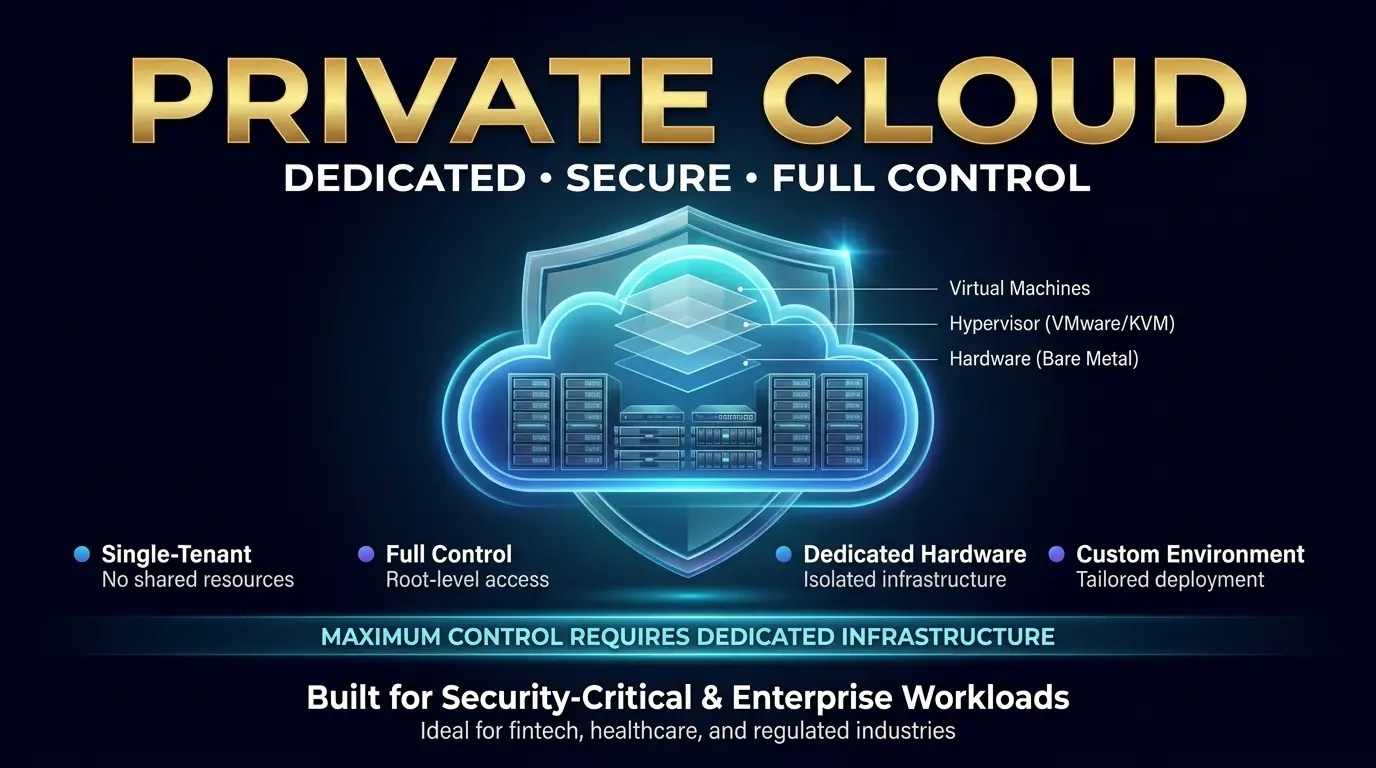
A private cloud is a single-tenant cloud environment dedicated exclusively to one organization. Infrastructure — whether physical servers, storage, and networking — is not shared with other customers. Private clouds may be hosted on-premises in an organization’s own data center, co-located in a third-party facility, or managed by an external provider on dedicated hardware.
How Private Cloud Works
A private cloud requires a virtualization layer (VMware vSphere, Microsoft Hyper-V, or open-source alternatives like Proxmox or OpenStack) deployed on bare metal servers with dedicated networking. Organizations retain root-level access to every layer of the stack, from firmware through hypervisor through operating system. Unlike public cloud, resources are not elastically pooled across tenants — capacity planning and hardware procurement remain the customer’s responsibility.
Four Types of Private Cloud
- On-premises private cloud — infrastructure owned and operated entirely within the organization’s own facilities. Maximum control; maximum capital expenditure.
- Hosted private cloud — dedicated hardware located in a third-party data center (such as Atal Networks’ Tier 4 facilities), operated by the customer. Colocation model.
- Managed private cloud — dedicated hardware managed end-to-end by an infrastructure provider. The customer owns the logical environment; the provider handles operations.
- Virtual Private Cloud (VPC) — logically isolated segment within a public cloud provider’s infrastructure. Sits at the boundary between public and private; shares physical infrastructure but provides network-level isolation.
Advantages of Private Cloud
- Full infrastructure control — customize hardware, hypervisor, OS, and networking to exact requirements.
- Regulatory compliance — satisfy HIPAA, PCI DSS, GDPR, FedRAMP, and other frameworks requiring data isolation and auditability.
- Predictable performance — no noisy-neighbor effects; dedicated resources deliver consistent latency and throughput.
- Data sovereignty — data never leaves a defined geographic boundary, meeting EU Data Act and national security requirements.
- Lower long-term TCO for stable workloads — at sufficient scale and steady utilization, private infrastructure delivers 15–30% lower total cost of ownership over a 5-year horizon compared to equivalent public cloud capacity.
Disadvantages of Private Cloud
- High CapEx — server, storage, and networking hardware represents significant upfront investment ($10K–$100K+ for initial build-out).
- Scaling limitations — capacity expansion requires hardware procurement cycles measured in weeks or months, not minutes.
- Maintenance overhead — the organization bears responsibility for hardware failure, firmware patching, and capacity planning.
- Specialized expertise required — managing VMware, Kubernetes, or OpenStack at scale demands certified engineering talent.
Best Use Cases for Private Cloud
- Financial services firms subject to regulatory oversight (Basel III, SOX, PCI DSS)
- Healthcare organizations handling Protected Health Information (PHI) under HIPAA
- Government agencies with classified data or national security workloads
- Large enterprises running steady, predictable workloads where dedicated capacity outperforms variable-cost public cloud
| 🖥️ Infrastructure Perspective — What Powers a Private Cloud?At the hardware layer, a private cloud is built on enterprise-grade bare metal servers — typically Intel Xeon Scalable (Gold/Platinum) or AMD EPYC processors with DDR5 ECC RAM, NVMe SSD storage arrays, and 25–100GbE networking. A minimum production-grade private cloud node for a mid-market enterprise typically specifies 32–64 cores, 256–512GB RAM, and 10–50TB NVMe storage. Atal Networks’ bare metal configurations deliver this foundation with full root access, IPMI management, and Tier 4 data center redundancy — providing the building blocks for enterprise private cloud without the capital expenditure of owning the facility. |
Hybrid Cloud — The Flexible Bridge Between Control and Scale
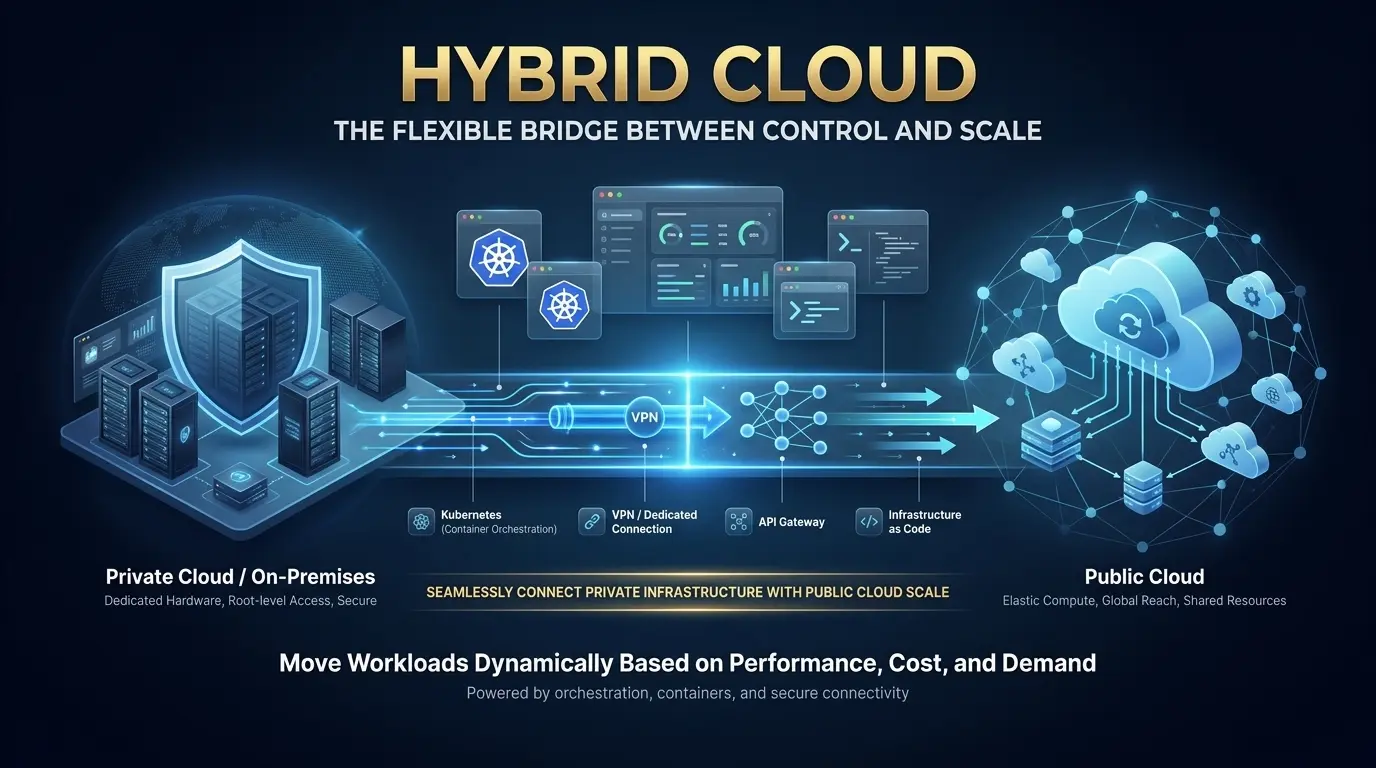
A hybrid cloud integrates private cloud infrastructure (on-premises or hosted) with one or more public cloud environments, connected through encrypted network links — typically a dedicated connection (AWS Direct Connect, Azure ExpressRoute), a site-to-site VPN, or an API gateway layer. Workloads can move between environments based on policy, cost thresholds, or performance requirements.
How Hybrid Cloud Works
Orchestration is the defining capability of hybrid cloud. Platforms like VMware vSphere with NSX, Microsoft Azure Arc, AWS Outposts, Red Hat OpenShift, or HashiCorp Terraform enable unified management of workloads across on-premises and public cloud resources. Kubernetes has become the de facto standard for workload portability — containerized applications deployed on-premises can be scheduled to public cloud nodes during demand spikes with minimal configuration change.
Advantages of Hybrid Cloud
- Workload flexibility — place each workload where economics and compliance best align; sensitive data stays on-premises, bursty compute moves to public cloud.
- Cloud bursting — automatically overflow excess demand to public cloud during peak periods (e.g., Black Friday e-commerce spikes, quarterly financial processing), reverting to on-premises capacity after the event.
- Cost optimization — run baseline workloads on predictable private infrastructure; avoid paying for public cloud reserved capacity that sits idle.
- Compliance with innovation — regulated data stays in the private environment while development, analytics, and AI training leverage public cloud capabilities.
- Gradual migration path — organizations can shift workloads incrementally, de-risking the transition from legacy on-premises systems to cloud-native architectures.
Disadvantages of Hybrid Cloud
- Integration complexity — connecting two distinct environments requires expertise in networking (BGP, VPN, dedicated links), identity federation, and data synchronization.
- Security surface expansion — securing workloads across two environments requires consistent policy enforcement, often through Zero Trust Network Access (ZTNA) frameworks.
- Skill requirements — hybrid operations demand teams fluent in both on-premises infrastructure and cloud-native tooling — a scarce combination in the market.
- Latency risk — data transfers between private and public environments add network latency; applications requiring sub-millisecond response times may not tolerate hybrid architectures.
Best Use Cases for Hybrid Cloud
- Retail and e-commerce platforms that experience sharp seasonal traffic spikes and need cloud bursting without year-round public cloud spending
- Disaster recovery and business continuity — primary workloads on-premises with automated failover to public cloud in the event of a data center outage
- Healthcare analytics — patient records remain on-premises in HIPAA-compliant private infrastructure while de-identified research data processes in public cloud
- Legacy application modernization — refactoring monolithic systems incrementally while maintaining production continuity
Market validation: According to Flexera’s 2026 State of the Cloud Report, 73% of organizations now operate hybrid cloud estates — a 3 percentage-point increase year over year. Among large enterprises (5,000+ employees), adoption reaches 78%, confirming hybrid cloud as the dominant architecture for mature cloud programs.

Multi-Cloud — Reducing Vendor Lock-In Across Providers
Multi-cloud is a strategy — not an architecture — in which an organization uses services from two or more distinct cloud providers simultaneously. Unlike hybrid cloud, which combines private and public environments, multi-cloud typically involves multiple public cloud providers (for example, AWS for compute-intensive workloads, Google Cloud for AI/ML services, and Azure for Microsoft 365 integration).
How Multi-Cloud Differs from Hybrid Cloud
| Dimension | Hybrid Cloud | Multi-Cloud |
| Definition | Combines private + public cloud in one integrated architecture | Uses two or more public (or private) cloud providers |
| Primary driver | Compliance, cost optimization, cloud bursting | Vendor diversification, best-of-breed services |
| Architecture type | Integrated (workloads move between environments) | Often siloed by provider per workload type |
| Complexity | Integration/networking complexity | Management and visibility complexity |
| Typical tools | Azure Arc, VMware vSphere, AWS Outposts | Terraform, Kubernetes, Anthos, Crossplane |
| Best for | Enterprises with regulated on-prem workloads | Global enterprises needing provider diversity |
Advantages of Multi-Cloud
- Vendor lock-in elimination — avoid dependency on a single provider’s pricing, service availability, or business continuity.
- Best-of-breed service access — leverage AWS Lambda for serverless, Google Vertex AI for machine learning, and Azure Cognitive Services for language AI simultaneously.
- Geographic optimization — route users to the provider with the best-performing region for their location.
- Resilience — a provider-level outage (which do occur, even for hyperscalers) affects only the workloads on that platform, not the entire operation.
Disadvantages of Multi-Cloud
- Management complexity — operating across multiple provider consoles, billing systems, and API conventions multiplies operational overhead by 15–25%.
- Skill fragmentation — teams must maintain proficiency in AWS, Azure, and GCP toolchains simultaneously.
- Cost visibility — consolidated spend tracking across providers requires dedicated FinOps tooling (Apptio, CloudHealth, or open-source OpenCost).
- Data portability friction — moving data between providers incurs egress fees and introduces latency; some proprietary services create de facto lock-in even in a multi-cloud model.
Best Use Cases for Multi-Cloud
- Global enterprises with regional offices in jurisdictions where different cloud providers hold data sovereignty certifications
- Organizations requiring specialized AI/ML capabilities unavailable on a single platform (e.g., Google TPUs for TensorFlow, AWS Trainium for PyTorch)
- Regulated industries (financial services, insurance) where distributing workloads across providers improves resilience and meets operational risk requirements
According to Flexera’s 2026 State of the Cloud Report, 80% of organizations use multiple public cloud providers, though only 14% operate exclusively in multi-cloud without any private cloud component. Multi-cloud without a private layer is still the minority architecture — most “multi-cloud” organizations are simultaneously running a hybrid model.
Community Cloud — Shared Infrastructure for Shared Compliance Needs
A community cloud is a shared cloud environment provisioned for the exclusive use of a specific community of organizations with common requirements — regulatory, security, mission-driven, or industry-specific. Infrastructure costs and governance responsibilities are distributed across participating members.
How Community Cloud Works
A community cloud can be hosted by one of the participating organizations, by a third-party provider, or by a combination. Access is restricted to community members; the public cannot access the environment. Examples include: the US Government’s FedRAMP-certified GovCloud environments, the NHS-N3 network for UK healthcare organizations, and financial services industry clouds operated under shared regulatory frameworks.
Advantages and Disadvantages
- Lower cost than private cloud — shared infrastructure distributes capital and operational expenditure across multiple member organizations.
- Tailored compliance — the environment is built and governed to satisfy the shared regulatory requirements of the entire community (HIPAA for healthcare, PCI DSS for payments).
- Trusted collaboration — member organizations can share workloads, datasets, and services within a governed, secure perimeter.
- Limited scalability — the community model constrains elasticity; infrastructure is sized for member needs rather than global demand.
- Governance complexity — decision-making requires consensus across multiple organizations with potentially competing priorities.
Best Use Cases for Community Cloud
- Healthcare consortia sharing imaging databases, clinical research datasets, or electronic health record systems
- Government agencies collaborating on intelligence, defense, or public service platforms with shared security classifications
- Financial services industry utilities (payment clearing networks, KYC databases) operated under shared regulatory supervision
- Research institutions and universities collaborating on large-scale scientific computing (genomics, climate modeling, particle physics)

Emerging Cloud Models — Edge Cloud and Sovereign Cloud
Edge Cloud
Edge cloud extends cloud computing infrastructure to locations physically close to end users, IoT devices, or industrial systems — at the network edge rather than centralized data centers. Processing occurs at or near the source of data generation, dramatically reducing latency for time-sensitive applications.
Edge cloud is critical for autonomous vehicles (sub-10ms decision latency), real-time industrial automation (predictive maintenance without data round-trips to a central cloud), and 5G-native applications requiring millisecond response times. AWS Wavelength, Azure Edge Zones, and Google Distributed Cloud all offer edge cloud services as of 2026.
Sovereign Cloud
Sovereign cloud is a cloud deployment model in which all infrastructure, data, and operations remain within a specific national or regional jurisdiction, under the governance of local legal frameworks. It addresses the intersection of cloud computing and data sovereignty — a top-three enterprise concern in 2025–2026 as the EU Data Act, India’s Digital Personal Data Protection Act, and China’s Data Security Law create binding data localization requirements.
Microsoft Azure, Google Cloud, and AWS all now offer sovereign cloud variants — dedicated infrastructure operated by in-country entities, with no data crossing national borders. For organizations subject to strict data residency requirements, sovereign cloud is becoming a mandatory architectural consideration rather than an optional preference.
Cloud Service Models — IaaS, PaaS, SaaS, and Beyond
Service models define what layer of the technology stack a cloud provider manages and what remains the customer’s responsibility. Deployment models and service models are independent dimensions — a private cloud can deliver IaaS, PaaS, or SaaS, and so can a public cloud.
Infrastructure as a Service (IaaS)
IaaS delivers raw compute, storage, and networking on demand. The provider manages physical hardware, hypervisors, and facilities; the customer manages everything above the hypervisor — operating system, middleware, runtime, applications, and data. IaaS is the most flexible cloud service model and the most technically demanding.
Examples: AWS EC2, Azure Virtual Machines, Google Compute Engine, Atal Networks VPS and bare metal servers. Best for: DevOps teams, system administrators, and organizations requiring full OS-level control.
Platform as a Service (PaaS)
PaaS delivers a managed development and deployment platform. The provider manages infrastructure, OS, middleware, and runtime; the customer focuses on application code and data. PaaS eliminates infrastructure management overhead and accelerates development cycles.
Examples: AWS Elastic Beanstalk, Azure App Service, Google App Engine, Heroku. Best for: Development teams building web applications, APIs, and microservices who want to focus on code, not infrastructure.
Software as a Service (SaaS)
SaaS delivers complete, ready-to-use applications over the internet. The provider manages the entire stack from infrastructure through application; the customer configures and uses the software. SaaS requires no infrastructure management and typically carries the lowest technical barrier to adoption.
Examples: Salesforce, Microsoft 365, Google Workspace, Zoom, Slack. Best for: Business users and organizations wanting to consume software without operational responsibility. The SaaS segment is projected at $377 billion in 2025 (Statista), making it the largest cloud service category.
Serverless and Function as a Service (FaaS)
Serverless computing is the next evolution of cloud service delivery. Developers deploy individual functions (code snippets) that execute in response to events; infrastructure provisioning, scaling, and idle-time billing disappear entirely. The provider manages all underlying infrastructure dynamically, scaling to zero when no requests arrive.
Examples: AWS Lambda, Azure Functions, Google Cloud Functions. Best for: Event-driven applications, API backends with variable traffic, real-time data processing pipelines, and microservices requiring extreme granularity.
| Dimension | IaaS | PaaS | 萨斯 | Serverless |
| You manage | OS, apps, data | Apps, data | 配置 | Code only |
| Provider manages | Hardware, hypervisor | Hardware + OS + runtime | Everything | Everything + scaling |
| Cost model | Per-hour/GB | Per-hour/request | Per-user/month | Per-invocation/ms |
| Control level | 高 | 中 | 低 | 最小 |
| Examples | AWS EC2, Azure VMs | Heroku, App Engine | Salesforce, Slack | AWS Lambda, Azure Functions |
| Best for | Full OS control | App development | Business users | Event-driven workloads |
Public vs. Private vs. Hybrid vs. Multi-Cloud vs. Community — Complete Comparison
| 因子 | Public | Private | Hybrid | Multi-Cloud | Community |
| 所有权 | 提供者 | Customer/MSP | Mixed | Multiple providers | Shared consortium |
| Access | Open internet | Restricted/private | Mixed | Internet + peering | Members only |
| Cost model | OpEx (pay-as-you-go) | CapEx + OpEx | Blended | Multi-vendor OpEx | Shared CapEx/OpEx |
| 可扩展性 | Virtually unlimited | Hardware-bounded | Elastic burst | Provider-bounded | Community-bounded |
| Security level | Shared responsibility | Full customer control | Split model | Multi-policy | Community-governed |
| Compliance fit | Good (with configs) | Excellent | Excellent | Good | Purpose-built |
| 表演 | Variable (shared) | Predictable | Workload-dependent | 变量 | Predictable |
| Management | Low overhead | High overhead | Highest overhead | High overhead | Medium overhead |
| Vendor lock-in risk | High (single provider) | 低 | 中 | 低 | 中 |
| Best for | Startups, SaaS, AI/ML | Finance, healthcare, govt | Enterprise, e-commerce | Global enterprises | Regulated sectors |
How to Choose the Right Cloud Model for Your Business
Decision Framework by Business Size
Startups and small businesses (1–50 employees): Public cloud is almost always the right starting point. Minimal CapEx commitment, instant provisioning, and managed services reduce the operational burden on small teams. AWS, Azure, or Google Cloud’s starter tiers typically cost $50–$500/month for baseline infrastructure.
Mid-market organizations (50–1,000 employees): A hybrid approach becomes viable as workloads mature and compliance requirements emerge. Begin with public cloud for development and customer-facing applications; introduce private infrastructure for databases, internal systems, or regulated data. Expect $1,000–$10,000/month in blended cloud spend.
Enterprises (1,000+ employees): Hybrid and multi-cloud are the dominant architectures. Large enterprises (10,000+ employees) are 78% more likely to operate hybrid estates (Flexera 2026). At this scale, the economics of private infrastructure for stable workloads improve significantly, and regulatory requirements often mandate dedicated environments for certain data classes.
Decision Framework by Workload Type
- Variable traffic (e-commerce, media, SaaS): Public cloud or hybrid with cloud bursting.
- Steady-state compute (ERP, databases, internal tools): Private cloud or dedicated servers deliver better TCO over 3–5 years.
- Compliance-heavy data (PHI, PCI data, classified): Private cloud or community cloud with specific regulatory certifications.
- AI/ML training and inference: Public cloud GPU clusters (on-demand) for training; private or edge for low-latency inference.
- Global user base: Multi-cloud or public cloud with multi-region deployment.
Simple Decision Flowchart
| 🔍 Cloud Model Decision GuideSTART HERE → Do you handle regulated data (PHI, PCI, classified)? YES → Do you need to collaborate with other regulated organizations? YES → Community Cloud NO → Private Cloud (or Hybrid if you also have public-facing workloads) NO → Is your traffic predictable and steady? YES → Private Cloud (better long-term TCO at scale) NO → Do you need services from multiple providers? YES → Multi-Cloud NO → Public Cloud (single provider, lowest management overhead) |
The Infrastructure Behind Cloud Computing — What Actually Runs in the Data Center
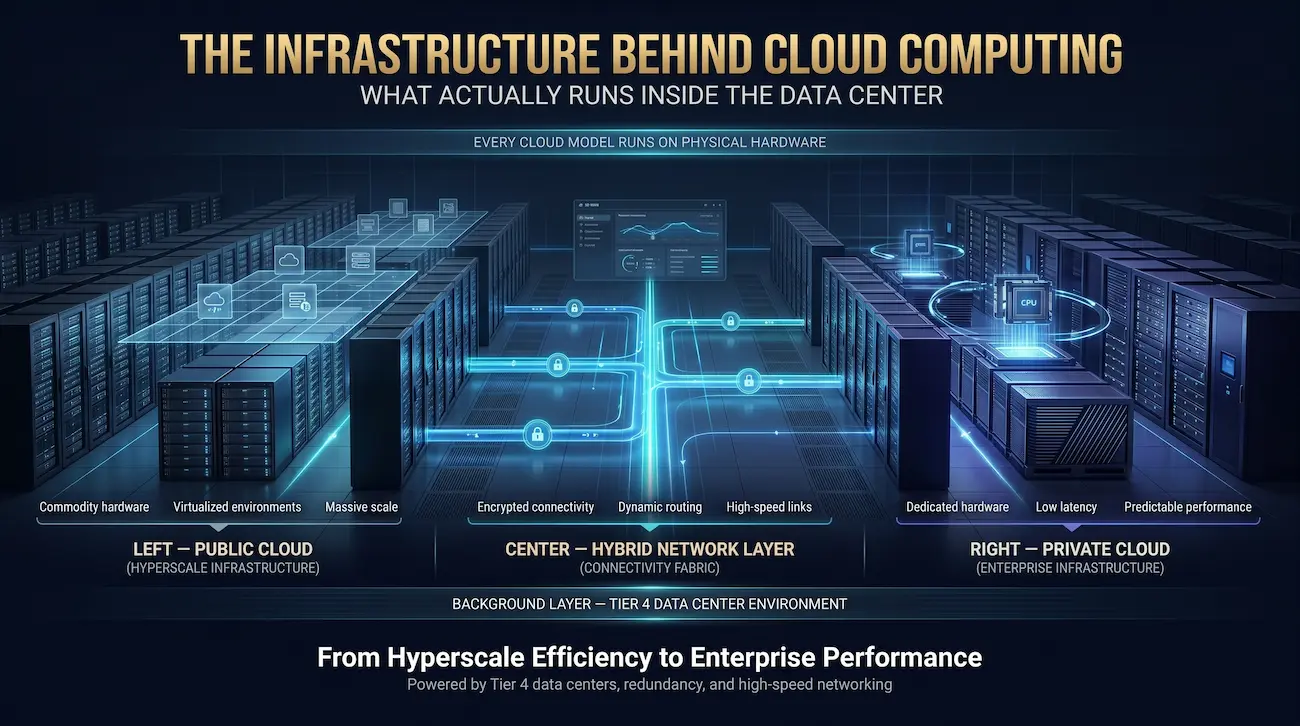
Every cloud model — public, private, hybrid, community, or edge — ultimately runs on physical hardware. Understanding what that hardware looks like is essential for organizations making infrastructure decisions, yet it is a perspective almost entirely absent from cloud computing guides written by software vendors.
Public cloud hyperscalers (AWS, Azure, GCP) operate custom-designed servers using commodity components — low-cost processors, standard DDR5 DRAM, and vast JBOD (Just a Bunch of Disks) storage arrays — optimized for density and power efficiency at scale. No single tenant touches a physical machine; virtualization abstracts all hardware.
Private cloud infrastructure, by contrast, runs on enterprise-grade bare metal servers: Intel Xeon Scalable Processors (Gold and Platinum SKUs with 32–64 cores) or AMD EPYC Genoa processors delivering exceptional multi-threaded performance, DDR5 ECC RAM (256–512GB per node), and NVMe SSD arrays capable of 1–5 million IOPS. This hardware provides the predictable, low-latency performance that shared public cloud cannot guarantee.
Hybrid cloud requires a networking layer connecting the two environments: BGP routing for dynamic path selection, site-to-site IPSec VPN for encrypted tunneling, and dedicated circuits (1–100Gbps) for latency-sensitive applications. SD-WAN fabrics increasingly overlay these connections to provide software-defined traffic management.
A Tier 4 data center — the highest availability classification — provides 2N power redundancy (every power path duplicated), N+1 cooling, multiple independent network paths, and a guaranteed 99.995% facility uptime. Atal Networks operates Tier 4 facilities with DDoS mitigation, 24/7 physical security, and sub-15-minute incident response SLAs — the foundation on which enterprise private and hybrid cloud environments are built.
Cloud Computing Costs — What Each Model Actually Costs
Cost transparency is one of the most significant gaps in cloud computing content. Here are realistic cost frameworks for each deployment model based on 2025–2026 infrastructure pricing.
| Cloud Model | Setup Cost | Monthly Operating Cost | Best Cost Scenario |
| Public cloud | $0 | $50–$5,000+ (scales with usage) | Variable workloads, short lifecycle projects |
| Private cloud (build) | $10,000–$250,000+ | $1,000–$15,000 (management + colocation) | Steady, high-utilization workloads at scale |
| Private cloud (managed) | $5,000–$50,000 | $2,000–$20,000 (full-service) | Regulated industries needing expertise + compliance |
| Hybrid cloud | $5,000–$50,000 (integration) | $500–$10,000+ (blended) | Mixed workload profiles with seasonal peaks |
| Multi-cloud | $0 (additional provider accounts) | 15–25% overhead for tooling | Global enterprises needing provider diversity |
| Community cloud | Shared (proportional allocation) | Lower than private per member | Consortia with aligned regulatory requirements |
Cloud migration costs represent an additional one-time investment: moving from on-premises to cloud (or between cloud models) typically costs $5,000–$100,000 depending on data volume, application complexity, and the degree of refactoring required. Organizations migrating more than 500TB of data or re-architecting legacy monolithic applications should budget toward the upper end of this range.
One critical and often overlooked cost factor: cloud egress fees. Data transferred out of a public cloud region incurs charges ($0.08–$0.12/GB for major providers). At petabyte scale, egress costs can exceed the cost of the underlying compute and storage, particularly for hybrid architectures where data moves frequently between private and public environments.
Security and Compliance Across Cloud Deployment Models
The Shared Responsibility Model
In public cloud, security responsibility is divided between provider and customer. Providers secure the infrastructure — physical data centers, hardware, hypervisors, and foundational services. Customers are responsible for everything above that layer: operating system configuration, identity and access management, network security groups, application code, and data encryption. Misconfigured storage buckets and overly permissive IAM policies are consistently among the top causes of public cloud security incidents.
In private cloud, the customer assumes full responsibility for every layer of the stack — from physical security through application-level controls. This provides maximum control but demands proportional investment in security operations.
In hybrid cloud, security responsibility is split across both models simultaneously, requiring consistent policy enforcement across environments. Zero Trust Network Access (ZTNA) — which validates every user, device, and application regardless of network location — is rapidly becoming the standard framework for hybrid security.
Compliance Frameworks by Cloud Model
| Framework | Public Cloud | Private Cloud | Hybrid Cloud | Community Cloud |
| HIPAA (Healthcare) | Possible with BAA | Native | Achievable | Purpose-built |
| PCI DSS (Payments) | Possible (Level 1 providers) | Native | Achievable | Possible |
| GDPR (EU data) | Possible (EU regions) | Native | Achievable | Possible |
| SOC 2 Type II | Provider-certified | Customer-achieved | Both layers | Shared certification |
| FedRAMP (US Gov) | Available (GovCloud) | Possible | Achievable | Purpose-built (GovCloud) |
| ISO 27001 | Provider-certified | Customer-achieved | Both layers | 共享 |
Emerging security standard: Zero Trust Architecture (NIST SP 800-207) — which assumes breach, verifies explicitly, and enforces least-privilege access — is becoming the required security posture for hybrid and multi-cloud environments. Organizations with mature cloud programs are replacing VPN-based perimeter security with identity-aware proxies and micro-segmentation.
Frequently Asked Questions About Types of Cloud Computing
Q: What are the 4 main types of cloud computing?
A: The four main cloud deployment models are: (1) public cloud — multi-tenant infrastructure delivered over the internet by providers like AWS, Azure, and Google Cloud; (2) private cloud — single-tenant infrastructure dedicated to one organization; (3) hybrid cloud — an integrated combination of private and public cloud environments; and (4) multi-cloud — a strategy using services from two or more distinct cloud providers. Community cloud is a fifth model used by regulated industries.
Q: What is the difference between public cloud and private cloud?
A: Public cloud infrastructure is shared across thousands of tenants, owned by a third-party provider, and billed on a pay-as-you-go model — offering maximum scalability at low upfront cost. Private cloud is dedicated to one organization, provides full infrastructure control, and delivers predictable performance and regulatory compliance — at the cost of higher CapEx and greater operational responsibility.
Q: How is multi-cloud different from hybrid cloud?
A: Hybrid cloud combines private cloud infrastructure with public cloud services in an integrated architecture where workloads move between environments. Multi-cloud uses two or more public cloud providers simultaneously — typically with workloads siloed by provider — as a strategy to avoid vendor lock-in and access best-of-breed services. An organization can operate both a hybrid architecture and a multi-cloud strategy at the same time.
Q: Which cloud type is best for small businesses?
A: Public cloud is the right choice for most small businesses. Zero CapEx, instant provisioning, and managed services reduce the operational burden on small teams. AWS, Azure, or Google Cloud starter configurations typically cost $50–$500/month. Small businesses handling sensitive regulated data (healthcare, financial services) should evaluate private cloud or managed private cloud options, even at smaller scale.
Q: What are IaaS, PaaS, and SaaS?
A: Infrastructure as a Service (IaaS) provides raw compute, storage, and networking — you manage the OS and above. Platform as a Service (PaaS) adds a managed runtime and development platform — you manage only your application code. Software as a Service (SaaS) delivers complete applications over the internet — you only configure and use the software. These service models apply to all deployment types (public, private, hybrid).
Q: How much does cloud computing cost per month?
A: Costs vary significantly by model. Public cloud: $50–$5,000+/month for typical workloads, scaling with resource consumption. Private cloud: $1,000–$15,000+/month for managed infrastructure (excluding setup costs of $10,000–$100,000). Hybrid: blended costs typically $500–$10,000/month. Multi-cloud adds 15–25% overhead for management tooling. Cloud migration adds a one-time $5,000–$100,000 project cost.
Q: What is a community cloud and who uses it?
A: A community cloud is shared infrastructure provisioned for a specific group of organizations with common compliance, security, or mission requirements. Access is restricted to community members only. Common users include healthcare consortia sharing clinical data platforms, government agencies operating under shared security classifications, financial services utilities (payment networks, shared KYC databases), and research institutions collaborating on large-scale scientific computing.
Q: Can I migrate from public cloud to hybrid cloud?
A: Yes. The typical path is phased: identify workloads with stable, predictable utilization that would benefit from dedicated infrastructure; evaluate colocation or managed private cloud options; establish network connectivity (VPN or dedicated circuit); deploy workload orchestration tooling (Kubernetes, Terraform, Azure Arc); and migrate workloads incrementally. AWS Migration Hub, Azure Migrate, and Google Migrate for Compute Engine provide tooling support for the migration process.
Q: What is sovereign cloud?
A: Sovereign cloud is a cloud deployment model in which all infrastructure, data, and operations remain within a specific national or regional jurisdiction, governed by local law. It addresses data residency requirements under frameworks like the EU Data Act, India’s DPDPA, and various national security laws. Major providers offer sovereign cloud variants — operated by in-country entities — for organizations that cannot allow data to cross national borders.
Q: How do I build a private cloud using dedicated servers?
A: Building a private cloud on dedicated servers requires four layers: (1) bare metal server hardware — Intel Xeon or AMD EPYC processors with sufficient RAM and NVMe storage; (2) a hypervisor or virtualization platform — VMware vSphere, Proxmox VE, or Microsoft Hyper-V; (3) a cloud management layer — OpenStack, Nutanix AHV, or VMware vCloud Director; and (4) networking — software-defined networking (NSX or OVS) and storage networking (Ceph or NFS). Atal Networks’ 裸金属 configurations provide the hardware foundation with full root access and Tier 4 data center infrastructure.
Conclusion — Choosing the Architecture That Fits Your Reality
There is no universally correct cloud model. The right architecture depends on the intersection of your workload characteristics, regulatory requirements, cost constraints, team capabilities, and growth trajectory. What this guide makes clear is that the choice is rarely binary — the dominant architecture among mature enterprises is hybrid, combining the control of private infrastructure with the scale of public cloud.
The most important shift in thinking is from asking “which cloud?” to asking “which workload belongs where?” Regulated, steady-state data processes belong on dedicated infrastructure where compliance and performance are predictable. Variable, customer-facing, and experimental workloads thrive in public cloud where elasticity and managed services reduce time-to-market. The hybrid or multi-cloud layer connects these environments into a coherent operational whole.
As AI workloads increasingly drive cloud decisions in 2026 — consuming 22% of total cloud costs on average (CloudZero) — organizations will face a new dimension of this question: does AI training and inference run best in public cloud GPU clusters (for flexibility and specialized hardware) or private cloud (for data privacy and cost at sustained scale)? The answer, again, will be hybrid.
The infrastructure foundation matters. Whatever architecture you choose, the servers, networks, and data centers beneath it determine the reliability, latency, and security of every workload. Atal Networks provides the IaaS layer for private and hybrid cloud deployments — bare metal servers, VPS, and colocation across global Tier 4 data centers — giving organizations the physical infrastructure foundation to build any cloud model with confidence.
| About the Author: This guide was produced by the Infrastructure Solutions Team at 阿塔尔网络, drawing on direct operational experience managing bare metal server deployments, private cloud environments, and hybrid cloud migrations for enterprise clients across regulated industries. Atal Networks serves 36,000+ customers worldwide across Tier 4 data centers, with a 99.99% uptime SLA and 24/7 expert support. Last reviewed and updated: April 2026. Statistics sourced from Flexera State of the Cloud 2026, Statista, CloudZero, Gartner, and IDC. All cost ranges reflect 2025–2026 market pricing. |