 콘텐츠로 건너뛰기








Deploying IPv6 on a VPS or dedicated server involves more than adding another IP address.
The server needs a usable IPv6 route. DNS must publish the correct records. Firewalls must allow the right traffic. Applications need to listen on IPv6. Monitoring should test IPv4 and IPv6 independently. Larger deployments may also involve routed prefixes, ASN, BGP, BYOIP, ROA, and RPKI.
For most existing public services, dual stack is a practical first step because IPv4 remains available while IPv6 is added and tested as a separate path.
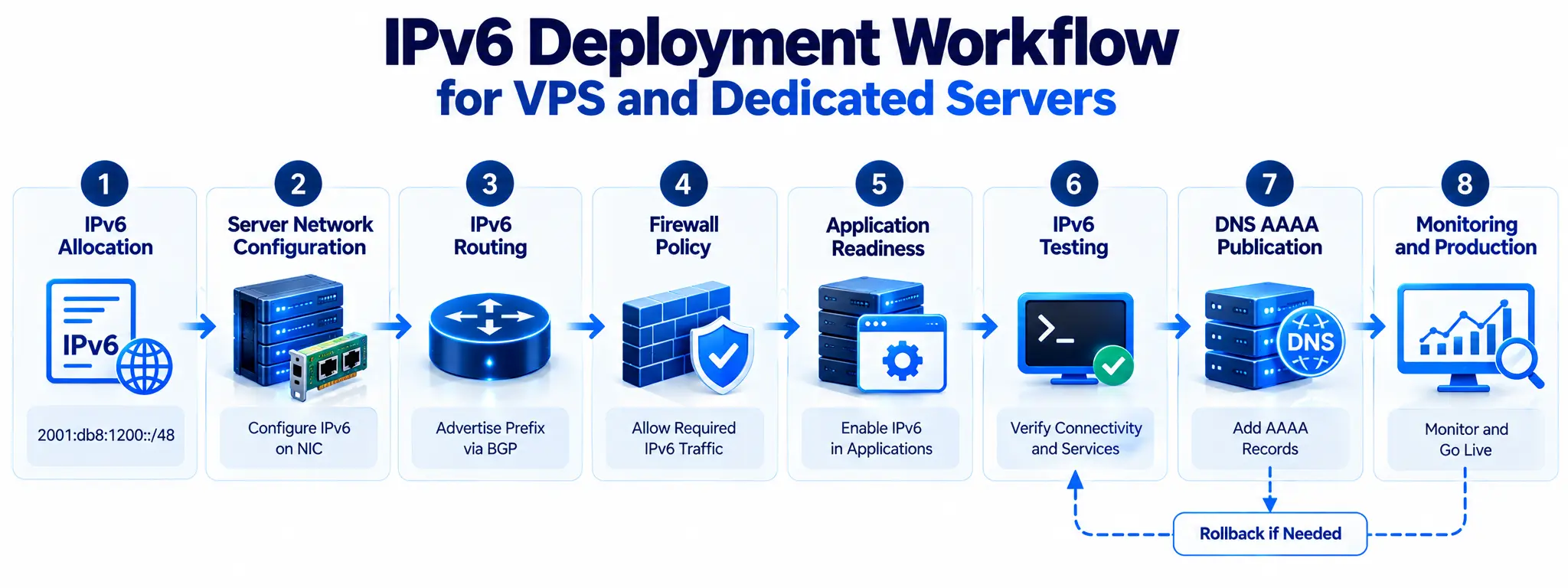
A safe deployment sequence looks like this:
IPv6 allocation → server network configuration → routing → firewall → application testing → DNS → monitoring → production rollout
This order reduces the chance of publishing a broken IPv6 service while IPv4 is still working.
IPv4, IPv6, and Dual-Stack Hosting
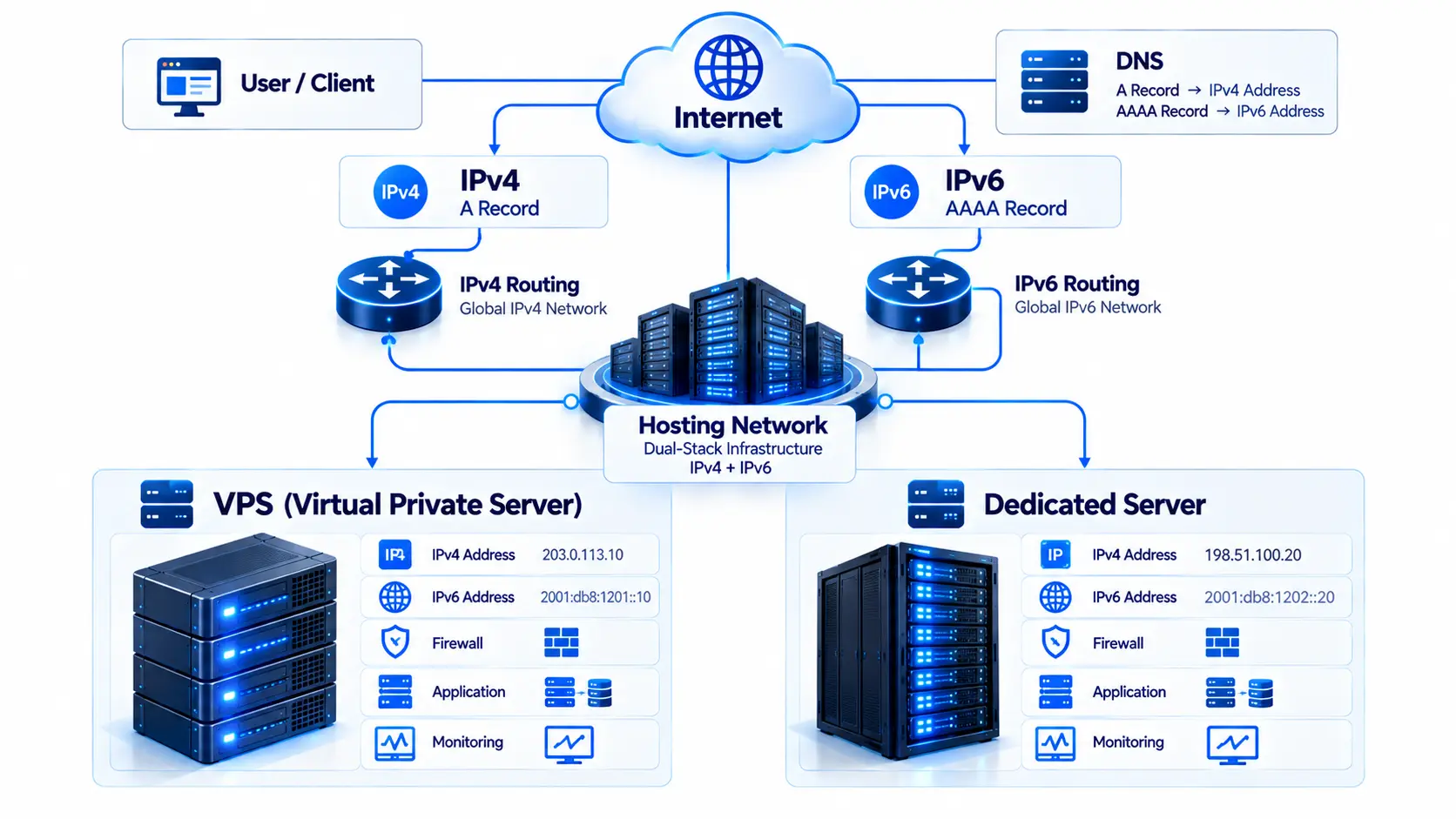
Dual-stack hosting means the same VPS or dedicated server supports both IPv4 and IPv6.
| Hosting Model | IPv4 | IPv6 | Common Fit |
| IPv4-only | 예 | 아니 | Older applications and networks |
| Dual stack | 예 | 예 | Most current public server deployments |
| IPv6-only | 아니 | 예 | Controlled modern infrastructure |
| IPv6 with translation | Indirect | 예 | IPv6-first networks that still need IPv4 access |
A dual-stack server could have:
IPv4: 198.51.100.20
IPv6: 2001:db8:1200:10::20
It also has separate routing paths.
Conceptually:
IPv4 default route: 0.0.0.0/0
IPv6 default route: ::/0
IPv4 working correctly does not prove IPv6 is healthy.
The server now has two protocol paths to manage:
- two address families
- two route sets
- two DNS record types
- IPv4 and IPv6 firewall behavior
- separate external reachability
- potentially different transit and peering paths
RFC 7381 describes dual stack as a common transition model for networks moving from IPv4-only operation toward wider IPv6 use.
Why Dual Stack Is Often the Best First Step
Dual stack lets us add IPv6 without immediately removing IPv4.
That matters because some customers, APIs, monitoring systems, third-party services, or internal applications may still depend on IPv4.
A staged dual-stack rollout gives us room to:
- keep the current IPv4 service active
- test IPv6 independently
- move services gradually
- find application issues before full rollout
- compare IPv4 and IPv6 performance
- reverse DNS changes quickly if needed
Dual stack does add operational work. Both paths need security, routing, testing, and monitoring.
That is why IPv6 deployment should be treated as a production change, not a checkbox in the hosting panel.
Plan IPv6 Before Editing the Server
The first task should be collecting network information from the hosting provider.
Before changing Netplan, NetworkManager, systemd-networkd, or another network configuration, document:
- assigned IPv6 address or prefix
- prefix length
- default gateway or routing method
- whether the prefix is directly connected or routed
- SLAAC, DHCPv6, or static configuration requirements
- VLAN information
- reverse DNS support
- provider-side firewall behavior
- whether additional subnets can be routed
- whether BGP or BYOIP is available
Provider network designs differ.
One host may use a normal gateway on the local subnet. Another may route a /64 to a VPS through a virtual router. A dedicated server may receive a larger block for virtual machines or customer networks.
Copying another provider’s IPv6 gateway settings can break connectivity even if the address itself is valid.
Understand the IPv6 Allocation You Receive
A provider may assign one IPv6 address or route an entire prefix to the server.
These serve different needs.
Single IPv6 Address
A single globally routable IPv6 address can be enough for a simple VPS or dedicated server running a few public services.
Typical use cases include:
- 웹 호스팅
- application servers
- API endpoints
- monitoring nodes
- simple VPN infrastructure
Routed IPv6 Prefix
A routed prefix gives the server or customer control over a larger block.
That becomes useful for:
- virtual machines
- containers
- multiple VLANs
- customer networks
- virtualization hosts
- separate application tiers
What Does a /64 Mean?
A /64 is the standard subnet size for many IPv6 LAN-style networks.
Example:
2001:db8:1200:100::/64
IPv6 global unicast addressing uses a hierarchical structure with a routing prefix, subnet ID, and interface ID. RFC 4291 defines the address architecture and 64-bit interface identifier structure used by normal global unicast addressing.
A /64 gives far more host addresses than most servers need. The reason to allocate it is clean subnet design, not a need to consume all individual addresses.
When a /56 or Larger Prefix Makes Sense
A /56 contains 256 separate /64 networks.
That may be useful for:
- a dedicated virtualization host
- many routed container networks
- multiple customer environments
- separate public, private, management, and storage subnets
- a server acting as a routing platform
A normal VPS does not automatically need a /56.
The prefix should match the number of networks that actually need to be built.
Configure IPv6 on the VPS or Dedicated Server
Once the provider’s routing model is clear, configure the operating system.
On Linux, start by checking existing IPv6 information:
ip -6 addr
ip -6 route
The first command shows IPv6 addresses.
The second shows IPv6 routes.
Link-Local and Global IPv6 Addresses
A server may already show an address beginning with:
fe80::
That is typically a link-local address.
Link-local addresses support communication on the local network segment but do not mean the server has public IPv6 Internet access.
Public services need a globally routable IPv6 address from the provider’s allocation.
Common Linux Configuration Systems
IPv6 may be configured through:
- Netplan
- NetworkManager
- systemd-networkd
- /etc/network/interfaces
- cloud-init
- a provider-specific control panel
A static setup usually needs:
- address
- prefix length
- interface
- gateway or provider-defined route
The exact syntax varies by operating system and provider network.
Test IPv6 Before Making DNS Changes
The server should pass direct IPv6 tests before any AAAA record becomes public.
Check addresses:
ip -6 addr
Check routing:
ip -6 route
Test outbound IPv6:
ping -6 2606:4700:4700::1111
Test an actual application connection:
curl -6 https://example.com/
Do not rely on ping alone.
A successful ICMPv6 reply does not prove that:
- HTTPS works
- SSH works
- the correct application is listening
- TLS is configured correctly
- the firewall permits production ports
- reverse proxy rules are correct
Test the real service.
IPv6 VPS vs Dedicated Server Deployment
The basic IPv6 concepts are the same, but the infrastructure around them differs.
| Area | VPS | Dedicated Server |
| Network interface | Virtual NIC | Physical NIC or bond |
| Provider dependency | 높은 | Lower |
| IPv6 allocation | Often provider-routed | More flexible |
| NDP behavior | Often provider controlled | More local control |
| VLANs | Plan dependent | Usually more flexible |
| Multiple subnets | Provider dependent | Easier to design |
| BGP | Select plans | Common in advanced deployments |
| BYOIP | Provider dependent | Strong use case |
| 가상화 | Guest workload | Can host many guests |
VPS Considerations
A VPS depends on the provider’s hypervisor, virtual switching, and routing model.
Check:
- virtual NIC configuration
- cloud-init
- routed prefix behavior
- NDP proxy requirements
- provider firewall
- security groups
- control-panel settings
A routed IPv6 block may behave differently from a subnet directly attached to the virtual interface.
Dedicated-Server Considerations
A dedicated server provides more control over network design.
A bare metal server may use:
- physical NICs
- bonded interfaces
- VLANs
- Linux bridges
- KVM
- Proxmox
- VMware
- routed guest prefixes
- BGP
If the server will host many VMs, plan IPv6 subnet allocation first rather than assigning guest addresses randomly.
Configure DNS Only After IPv6 Works
DNS is often the point where users first start reaching the service over IPv6.
IPv4 uses an A record.
IPv6 uses an AAAA record.
Example:
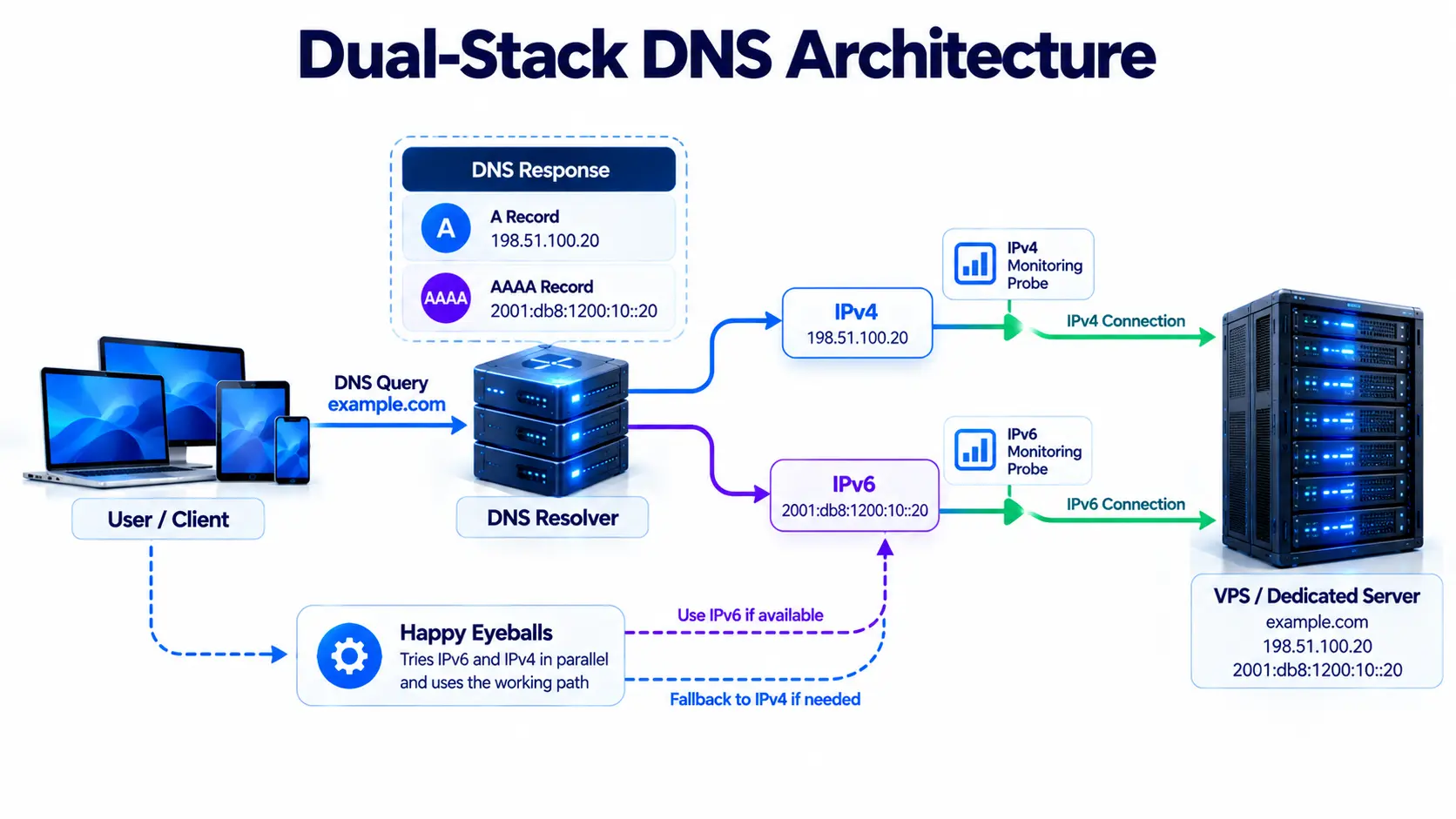
example.com. A 198.51.100.20
example.com. AAAA 2001:db8:1200:10::20
Publishing both creates a dual-stack hostname.
Do Not Publish AAAA Too Early
RFC 7381 recommends enabling AAAA records as systems become IPv6-ready and notes that all services using that hostname should support IPv6 before the AAAA record is published.
That gives us a practical production rule:
Test routing, firewall policy, application binding, and HTTPS over IPv6 before publishing the AAAA record.
A safe sequence is:
- Configure the IPv6 address.
- Verify the IPv6 route.
- Configure firewall policy.
- Test the application directly.
- Add IPv6 monitoring.
- Publish the AAAA record.
- Test the public hostname again.
Test IPv4 and IPv6 Separately
Use:
curl -4 https://example.com/
and:
curl -6 https://example.com/
Both should return the correct application independently.
Happy Eyeballs Can Hide IPv6 Problems
Modern clients may receive both A and AAAA records for the same hostname.
Happy Eyeballs is a connection method that can try available addresses and establish a working connection without making the user wait through a long failure. RFC 8305 defines this process, including DNS resolution and concurrent connection attempts.
This is useful for users, but it creates an operations problem.
A website can appear available because clients use IPv4 while the IPv6 path is broken.
For that reason, a normal browser test is not enough.
Operations teams should force separate IPv4 and IPv6 tests.
Configure IPv6 Reverse DNS
Reverse DNS maps an IP address back to a hostname using PTR records.
IPv6 reverse DNS uses the ip6.arpa namespace.
PTR records may matter for:
- mail infrastructure
- logging
- incident response
- abuse handling
- network diagnostics
- server identity checks
Reverse DNS management depends on how the provider delegates the prefix.
A provider may expose PTR management in its control panel, handle it through support, or delegate reverse DNS for a routed customer prefix.
Do not assume every address in a large IPv6 block needs its own PTR record.
Create records for services that have an operational reason to use them.
Build Firewall Rules for Both Address Families
IPv6 should have an intentional security policy from the start.
IPv4 firewall rules do not automatically mean equivalent IPv6 traffic is filtered in the same way.
RFC 7381 recommends extending IPv4 security policies to IPv6 while accounting for protocol differences, including ICMPv6.
Review both:
- host firewall
- provider firewall
- ACLs
- security groups
- network firewall
Common Linux tools include:
- nftables
- UFW
- ip6tables on older deployments
Review Every Public Service
Check whether IPv6 should reach:
- SSH
- HTTP
- HTTPS
- SMTP
- DNS
- control panels
- APIs
- monitoring endpoints
- databases
The rule should be based on service need, not simply copied from every existing IPv4 rule.
Do Not Block All ICMPv6
Blocking all ICMPv6 is a common mistake.
IPv6 relies on ICMPv6 for network functions and error reporting. Neighbor Discovery is part of IPv6’s local network operation, so overly broad filtering can break connectivity.
Build a policy that allows the protocol messages required for normal operation while blocking traffic that is not needed.
This is different from treating ICMPv6 as only a ping protocol.
Check Application AllowLists and DenyLists
Firewall rules are only one layer.
Applications may also use IP-based access rules.
Examples include:
- administrator allowlists
- API access controls
- rate limiting
- WAF rules
- fraud detection
- geolocation
- IP reputation checks
- login restrictions
An application may currently trust:
198.51.100.0/24
Once the same client reaches the service over IPv6, the application sees a different source address.
Review application-level policies before publishing AAAA records.
Confirm Applications Listen on IPv6
A server can have perfect IPv6 routing while the application remains IPv4-only.
A service listening on:
0.0.0.0:443
is listening on IPv4 wildcard interfaces.
IPv6 typically uses an address such as:
[::]:443
Exact behavior depends on the operating system and application.
Check active listeners:
ss -lntp
Then test the actual service:
curl -6 https://example.com/
Check:
- Nginx
- Apache
- SSH
- reverse proxies
- mail servers
- API gateways
- application servers
Do not treat a successful IPv6 ping as application readiness.
Check Nginx and Apache IPv6 Configuration
Web servers are often the first public service moved to dual stack.
A typical Nginx configuration may use:
listen 80;
listen [::]:80;
For HTTPS:
listen 443 ssl;
listen [::]:443 ssl;
Configuration details vary by release and site setup.
Apache can also bind to IPv6, but check the active listener and virtual-host configuration.
After any web-server change, test both protocols:
curl -4 https://example.com/
curl -6 https://example.com/
The same hostname, certificate, and application response should work through both.
Test TLS Over IPv4 and IPv6
TLS usually validates the hostname, not the IP version.
Still, IPv6 can expose mistakes in the server path.
For example:
- IPv4 reaches the correct reverse proxy
- IPv6 reaches a different virtual host
- the second listener presents the wrong certificate
Test HTTPS directly over both address families.
Check:
- certificate
- SNI
- virtual host
- application response
- redirect behavior
A successful IPv4 TLS test does not cover IPv6.
Check Application and Database Compatibility
A production IPv6 rollout can fail even when the network is correct.
Many older applications were written with IPv4 assumptions.
An IPv4 address looks like:
192.0.2.20
IPv6 can look like:
2001:db8:1200:10::20
Review any system that stores, compares, logs, filters, or parses addresses.
Common risk areas include:
- database columns
- regular expressions
- analytics systems
- API validation
- access logs
- session systems
- rate limits
- fraud checks
- geolocation
- reputation tools
Check IP Address Storage
Some older applications store IPv4 addresses in 32-bit integer fields.
That cannot represent an IPv6 address.
String fields can also be too short.
Before a wider rollout, test:
- user IP logging
- security event storage
- analytics records
- access-control tables
- API payloads containing IP addresses
Check Application Dependencies
Test communication between:
- application and database
- application and cache
- application and APIs
- monitoring and server
- backup systems
- identity services
A public website may support IPv6 while an internal service dependency remains IPv4-only.
That is acceptable during a staged migration as long as the dependency is understood and monitored.
Check Containers and Virtual Machines
Adding IPv6 to the host does not automatically add IPv6 to every guest.
Review:
- Docker
- Kubernetes
- LXC/LXD
- KVM
- Proxmox
- VMware
- Linux bridges
- virtual switches
Guest environments may require:
- their own IPv6 addresses
- routed prefixes
- gateways
- firewall rules
- NDP handling
- DNS settings
A dedicated virtualization server may benefit from assigning separate /64 networks to different guest or service segments.
Plan ASN, BGP, and Routing Requirements
Most VPS and dedicated-server customers do not need BGP just to use IPv6.
Provider-assigned IPv6 normally relies on the hosting provider’s routing.
BGP becomes relevant for more advanced designs, including:
- BYOIP
- provider-independent IPv6 space
- customer ASN
- multihoming
- anycast
- several data centers
- custom routing policy
For a BGP-based IPv6 deployment, document:
- IPv6 prefix
- origin ASN
- upstream ASN
- BGP neighbor
- next hop
- import policy
- export policy
- ROA
- RPKI state
- IRR information where used
These details should be reviewed before the prefix carries production traffic.
Atal Networks provides IPv4/IPv6 and ASN-related services along with private networking and BYOIP support.
Monitor IPv4 and IPv6 Separately
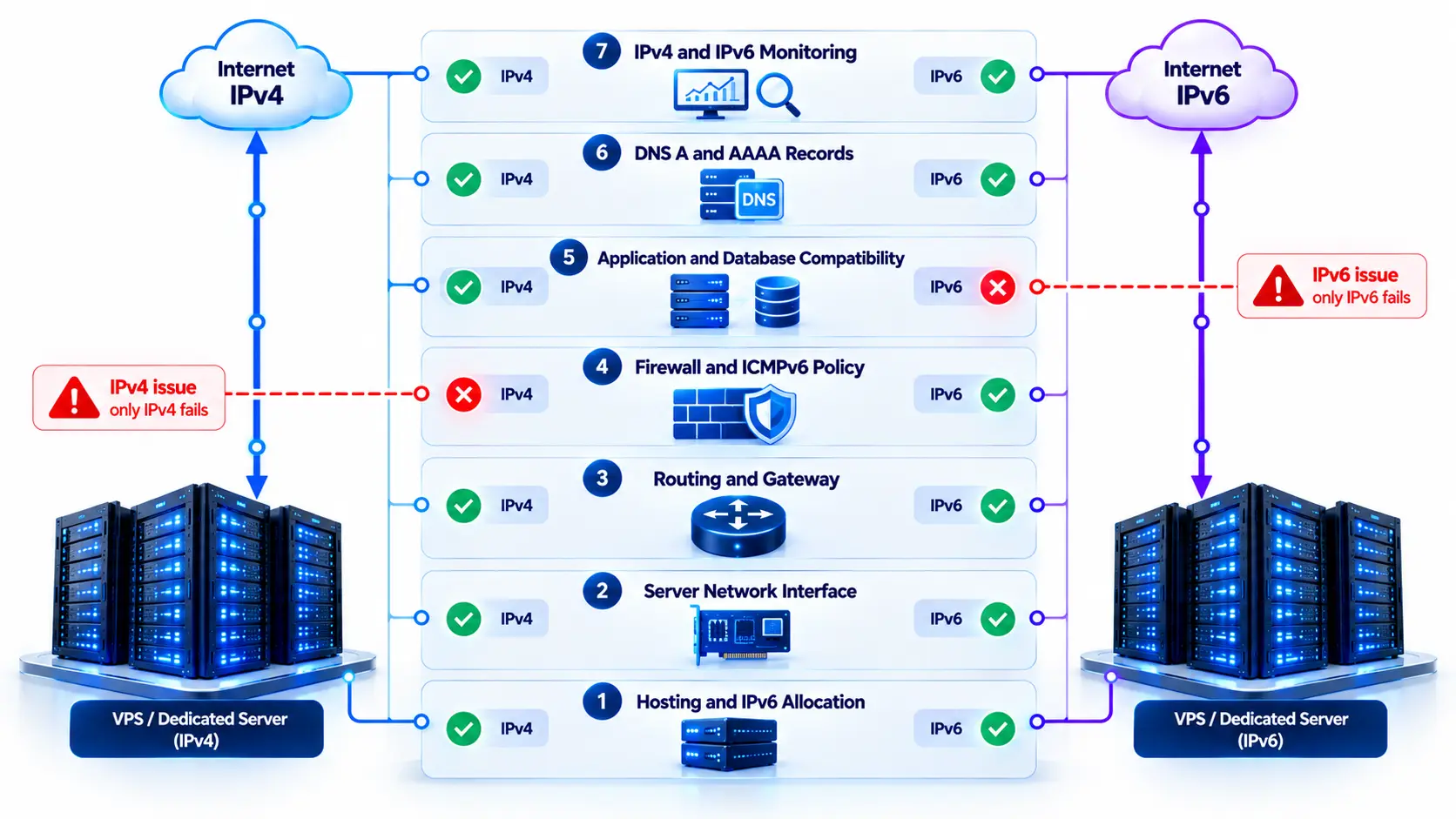
A dual-stack service should have separate health checks for both protocols.
| Check | IPv4 | IPv6 |
| DNS | A | AAAA |
| HTTP | 예 | 예 |
| HTTPS | 예 | 예 |
| TLS | 예 | 예 |
| Latency | 예 | 예 |
| Packet loss | 예 | 예 |
| Routing | 예 | 예 |
| External probe | 예 | 예 |
RFC 7381 states that monitoring and reporting systems need IPv6 support during deployment.
The practical reason is simple:
A working IPv4 path can hide a broken IPv6 path.
Run separate health checks that force each protocol.
Compare IPv4 and IPv6 Performance
Do not assume IPv6 will always be faster or slower.
The path depends on:
- peering
- transit providers
- user ISP
- server location
- routing policy
- network congestion
Compare:
- DNS lookup time
- connection time
- TLS handshake
- first-byte time
- latency
- packet loss
A large performance difference can indicate routing or peering issues rather than a protocol problem.
Plan the Migration in Stages
A staged rollout reduces production risk.
Stage 1: Inventory
Record:
- servers
- 응용 프로그램
- DNS
- firewall rules
- databases
- monitoring systems
- external APIs
- internal dependencies
Stage 2: Configure IPv6 Without Public DNS
Add:
- IPv6 address
- route
- gateway
- firewall policy
Do not publish AAAA yet.
Stage 3: Test Directly
Check:
- ICMPv6
- SSH
- HTTP
- HTTPS
- APIs
- TLS
- database access
- outbound connectivity
Stage 4: Add IPv6 Monitoring
Create protocol-specific checks before traffic starts.
Stage 5: Publish AAAA
Add the IPv6 DNS record after the service works correctly.
Stage 6: Watch Production Behavior
Review:
- application errors
- firewall drops
- IPv6 latency
- connection failures
- TLS errors
- server logs
Stage 7: Expand the Rollout
Move more services after the first deployment operates reliably.
Build a Rollback Plan Before Publishing AAAA
Every production change should have a documented reversal path.
For dual-stack IPv6 deployment, record how to reverse:
- AAAA records
- firewall changes
- routes
- application listeners
- provider-side network changes
- BGP advertisements
Before the change, review DNS TTL values.
If a serious IPv6 issue appears after launch, removing the affected AAAA record can temporarily direct new client connections toward IPv4 while the problem is investigated.
That should be treated as a rollback action, not a permanent fix.
Common IPv6 Deployment Mistakes
Avoid these common errors:
- Publishing AAAA before testing IPv6.
- Testing only with ping -6.
- Assuming IPv4 firewall rules cover IPv6.
- Blocking all ICMPv6.
- Leaving applications bound only to IPv4.
- Forgetting reverse DNS requirements.
- Ignoring application allowlists.
- Using IPv4-only database fields.
- Forgetting container or VM routing.
- Monitoring only the hostname instead of each protocol.
- Treating IPv4 fallback as proof that IPv6 works.
- Copying another provider’s gateway configuration.
- Assigning addresses without planning the prefix.
- Advertising BYOIP before reviewing ASN and ROA data.
- Launching without a rollback path.
IPv6 VPS and Dedicated Server Deployment Checklist
Before putting IPv6 into production:
- Confirm the IPv6 allocation.
- Record the prefix length.
- Confirm the provider routing model.
- Record the gateway or routing method.
- Configure the server address.
- Verify the IPv6 default route.
- Test outbound IPv6.
- Test inbound connectivity.
- Build IPv6 firewall rules.
- Review ICMPv6 policy.
- Check application listeners.
- Test HTTP and HTTPS over IPv6.
- Review allowlists and denylists.
- Check database IP fields.
- Test internal dependencies.
- Configure PTR records where required.
- Test containers and VMs.
- Add independent IPv6 monitoring.
- Check ASN and BGP details where applicable.
- Review ROA and RPKI for BYOIP.
- Publish AAAA after testing.
- Compare IPv4 and IPv6 health.
- Keep rollback steps ready.
Information Atal Networks Needs for an IPv6 Deployment
A clear technical request helps us match the server, IP allocation, and routing design correctly.
Server Requirements
Provide:
- VPS or dedicated server
- operating system
- CPU and RAM requirements
- storage requirements
- virtualization requirements
IP Requirements
Provide:
- number of IPv4 addresses
- IPv6 requirement
- preferred IPv6 prefix size
- existing customer-owned prefixes
- BYOIP requirements
Network Requirements
Include:
- deployment country or city
- bandwidth needs
- 1Gbps or 10Gbps requirement
- private networking
- VLAN requirements
- DDoS requirements
- expected traffic pattern
Routing Requirements
For advanced deployments, provide:
- ASN
- IPv4 and IPv6 prefixes
- origin ASN
- BGP requirement
- ROA status
- multihoming requirement
Application Information
Share:
- public hostnames
- web server
- application platform
- database
- containers or VMs
- DNS provider
- firewall requirements
- preferred migration window
This lets the network design be planned before production traffic moves.
Deploy IPv6 With Atal Networks
Atal Networks provides VPS Hosting, Dedicated Servers, Bare Metal Servers, IPv4/IPv6 services, colocation, and network infrastructure for businesses operating across global locations.
Our infrastructure also supports private networking, BYOIP, multihomed networks, custom hardware configurations, and high-bandwidth server options.
We recommend planning IPv4 and IPv6 as one deployment project rather than treating IPv6 as an address added after the server goes live.
Discuss your server type, IP requirements, application stack, ASN, routing, and deployment location with Atal Networks.
자주 묻는 질문
What is dual-stack hosting?
Dual-stack hosting means a VPS or dedicated server supports IPv4 and IPv6 at the same time. A hostname can have both an A record and an AAAA record, allowing compatible clients to use either protocol.
Can a VPS use IPv4 and IPv6 together?
Yes. The provider must route both protocols to the VPS, and the operating system, firewall, application, and DNS configuration must support both paths.
Is a /64 enough for a VPS?
For many VPS deployments, yes. A /64 contains far more individual addresses than a VPS normally needs. Larger allocations are useful when the infrastructure requires several separate IPv6 subnets.
Does a dedicated server need a larger IPv6 block?
Not automatically. A /64 may be enough for a simple dedicated server. Larger blocks can help with virtualization, multiple VLANs, customer networks, and routed guest subnets.
Should I add an AAAA record before configuring IPv6?
No. Configure and test the IPv6 address, routing, firewall, application, and HTTPS service first. Publish the AAAA record only after direct IPv6 testing passes.
Do IPv4 firewall rules also protect IPv6?
Not necessarily. IPv6 may use different rule sets, provider controls, or security groups. Review IPv6 firewall behavior directly.
Does Nginx automatically listen on IPv6?
It depends on the operating system and Nginx configuration. Check active listeners and test the site with curl -6 rather than assuming IPv6 is active.
What is Happy Eyeballs?
Happy Eyeballs is a connection method that helps dual-stack clients establish a working connection when several IPv4 and IPv6 addresses are available. Because fallback can hide a broken path, IPv6 should still be monitored separately.
Do I need BGP to use IPv6 on a dedicated server?
No. Most servers use IPv6 addresses routed by the hosting provider. BGP is mainly needed for customer-owned prefixes, BYOIP, custom ASN use, multihoming, anycast, or multi-site routing.
Can I use my own IPv6 prefix with a dedicated server?
That depends on the provider’s BYOIP and routing policy. A deployment may require prefix ownership, an ASN, BGP configuration, ROA data, and routing authorization.
How should IPv4 and IPv6 be monitored?
Run independent checks for DNS, HTTP, HTTPS, TLS, latency, packet loss, and external reachability. This prevents working IPv4 connectivity from hiding an IPv6 failure.