 تخطي إلى المحتوى







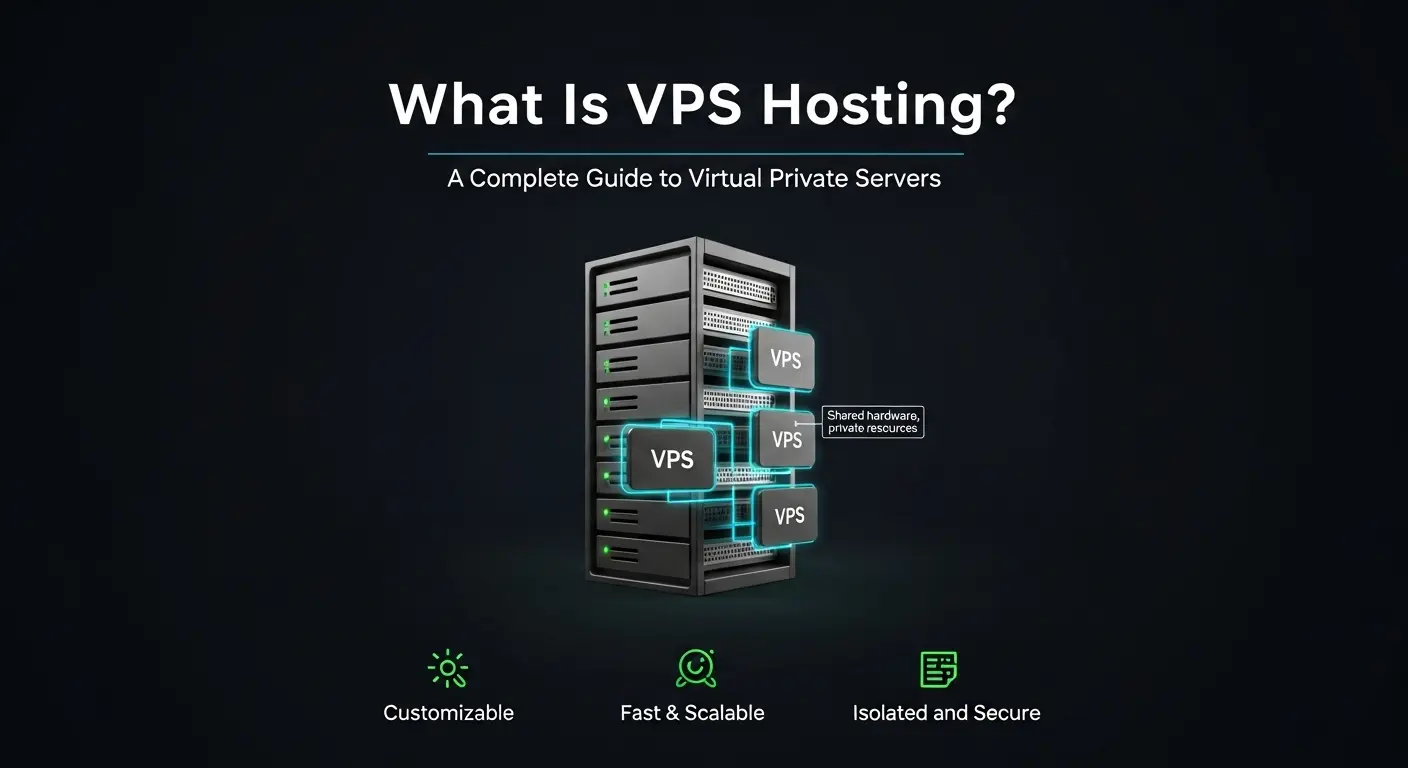
VPS hosting, short for virtual private server hosting, is a type of web hosting that partitions one physical server into multiple isolated environments. Each environment runs its own operating system with dedicated CPU, RAM, and storage reserved exclusively for one account. Other users on the same physical machine cannot access those resources or consume them.
This guide covers how VPS hosting works from the inside out, the resource types you actually receive, the different VPS configurations available, what it costs, and how to choose the right provider for your workload.
Table of Contents
- VPS Hosting at a Glance
- How VPS Hosting Works
- The Resources Inside Your VPS
- Types of VPS Hosting
- Benefits of VPS Hosting
- VPS vs. Shared vs. Dedicated vs. Cloud
- What Is VPS Hosting Used For?
- Signs Your Site Has Outgrown Shared Hosting
- Five Things People Get Wrong About VPS Hosting
- VPS Security: Your Responsibilities
- Your First 24 Hours on a VPS
- How to Choose a VPS Hosting Provider
- Atal Networks VPS: Infrastructure Built by Operators
- الأسئلة الشائعة
- الأفكار النهائية

VPS Hosting at a Glance
Before getting into the technical detail, here is the short version for readers who need a fast answer.
A virtual private server gives you a private, isolated server environment inside a larger shared machine. Resources are reserved exclusively for your account. You get root or admin access to install software, adjust settings, and control the full environment.
VPS hosting delivers more stable performance than shared hosting because your account does not compete for the same CPU and RAM pool as hundreds of other users on the same machine. It costs significantly less than renting an entire dedicated server because the underlying physical hardware is still shared, just divided into separate, isolated environments.
The core value: dedicated-server control and consistency, at a fraction of the dedicated-server price.
How VPS Hosting Works
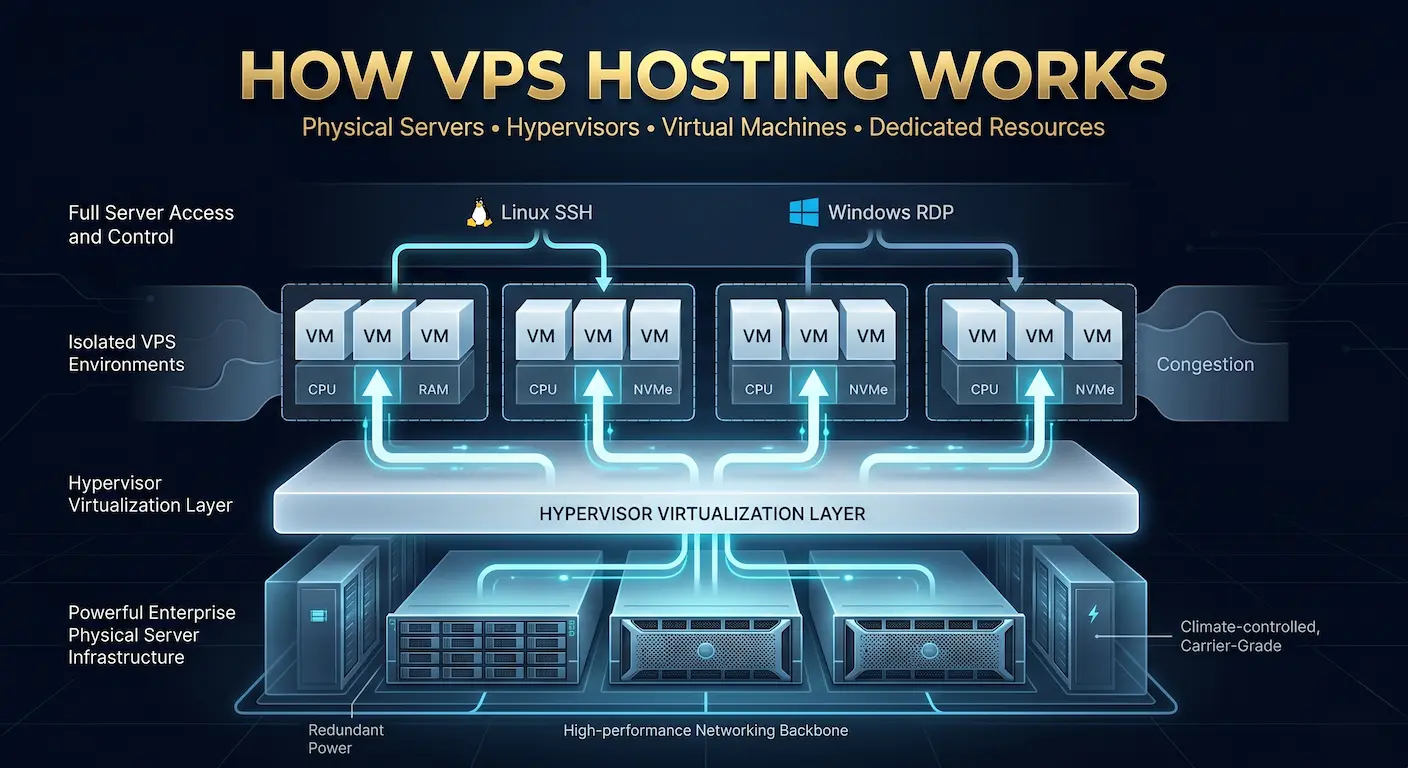
VPS hosting is a layered system. Understanding each layer explains why it performs differently from shared hosting and what you are actually paying for each month.
Step 1: One Physical Server in a Data Center
A large, powerful server sits inside a professional data center with redundant power, climate control, and high-speed network connectivity. This machine has far more CPU, RAM, and storage than any single website requires.
Step 2: A Hypervisor Adds a Virtualization Layer
The hosting provider installs a software layer called a hypervisor on that physical server. The hypervisor sits between the hardware and everything running on top of it. Its job is to divide physical resources into isolated virtual environments and enforce strict boundaries between them.
Step 3: The Server Gets Split Into Virtual Machines
The hypervisor creates multiple virtual machines (VMs), each operating as an independent server. Each VM has its own operating system, its own storage partition, and its own network interface. From inside a VM, the environment is indistinguishable from a physical machine.
Step 4: Each VM Receives Dedicated Resource Allocation
Every VPS receives a fixed allocation of resources before it boots: a set number of virtual CPU cores, a defined RAM amount, and a specific storage partition. These are reserved for that VM. No neighboring VM can consume them, regardless of the load those neighbors are carrying.
Step 5: You Connect and Manage Your VPS Like a Real Server
Once your VPS provisions, you connect to it as a real server. Linux VPS instances use SSH (Secure Shell). Windows VPS instances use RDP (Remote Desktop Protocol). From that connection, you have full root or administrator access to configure every aspect of the environment.
This five-step model is what delivers predictable performance and full control while still sharing the physical hardware cost across multiple accounts.
KVM vs. Container Virtualization: Two Different Isolation Models
Two fundamentally different virtualization approaches exist in VPS infrastructure, and the difference matters for security, OS flexibility, and performance consistency.
KVM (Kernel-based Virtual Machine) is a full virtualization technology built into the Linux kernel. Each KVM VPS runs its own independent kernel inside hardware-enforced memory boundaries. The guest OS has no awareness of the host server or other virtual machines. You can run Ubuntu, Windows Server, FreeBSD, or any OS because the hardware abstraction is complete. One VM cannot read the memory of another even when they share the same physical host, because the CPU enforces the boundary at the hardware level.
OpenVZ is a container-based virtualization approach. All OpenVZ containers share the host kernel. Isolation is enforced at the OS level rather than the hardware level. Containers boot faster and carry lower overhead than KVM VMs, but they cannot run a different kernel than the host, and they offer less security isolation.
For production workloads, KVM is the standard. The linux-kvm.org project documents KVM’s full technical specification for readers who need the low-level detail.
On Atal Networks’ KVM infrastructure, each VPS instance receives its resource allocation before the virtual machine boots. Those resources are reserved, not drawn from a shared burst pool afterward. Performance is consistent from the first request.
The Resources Inside Your VPS
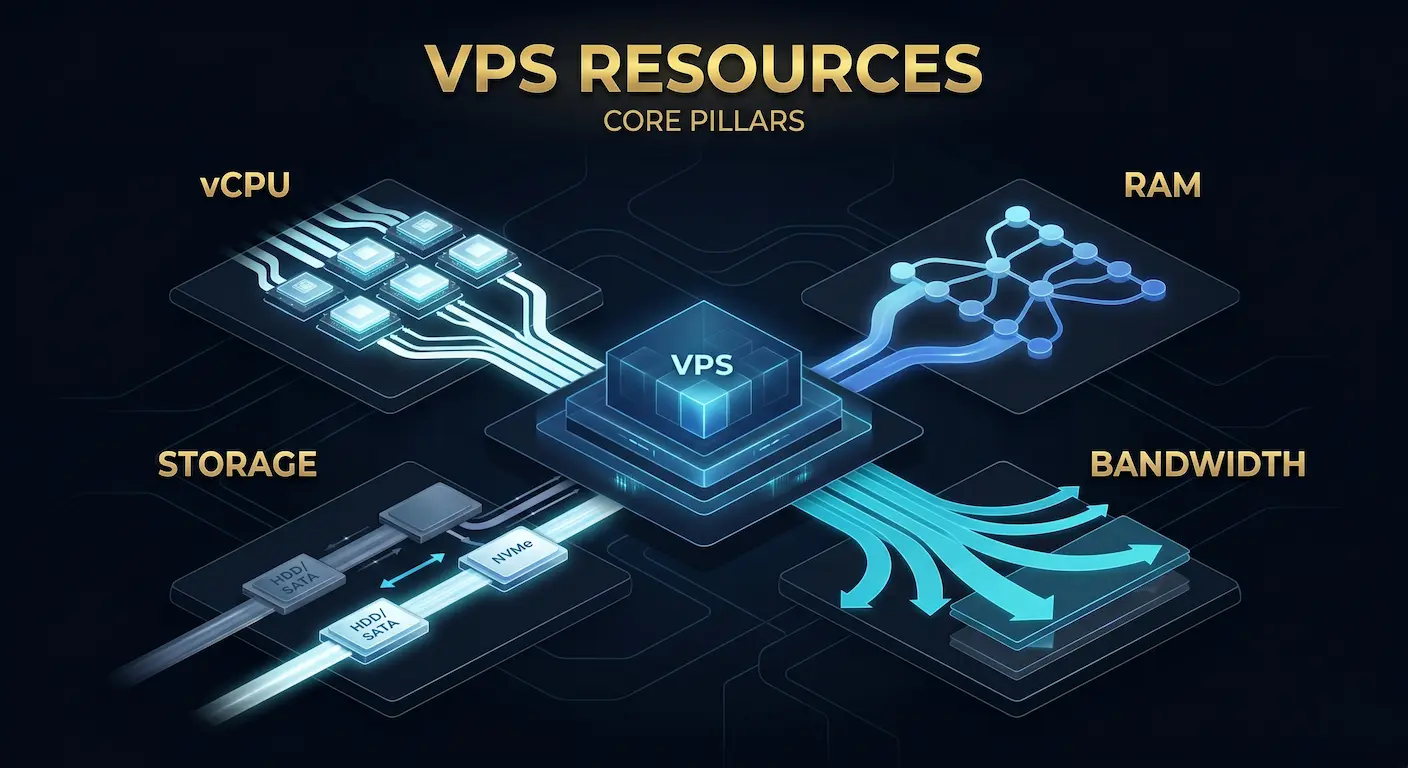
A VPS plan specifies real, measurable resources. Here is a breakdown of each resource type and what it means for your workload.
vCPU (Virtual CPU)
Virtual CPU cores represent your share of the physical server’s processing power. More vCPU cores help with workloads that run multiple simultaneous processes: concurrent web requests, background jobs, build pipelines, and compute-heavy tasks like image processing or data analysis.
For most websites and web applications, 2 to 4 vCPU cores handle typical traffic loads adequately. Game servers and CI/CD build runners often need 6 to 8 cores or more depending on concurrent load.
ذاكرة الوصول العشوائي
RAM determines how many processes, users, and database queries your VPS can handle at once before it starts using slower disk-based swap space. Low RAM is the most common bottleneck for web application workloads.
A WordPress site with proper caching runs comfortably on 1 to 2 GB of RAM. A WooCommerce store under active traffic needs 2 to 4 GB. A custom application with large database working sets or multiple services running simultaneously may need 8 to 16 GB or more.
Storage: SSD vs. NVMe
All modern VPS plans use SSD storage at minimum. The meaningful distinction is between SATA SSD and NVMe SSD.
SATA SSD delivers sequential read speeds around 550 MB/s. NVMe SSD delivers sequential reads up to 7,000 MB/s, roughly 12 times faster for random I/O operations. For database-heavy workloads, high-concurrency applications, and any site where storage I/O appears in your performance profiling, NVMe makes a measurable difference in response times.
Bandwidth and Data Transfer
Bandwidth defines how much data your VPS can transfer per month. Most VPS plans include 1 to 10 TB of monthly transfer, which covers the vast majority of websites and applications. High-traffic media sites, CDN edge nodes, and video streaming servers exhaust these limits faster.
Network port speed (1 Gbps vs. 10 Gbps) defines how fast data moves at peak. A 1 Gbps port can transfer approximately 325 GB per hour at full utilization. For most web applications, this ceiling is never a constraint.
Some providers also offer unmetered bandwidth on a fixed port speed. This means data transfer is not capped but the port speed itself limits throughput. Read your provider’s acceptable use policy carefully before assuming unmetered equals unlimited.
VPS Sizing by Workload
Use this table as a starting point. Actual requirements vary by traffic pattern, software stack, and database size. Start one tier below your estimated peak, monitor for two to four weeks, then scale as needed.
| Workload | vCPU | ذاكرة الوصول العشوائي | التخزين |
| Blog / small site | 1–2 | 1–2 GB | SSD |
| WordPress / SMB site | 2–4 | 2–4 GB | SSD or NVMe |
| SaaS MVP / API | 4–8 | 8–16 GB | NVMe preferred |
| E-commerce peak load | 4–8 | 8–32 GB | NVMe + backups |
| Game server | 4–8 | 8–16 GB | SSD |
| Dev / test runners | 2–8 | 4–16 GB | SSD |
| Database server | 4–8 | 16–64 GB | NVMe required |
| VPN / proxy multi-IP | 2–4 | 2–8 GB | SSD + extra IPs |
Types of VPS Hosting
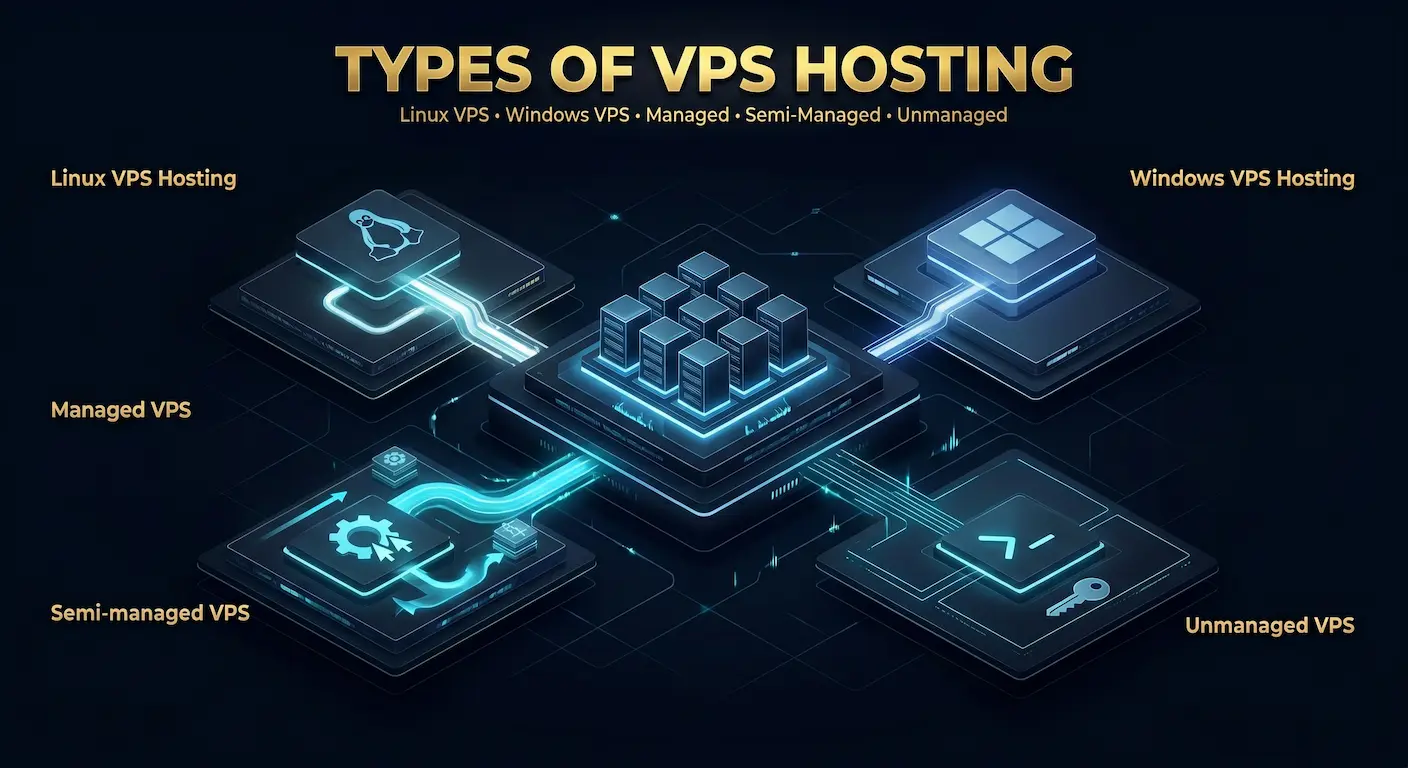
VPS hosting comes in several configurations. Understanding each one helps you match a plan to your workload, budget, and technical capability.
استضافة Linux VPS
استضافة Linux VPS is the most widely used VPS option. It runs on open-source operating systems including أوبونتو, دبيانو و الملينكس, which are known for stability, security, and strong community support.
Linux VPS environments are lightweight and fully customizable. They carry no OS licensing cost, making them more cost-efficient than Windows-based alternatives at any given resource tier. The full web application stack, including Nginx, Apache, MySQL, PostgreSQL, PHP, Node.js, and Python, runs natively on Linux.
استضافة Windows VPS
Windows VPS hosting serves workloads that depend on Microsoft technologies. A Windows VPS supports applications built with .NET, MSSQL Server, and other Windows-only software. Access is typically through Remote Desktop Protocol (RDP) rather than SSH.
Windows Server licensing adds $10 to $30 per month to the plan cost depending on edition. If your application does not require Windows-specific tools, Linux is the more cost-efficient default.
Managed, Semi-Managed, and Unmanaged VPS
This is the most important decision when choosing a VPS plan, and it directly affects both cost and operational responsibility.
Managed VPS hosting means the provider handles operating system updates, security patching, monitoring, backups, and often initial server configuration. You focus entirely on your application.
Semi-managed VPS hosting splits responsibility. The provider manages core systems such as the OS and network layer. You manage your applications, software configurations, and application-level security.
Unmanaged VPS hosting gives you root access and full control. You handle all administration: OS installation, security hardening, software updates, monitoring, and backups. It costs the least at any resource tier but requires genuine server administration skills.
| Task | Managed VPS | Semi-Managed | Unmanaged VPS |
| OS updates | Provider | Shared | You |
| Security patching | Provider | Shared | You |
| Monitoring | Provider | Basic | You |
| Backups | Often included | Optional | You |
| Incident response | Provider (SLA) | محدود | You |
| Performance tuning | Assisted | محدود | You |
| Application management | You | You | You |
Cloud VPS vs. Traditional VPS
A traditional VPS runs on a single physical host. If that host fails, the VPS instances on it go offline until the host recovers or instances migrate.
A cloud VPS runs on a distributed pool of compute resources. Hardware failures trigger automatic migration to healthy nodes, typically with minimal downtime. Cloud infrastructure also supports more flexible scaling since resources come from a distributed pool rather than one host’s fixed capacity.
Traditional VPS costs less at the same resource tier. Cloud VPS costs more but delivers higher availability for uptime-critical applications. Choose based on your tolerance for hardware-level downtime, not on a preference for the word “cloud.”
Benefits of VPS Hosting
VPS hosting delivers five practical advantages that directly support performance, control, and growth.
More predictable performance than shared hosting. With dedicated resources, your application is not affected by traffic spikes or resource consumption from other users on the same physical machine. Load times stay consistent as your traffic grows.
Full control through root or admin access. Root access lets you install any software, modify any system configuration, and manage security policies at the OS level. This flexibility is essential for modern web applications, custom stacks, and optimized server configurations that shared hosting panels simply cannot support.
Stronger security isolation. Each VPS runs in its own isolated environment. Other accounts on the same physical server cannot access your files, processes, or memory. A compromised neighboring account creates no attack path into your environment.
Cost-effective compared to a dedicated server. VPS delivers dedicated-server features including isolation, root access, and guaranteed resources, at a fraction of the cost. You pay only for the portion of the physical hardware you use, not for the entire machine.
Scales without rebuilding infrastructure. Most providers support vertical scaling: adding more vCPU cores or RAM to an existing instance with only a reboot. You can start lean and grow your resource allocation as your workload expands, without migrating to a different server tier.
VPS vs. Shared vs. Dedicated vs. Cloud
Each hosting model serves a different combination of budget, performance requirement, and technical need. This table shows the key differences.
| عامل | Shared Hosting | استضافة VPS | Dedicated Server | Cloud Server |
| Resource isolation | None (shared pool) | Guaranteed, hypervisor-enforced | Full machine | Distributed pool |
| Root / admin access | لا | نعم | نعم | نعم |
| Performance consistency | Variable | Consistent | Maximum | Variable to high |
| Custom OS | لا | نعم | نعم | نعم |
| Scaling speed | Very limited | Medium | Low (hardware-bound) | ارتفاع |
| Cost predictability | ارتفاع | ارتفاع | ارتفاع | Medium |
| Typical monthly cost | $2–$10 | $5–$150+ | $80–$600+ | Usage-based |
| Best fit | Personal sites, low traffic | Growing sites, developers, apps | Mission-critical, compliance | Variable workloads |
Quick Decision Guide
Pick shared hosting when you run a low-traffic personal site or blog, do not need custom software, and are working within a tight budget. Shared hosting is the right fit for sites under 10,000 monthly visits with simple technical requirements.
Pick VPS hosting when your site slows under traffic spikes, your application needs software your shared host does not support, you process payments or handle customer data, or you need a server in a specific country. VPS is the right step for most growing businesses and all developers.
Pick a dedicated server when your workload requires full hardware ownership, maximum isolation for compliance, or specific hardware configurations such as high RAM pools, GPU cards, or custom storage arrays. Compare options on our dedicated servers vs. VPS hosting صفحة.
Pick cloud hosting when your workloads fluctuate significantly and you need rapid, on-demand scaling with pay-as-you-go billing. Cloud suits burst workloads better than steady-state applications where fixed monthly VPS pricing is more economical.

What Is VPS Hosting Used For?
VPS hosting supports any workload that needs dedicated resources, root access, or a specific server configuration that shared hosting cannot provide.
Growing Websites and E-Commerce Stores
Growing websites consistently outgrow shared hosting before outgrowing VPS. An e-commerce store processing concurrent transactions needs consistent database response times and enough RAM to prevent queries from spilling to slower disk swap. On a VPS, you configure the full stack for your requirements: PHP-FPM worker counts, MySQL buffer pool sizes, Nginx connection limits. These settings directly affect page speed, and page speed directly affects conversion rates.
SaaS Platforms and Tech Startups
SaaS teams use VPS infrastructure to run APIs, admin dashboards, and multi-tenant applications where they own the software and the server configuration. VPS resources scale gradually as the product grows, making it easier to launch without overcommitting infrastructure spend in the early stages. The isolation model also means one tenant’s activity cannot affect another tenant’s application performance.
DevOps Teams and CI/CD Pipelines
DevOps and system administration teams use VPS instances as build servers, CI/CD runners, staging environments, and isolated testing systems. Container-based stacks like Docker deploy cleanly on VPS infrastructure, with each project in its own isolated namespace. The ability to snapshot a VPS state, test a deployment against it, and roll back instantly is a significant advantage over shared hosting panels that offer no equivalent capability.
VPN and Proxy Infrastructure
A VPS in a specific country serves as a private VPN endpoint or proxy server. You install WireGuard or OpenVPN, route your traffic through the VPS, and your connection exits from that location’s IP address. You control the entire data path: no third-party VPN provider logs your traffic.
Proxy deployments requiring multiple IP addresses benefit from our VPS مع IPS plans. Larger address blocks for multi-endpoint proxy networks, email infrastructure, and SEO hosting setups are available through our IPv4 leasing service.
خوادم الألعاب
Game servers require stable CPU allocation, low latency, and the ability to handle many simultaneous TCP and UDP connections. A VPS with dedicated CPU cores and a data center location close to your player base provides a solid foundation for Minecraft, Counter-Strike 2, Rust, Valheim, and other multiplayer titles. You control who connects, which mods run, and how the server behaves. Shared hosting supports none of these.
Database Hosting
Database workloads benefit most from dedicated RAM and fast NVMe storage. Separating your database server from your application server onto different VPS instances is a standard architecture pattern for applications that need to scale database capacity independently. Each layer scales on its own resource tier without affecting the other.
Email Servers
A self-hosted email server on a VPS gives you complete control over delivery policies, spam filtering, archival, and security. Platforms like Mailcow and Mailu deploy on a VPS in under an hour. The IP reputation of your VPS’s dedicated IPv4 address determines your email deliverability, which you build through consistent sending practices.
Private and Jurisdiction-Specific Hosting
Some workloads need hosting inside a specific country’s legal environment. Private VPS hosting places your server in a jurisdiction whose laws govern which takedown requests the provider must honor, what data retention obligations apply, and which regulatory frameworks cover stored data.
Legitimate use cases include privacy-focused services, legal research platforms, multi-jurisdictional businesses, and content that is legal in the hosting country but subject to US copyright takedown mechanisms.
The critical distinction is real infrastructure versus routing. A provider advertising anonymous hosting while running your server in a domestic data center with a foreign IP address does not deliver genuine jurisdictional placement. Our private VPS hosting plans place servers in physical data centers inside the target jurisdictions, not routing arrangements.
Signs Your Site Has Outgrown Shared Hosting
Shared hosting works well until the workload exceeds what a shared resource pool can support. These signals indicate you have hit that ceiling.
Slow load times during traffic spikes. Your site performs fine at baseline but slows significantly when visitor numbers rise. This is the shared resource pool running dry. Your account competes for CPU and RAM with hundreds of other sites on the same server, and it loses under load.
Consistent resource limit warnings. CPU throttling notices, RAM limit alerts, or process count warnings in your hosting panel are hard ceilings on a shared server. Optimizing your site code does not remove these limits. Only moving to dedicated resources does.
Inability to install required software. Your application needs a specific PHP extension, a custom library, a particular runtime version, or a software package your shared host does not support. Root access on a VPS removes every software restriction.
Payment processing or regulated data. Any workload handling payment card data, personal health information, or other regulated content benefits from the isolation model VPS provides. Shared hosting’s common OS environment creates exposure that isolation eliminates.
Database queries that slow down over time. Large tables, join-heavy queries, and concurrent database connections exhaust shared RAM quickly. A dedicated database VPS with sufficient memory keeps query performance consistent as your data grows.
Jurisdictional or location requirements. Your use case requires a server physically located in a specific country for legal, latency, or compliance reasons. Shared hosting rarely offers precise geographic placement options. VPS does.
Five Things People Get Wrong About VPS Hosting
Misconception 1: VPS is always faster than shared hosting. A VPS with 512 MB of RAM and 1 vCPU performs worse than a shared hosting plan with good caching. VPS means dedicated and isolated resources. Speed depends on how much you allocate and how well you configure your stack.
Misconception 2: VPS gives you a dedicated physical machine. VPS shares physical hardware with other virtual machines. A dedicated server gives you physical isolation. VPS gives you logical isolation enforced by a hypervisor. Both protect your environment effectively, but they are not the same thing. Our خوادم معدنية عارية page covers physical hardware options for workloads that require full hardware ownership.
Misconception 3: Managed VPS removes all technical responsibility. Managed VPS means your provider handles the server OS layer. Your application, its configuration, its security, and its performance remain your responsibility. A managed VPS running an outdated, unpatched application is still a security liability.
Misconception 4: More RAM always improves performance. RAM eliminates a specific bottleneck: exhausting memory and falling back to slower disk swap space. If your application fits comfortably in existing RAM, adding more RAM changes nothing. Profile your actual workload before scaling any resource.
Misconception 5: VPS is too technical for non-developers. A managed VPS with a control panel such as cPanel or Plesk provides an interface nearly identical to shared hosting. Many businesses run production workloads on managed VPS without ever using a command line. The technical burden scales with the management level you choose.
VPS Security: Your Responsibilities
VPS hosting is substantially more secure than shared hosting. KVM virtualization enforces hardware-level isolation between accounts. Other users on the same physical host cannot access your filesystem, read your processes, or consume your memory. A compromised neighboring account creates no attack path into your VPS because the isolation is enforced below the OS level.
The NIST definition of virtualization describes this isolation boundary in detail at the standards level.
That hardware-level isolation is your baseline. Everything above the OS image is your responsibility. The checklist below is the practical minimum for any VPS, managed or unmanaged.
Keep OS and packages updated. Apply security patches on a regular schedule. Automated security update tools handle this at the OS level without manual intervention.
Use SSH key authentication. Disable password-based SSH login in /etc/ssh/sshd_config by setting PasswordAuthentication no. Use SSH key pairs exclusively. Password-based login is the most common entry point for automated brute-force attacks.
Configure a firewall. Allow only the ports your applications require. Block everything else. UFW on Ubuntu and Debian makes this configuration straightforward. A default-deny firewall blocks the majority of automated scanning traffic before it reaches your services.
Install fail2ban. This automatically blocks IP addresses after repeated failed login attempts. It stops most brute-force SSH attacks within the first hour of a new VPS being online.
Schedule automated backups and test restores. A daily backup job that copies your database and critical files to a remote location protects against data loss. Testing the restore process confirms the backup actually works before you need it.
Enable monitoring and alerts. Track CPU usage, RAM, disk space, and login activity. Unexpected resource spikes often indicate a compromised process or a runaway application. Alerts let you respond before small problems become outages.
Apply least-privilege access. Give users and services only the permissions they need. Avoid running application processes as root.
Following these practices gives VPS hosting strong, practical security boundaries for business workloads.
Your First 24 Hours on a VPS
Most VPS guides end at the definition. This section covers the sequence that turns a freshly provisioned VPS into a stable, secure production server.
Minutes 0–5: Connect to your VPS. Log in as root over SSH immediately after receiving your credentials: ssh [email protected]. Confirm the connection works before doing anything else.
Minutes 5–20: Update the OS. Run your full system update before installing anything.
- Ubuntu / Debian: apt update && apt upgrade -y
- AlmaLinux / Rocky Linux: dnf update -y
This patches every package in the base OS image to its current version. Starting with a fully patched system is the foundation for everything that follows.
Minutes 20–40: Harden SSH access. Copy your public SSH key to the server using ssh-copy-id. Then open /etc/ssh/sshd_config, set PasswordAuthentication no, and restart the SSH service. Confirm your key-based login works before closing the current session. Locking out root password login stops the bulk of automated attacks targeting new servers.
Minutes 40–60: Configure your firewall. On Ubuntu: ufw allow 22 && ufw allow 80 && ufw allow 443 && ufw enable. Adjust the port list to match your actual application requirements. Block all other ports by default.
Hour 1–4: Install your application stack. Install fail2ban first, then your web server (Nginx or Apache), database engine (MySQL, PostgreSQL, or MariaDB), runtime (PHP, Node.js, or Python), and your application. Test each service as you install it rather than installing everything at once.
Hour 4–8: Set up automated backups. Configure a cron job that exports your database and copies critical files to a remote storage location daily. Then manually trigger one backup and restore a test environment from it. Do not assume your backup system works until you have proven it restores correctly.
Hour 8–24: Add monitoring. Install a lightweight monitoring stack (Netdata is a common choice for self-hosted VPS monitoring) and set up basic alerts for CPU, RAM, and disk usage. A simple uptime check from an external service completes the monitoring setup.
Following this sequence on every new VPS produces a stable, secure server regardless of the application it runs.
How to Choose a VPS Hosting Provider
Selecting a provider means matching your workload’s real resource requirements to a plan’s specifications, then verifying that the provider operates reliably at the infrastructure level. These six steps make the decision systematic.
Step 1: Define your workload clearly. Identify how the VPS will be used before looking at any plan. A WordPress site needs balanced CPU, RAM, and fast storage. A SaaS API needs higher RAM and room to scale. A game server needs stable CPU allocation and low latency to the player base. A VPN or proxy deployment needs IP management and geographic flexibility. Being precise about the use case prevents both underpowering and overspending.
Step 2: Choose your operating system. Linux VPS is cost-efficient and compatible with the full modern web stack. Windows VPS is required for .NET applications, MSSQL databases, and software accessed via Remote Desktop. If you do not have a specific Windows requirement, Linux is the better default at any budget.
Step 3: Set your baseline resources. Start from RAM, the most common bottleneck for web workloads. Set vCPU count based on concurrent processing requirements. Choose storage type (SSD vs. NVMe) based on your I/O profile. Pick a provider that supports vertical scaling without data migration, so you can start lean and resize without downtime as requirements become clearer.
Step 4: Match the management level to your team. Managed VPS suits businesses that want production stability without dedicated server administration staff. Unmanaged VPS suits DevOps teams and experienced administrators who want full control at the lowest cost per resource tier. Semi-managed sits between the two. The best providers are explicit about exactly which tasks they own and which tasks belong to you.
Step 5: Pick the right data center location. Latency between your server and your users affects every interaction. As a practical guide: under 50 ms is excellent for interactive applications; 50 to 150 ms works for most websites; over 150 ms creates noticeable lag for real-time services. For globally distributed audiences, multiple VPS instances in different regions combined with geographic DNS routing distribute load across markets and reduce latency for all users.
Step 6: Verify reliability and support quality. Check for a documented uptime SLA, clear support response time commitments, backup options with tested restore procedures, and a transparent upgrade path. Providers that are vague about any of these are telling you something important about how they operate.
Atal Networks VPS: Infrastructure Built by Operators
Atal Networks has operated hosting infrastructure for over 15 years, serving 36,000+ clients across a network that spans 213+ data centers in 196 countries. Our VPS hosting platform runs on KVM with NVMe SSD storage arrays. Resources are reserved before instances boot, not drawn from a shared burst pool, so your allocated CPU and RAM are available from the first request.
That operational depth shapes the infrastructure differently from providers that resell capacity from a larger cloud platform. We own and operate the physical servers. Clients access hardware maintained by a dedicated infrastructure team, not a management layer over someone else’s cloud.
213+ Locations Across 196 Countries
Geographic placement is a real decision on our platform, not a short dropdown. Our 213+ data centers span 196 countries with physical infrastructure. A client deploying a VPS in Singapore gets a server physically located in Singapore. A client in Brazil gets infrastructure located in Brazil. This matters for network latency, data residency requirements, and jurisdictional compliance.
Browse our VPS servers in the USA for US-based configurations, or contact us for infrastructure placement in specific regions.
IPv4 Leasing and VPS With IPs
All standard VPS plans include one dedicated IPv4 address. Additional addresses are available through our VPS مع IPS plans and our IPv4 leasing service for larger address blocks. These configurations serve proxy networks, multi-domain email infrastructure, SEO hosting setups, and VPN deployments requiring multiple independent endpoints.
الأسئلة الشائعة
Q: What is VPS hosting in simple terms? VPS hosting gives you a private, isolated section of a shared physical server with dedicated CPU, RAM, and storage reserved exclusively for your account. Other users on the same machine cannot access or consume your resources. You get dedicated-server control at a fraction of the cost.
Q: Is VPS hosting better than shared hosting? For most growing websites and applications, yes. VPS delivers guaranteed resources, hypervisor-enforced isolation, and root access. Shared hosting provides none of these. Shared hosting makes sense for low-traffic personal sites. Once traffic grows, database demands increase, or your application requires custom software, VPS is the appropriate step.
Q: How does a VPS work technically? A hypervisor, such as KVM, runs on the physical server and creates isolated virtual machines. Each VM receives a fixed allocation of CPU cores, RAM, and storage before it boots. The VM runs its own operating system, completely independent from other VMs on the same hardware. Resource boundaries are enforced at the hardware virtualization layer.
Q: What is the difference between managed and unmanaged VPS? An unmanaged VPS gives you root access and requires you to handle all administration: OS updates, security patching, monitoring, and backups. A managed VPS includes provider support for the server layer. You focus on your application. Managed plans cost 30 to 50 percent more at the same resource tier but eliminate the need for in-house server administration.
Q: Is VPS hosting secure? VPS hosting is substantially more secure than shared hosting. KVM virtualization enforces hardware-level isolation between accounts. Other users on the same physical host cannot access your files, processes, or memory. Security above that baseline depends on your own configuration: firewall rules, update cadence, SSH hardening, and backup discipline.
Q: How much does VPS hosting cost per month? VPS plans range from approximately $5 per month for entry-level configurations (1–2 vCPU, 1–2 GB RAM) to $150 or more for high-performance plans. Managed VPS adds a 30 to 50 percent premium over unmanaged at the same resource tier. Additional costs include Windows licensing ($10–$30/month), extra IPv4 addresses ($1–$5 each/month), and control panel licenses such as cPanel ($15–$45/month).
Q: Can a VPS host multiple websites? Yes. A VPS with sufficient RAM and either a control panel or Nginx virtual host configuration can host multiple websites simultaneously. Many businesses run 5 to 20 sites on a single mid-range VPS. Each site gets its own document root, database, and domain configuration while sharing the VPS’s allocated underlying resources.
Q: What operating systems can I run on a VPS? On a KVM VPS, you can run any OS that the provider’s image library includes: Ubuntu, Debian, AlmaLinux, Rocky Linux, CentOS Stream, Fedora Server, Windows Server, and others depending on the provider. OpenVZ containers are limited to distributions compatible with the host kernel. KVM imposes no such restriction.
Q: What is the difference between VPS and cloud hosting? A traditional VPS runs on a single physical host with fixed monthly pricing. A cloud server runs on a distributed pool of resources with consumption-based pricing. Cloud hosting scales faster and handles hardware failures more gracefully. VPS offers more predictable monthly costs and simpler capacity planning for steady-state workloads.
Q: Windows VPS vs. Linux VPS: which should I choose? Linux VPS is the better default for most web applications. It costs less (no OS licensing fee), runs the full modern web stack natively, and offers stronger community support. Windows VPS is required for .NET applications, MSSQL Server databases, and Windows-based software accessed via Remote Desktop.
Q: Should I upgrade from VPS to a dedicated server? Move to a dedicated server when your workload requires full hardware ownership, maximum isolation for compliance purposes, or consistent high performance that a virtualized environment cannot maintain. Our خوادم معدنية عارية and dedicated server options cover this tier in detail.
الأفكار النهائية
VPS hosting sits between shared hosting and dedicated servers. It delivers isolated, guaranteed resources; full root access; and the flexibility to configure your server environment exactly for your workload. It costs more than shared hosting and less than dedicated hardware.
The right time to move to VPS is when shared hosting can no longer keep up: when traffic spikes slow your site, when resource warnings appear consistently, when your application needs software your shared host cannot provide, or when your use case requires a specific geographic location or legal jurisdiction.
A properly configured VPS handles the vast majority of web application workloads at a cost most businesses can sustain over the long term.
Explore Atal Networks’ VPS plans: 213+ data center locations across 196 countries, KVM-based infrastructure with NVMe storage, and private options for jurisdiction-specific deployments, backed by 15+ years of operational experience and 36,000+ clients worldwide.