 콘텐츠로 건너뛰기








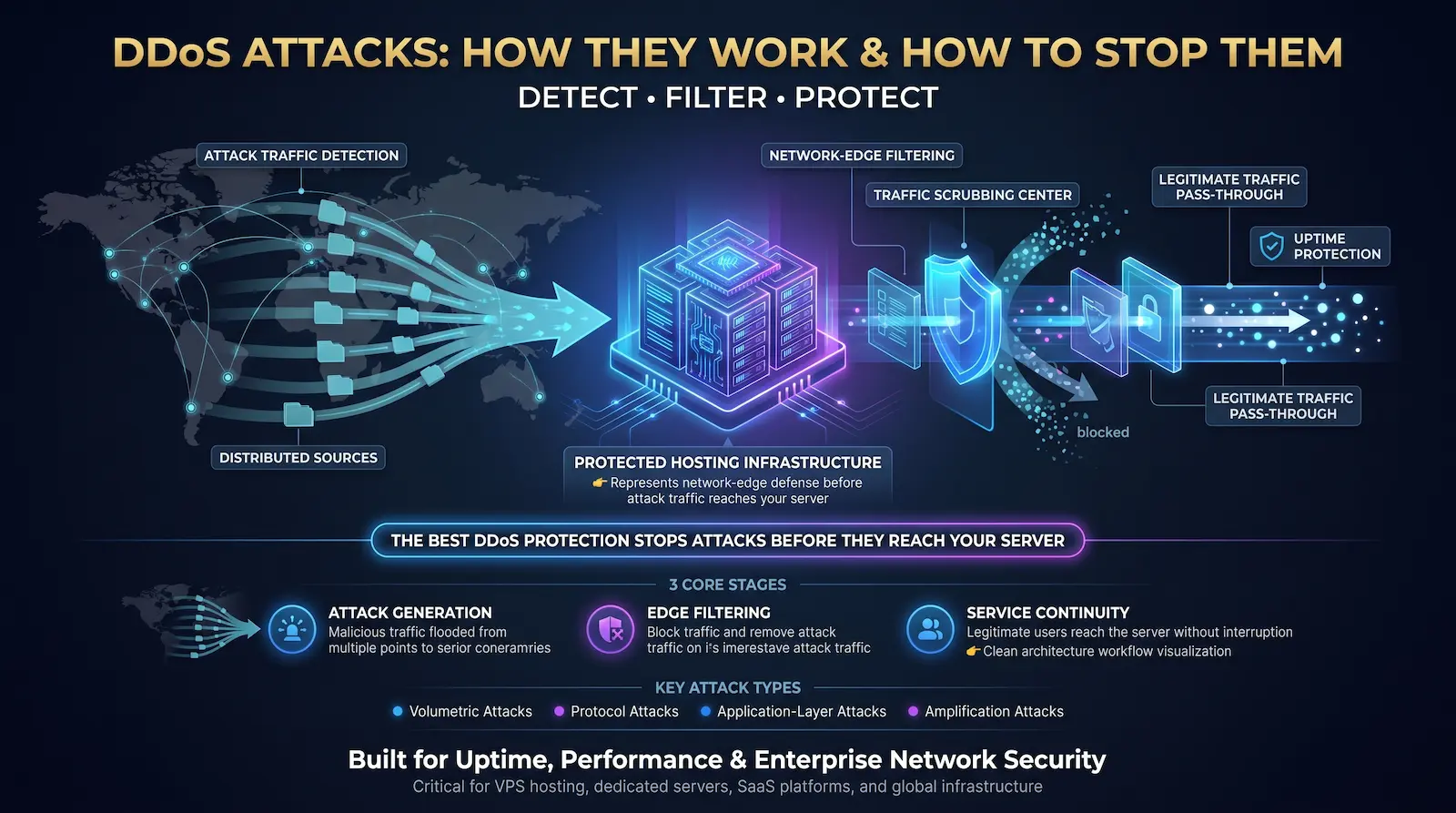
A Distributed Denial of Service (DDoS) attack floods a server, network, or online service with traffic from thousands to millions of compromised devices until it can no longer respond to legitimate users. DDoS attacks target bandwidth, connection capacity, or application processing power — all at once, from sources distributed across dozens of countries, making them nearly impossible to block by IP address alone.
The numbers behind this threat are not abstract. In Q1 2025, Cloudflare blocked 20.5 million DDoS attacks — matching 96% of everything it blocked across all of 2024. The largest single attack on record peaked at 22.2 terabits per second in September 2025. Terabit-scale attacks now occur daily.
An unprotected organization loses approximately $6,000 per minute during a DDoS attack, according to Kentik’s 2026 DDoS analysis. At 45 minutes average attack duration, that is $270,000 per incident — before factoring in reputational damage, SLA penalties, and customer churn.
At Atal Networks, our network engineering team defends against DDoS attacks continuously across 213+ data centers in 196+ countries. Our DPI-powered scrubbing and BGP Flowspec-based mitigation protects more than 35,000 전용 서버 과 VPS 호스팅 clients every day. This article covers how these attacks are built, how they run, and exactly what stops them.
Table of Contents
- DDoS vs. DoS: What Makes Them Different
- How Botnets Power DDoS Attacks
- The 7 Types of DDoS Attacks
- Multi-Vector DDoS: The 2025-2026 Attack Model
- The Real Financial Cost of a DDoS Attack
- 9 Methods That Actually Stop DDoS Attacks
- DDoS Protection: Dedicated Server vs. VPS
- DDoS Attack Response: Step-by-Step
- Legal Consequences of DDoS Attacks
- How Atal Networks Protects Your Server
- Frequently Asked Questions About DDoS Attacks
- Related Articles

DDoS vs. DoS: What Makes Them Different
A Denial of Service (DoS) attack sends high traffic volume from a single machine to overwhelm a target. A Distributed Denial of Service (DDoS) attack does the same using thousands to millions of compromised devices across multiple countries and IP ranges simultaneously — making source-based blocking nearly impossible.
A DoS attack is straightforward to stop. Identify the single attacking IP address, block it, and the attack ends. Attackers solved this defense decades ago by switching to a distributed model.
A DDoS attack draws on a botnet — a network of devices compromised without their owners’ knowledge. When 500,000 unique IP addresses each send a small stream of traffic to your server, you cannot block the attack by banning individual sources. The traffic profile matches legitimate users because the compromised devices generating it are legitimate—they are just being controlled remotely.
According to Wikipedia’s entry on denial-of-service attacks, this distributed architecture separates the attack origin (the attacker) from the attack source (the botnet), making attribution and mitigation exponentially harder than single-source attacks.
The target resource varies by attack type:
| Attack Category | Resource Targeted | OSI Layer |
| Volumetric attack | Network bandwidth | Layers 3–4 |
| Protocol attack | Connection state (firewall, router) | Layers 3–4 |
| Application-layer attack | Server CPU, memory, threads | Layer 7 |
A single campaign often targets all three simultaneously—a technique called multi-vector DDoS that we cover in detail below.

How Botnets Power DDoS Attacks
A botnet is a network of compromised devices—home routers, security cameras, smart TVs, IoT sensors, and infected computers—controlled through a command-and-control (C2) server. The attacker activates the botnet by sending a single instruction through the C2 channel, causing every compromised device to send traffic to the target at the same moment.
How Devices Become Part of a Botnet
Attackers scan the internet for devices with known software vulnerabilities or factory-default credentials. Home routers shipped with “admin/admin” passwords are the easiest entry point. IP cameras running outdated firmware are next. Once a device is compromised, malware spreads laterally to other devices on the same local network.
The Mirai botnet, which produced the record-breaking 1.2 Tbps Dyn DNS attack in October 2016, used this exact method. It infected over 600,000 IoT devices by scanning for Telnet access with 61 common factory credential pairs. Modern Mirai variants—including Eleven11bot and Aisuru, both tracked by Nokia’s Deepfield Emergency Response Team in early 2025—continue to use the same technique against newer IoT hardware.
Nokia’s 2025 DDoS research found that 100 to 200 million IPv4 endpoints now covertly participate in attack traffic via residential proxy networks. These are not data centers. servers—they are household devices: laptops, phones, gaming consoles, DVRs, and baby monitors. The traffic they generate carries a clean residential IP reputation, which breaks IP-reputation-based blocking entirely.
Command-and-Control Infrastructure
The attacker does not communicate directly with each infected device. C2 servers relay instructions. Modern botnets use peer-to-peer C2 architectures with no central point of failure—taking down one C2 server does not stop the network. Advanced botnets route C2 traffic over encrypted channels on port 443, disguising instructions as normal HTTPS traffic to evade detection.
DDoS-as-a-Service: $5 Buys an Attack
Booter and stresser services sell DDoS capacity on a subscription basis — no technical knowledge required. Pricing on dark web markets starts at approximately $5 per hour for a small attack and scales to thousands of dollars for sustained, high-volume campaigns targeting large infrastructure.
In 2025, Europol dismantled multiple DDoS-for-hire services in coordinated international operations, arresting platform administrators and prosecuting paying customers. The enforcement action confirms that using a booter service — not just operating one — constitutes a criminal offense in EU member states and the United States.
The 7 Types of DDoS Attacks
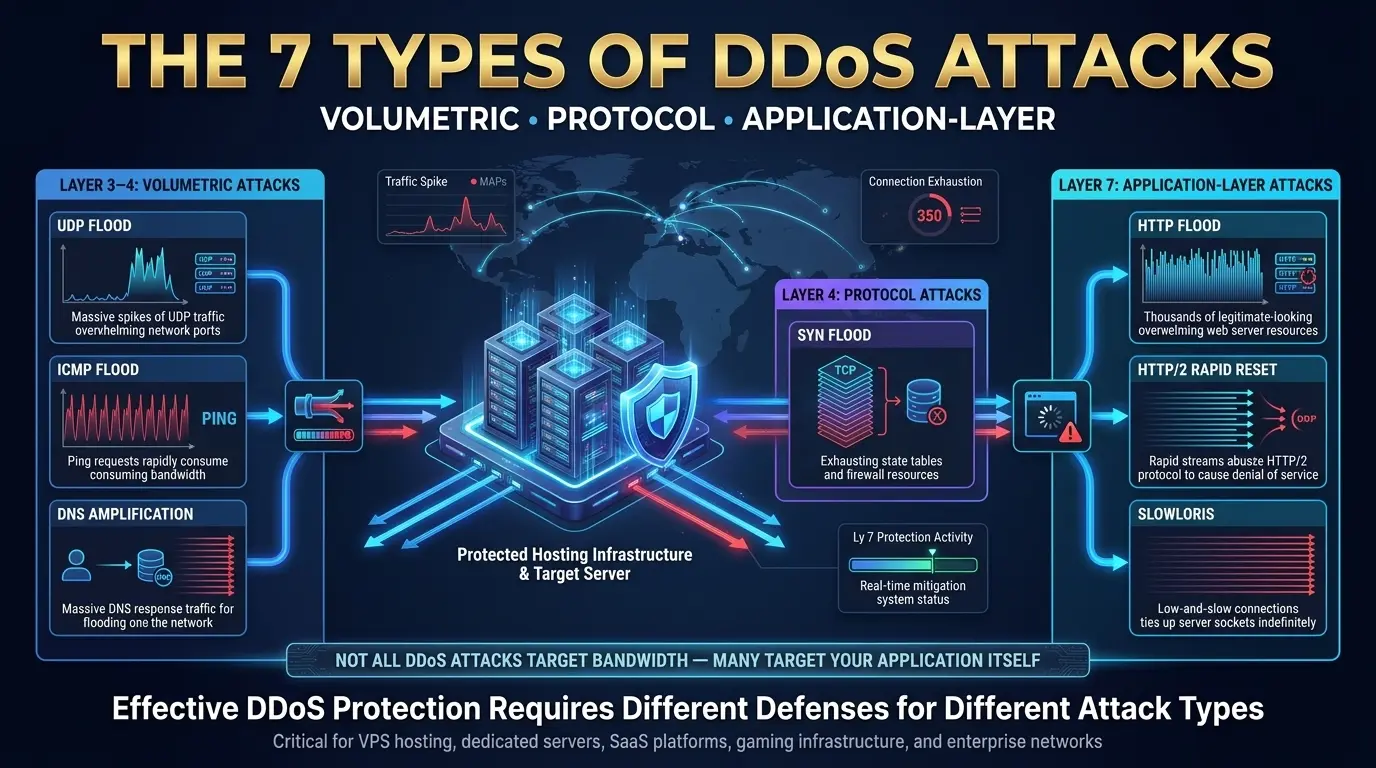
DDoS attacks divide into three categories: volumetric attacks that saturate bandwidth at Layers 3 and 4, protocol attacks that exhaust connection state tables in routers and firewalls, and application-layer attacks that overwhelm server processing capacity at Layer 7. Each type requires a different detection method and a different mitigation response.
1. UDP Flood
A UDP flood sends massive volumes of User Datagram Protocol packets to random ports on the target server. The server checks each port for a listening service, finds none, and replies with ICMP “Destination Unreachable” packets. This bidirectional exchange exhausts the server’s available network bandwidth.
UDP packets require no handshake before transmission. An attacker using a large botnet can generate and sustain multi-terabit UDP floods with relatively modest infrastructure. UDP floods powered the majority of the largest volumetric attacks recorded in 2025, including attacks exceeding 1 Tbps targeting gaming, financial services, and telecommunications infrastructure.
Detection signal: Sudden spike in UDP traffic volume, high ICMP Destination Unreachable rate, source IPs concentrated in specific AS ranges.
Mitigation: Rate-limit inbound UDP at the upstream network edge. Apply BGP Flowspec rules targeting the attacking AS ranges. For servers that do not use UDP, block all inbound UDP at the perimeter network firewall.
2. ICMP (Ping) Flood
An ICMP flood sends a high-volume stream of Internet Control Message Protocol (ICMP) echo request packets—also known as pings—to the target. The server must respond to each one with an echo reply, consuming both inbound and outbound bandwidth. A sufficient volume of ICMP packets saturates the server’s network link before any legitimate traffic can reach it.
The Smurf attack variant amplifies this further: the attacker sends ICMP requests with the target’s IP address forged as the source to a network broadcast address. Every device on that network responds to the target’s IP, multiplying the attack volume without multiplying the attacker’s resources. RFC-compliance fixes in modern networking equipment have made pure Smurf attacks less effective, but ICMP floods remain a standard component of multi-vector campaigns.
Detection signal: ICMP traffic volume exceeds baseline by 10x or more; ICMP packets arriving from geographically scattered sources at uniform intervals.
Mitigation: Rate-limit ICMP at the edge. For servers with no legitimate ICMP traffic needs, block all inbound ICMP.
3. SYN Flood
A SYN flood exploits the TCP three-way handshake by sending thousands of SYN packets per second to the target. The target allocates connection state for each one and replies with SYN-ACK, but the attacker never sends the final ACK. Half-open connections fill the server’s connection state table, blocking all new legitimate TCP connections.
The three-way handshake (SYN → SYN-ACK → ACK) is required to establish every TCP connection. The server must hold state for each SYN it receives while waiting for the ACK to complete the handshake. A SYN flood of sufficient volume fills this state table. When the table is full, the server cannot accept new connections from anyone—the service appears offline.
This attack type is fully documented in RFC 4987, which describes TCP SYN flooding and its countermeasures. Modern infrastructure commonly uses SYN cookies as a defense — a technique that allows the server to validate the TCP handshake without storing connection state for incomplete handshakes.
Detection signal: High ratio of half-open to established TCP connections; connection state table utilization near 100%; incoming SYN rate exceeds the server’s SYN-ACK sending rate.
Mitigation: Enable SYN cookies at the OS or network level. Apply rate limits on inbound SYN packets per source IP. Configure the network firewall to drop SYN packets from known-bad IP ranges.
4. DNS Amplification
A DNS amplification attack exploits open DNS resolvers to multiply attack traffic volume. The attacker spoofs the target’s IP address and sends small DNS queries (40–60 bytes) to thousands of open resolvers. Each resolver sends a large DNS response (up to 4,000 bytes) to the target’s IP—producing an amplification factor of up to 70x without requiring proportional botnet capacity.
Amplification attacks are among the most efficient DDoS techniques available because the attacker can generate terabit-scale floods using modest resources. The attack traffic arrives from legitimate DNS server IP addresses worldwide, making source-based blocking destroy valid DNS functionality.
NTP amplification works the same way using the Network Time Protocol monlist command, which can produce responses 4,096 times larger than the triggering request. SSDP, CLDAP, and memcached have also been exploited as amplification vectors.
Detection signal: Spike in inbound UDP traffic from port 53 (DNS) or port 123 (NTP); source IPs mapping to legitimate DNS or NTP infrastructure; traffic volume disproportionate to your server’s DNS activity.
Mitigation: Upstream filtering of amplification vectors at the ISP or transit level. Applying ingress filtering (BCP 38) blocks spoofed-source packets before they leave the attacker’s network.
5. HTTP Flood
An HTTP flood sends a sustained high volume of valid HTTP GET or POST requests to a web server or API endpoint. Unlike bandwidth attacks, an HTTP flood exhausts server CPU, memory, and application thread pools—making the application unresponsive even when network bandwidth remains available.
HTTP floods are the dominant form of Layer 7 DDoS. Because every request is syntactically valid—correct headers, proper HTTP structure, diverse source IPs—it is significantly harder to distinguish attack traffic from real users without behavioral analysis.
Advanced HTTP floods rotate User-Agent strings, Accept-Language headers, and cookies to simulate browser behavior. Some complete full TLS handshakes before sending requests, bypassing TLS-fingerprinting-based defenses. This makes Layer 7 detection reliant on behavioral analysis and rate patterns rather than packet structure.
Detection signal: Request rate per source IP abnormally high; requests target the same endpoint repeatedly; request patterns lack the variety of normal browsing (no static resource requests, no image loads); error rate on the server rises sharply.
Mitigation: Web Application Firewall (WAF) with behavioral rate limiting. CAPTCHA challenges for suspicious traffic. Edge caching to absorb static content requests. Distinguishing bots from browsers via JavaScript challenge at the CDN layer.
6. HTTP/2 Rapid Reset
The HTTP/2 Rapid Reset attack abuses stream multiplexing in HTTP/2 to generate an extreme rate of server processing without completing requests. The attacker opens thousands of HTTP/2 streams and immediately resets each one with RST_STREAM—forcing the server to process the overhead of each stream while the attacker avoids waiting for responses.
This vulnerability — designated CVE-2023-44487 — was disclosed in October 2023 after attackers used it to generate 201 million requests per second against Cloudflare’s infrastructure, the largest Layer 7 attack recorded at that time. Unlike volumetric attacks, HTTP/2 Rapid Reset can generate attack throughput exceeding any previous application-layer record using comparatively small bandwidth.
Every server running HTTP/2 must have this CVE patched. NGINX, Apache, IIS, and major CDNs released patches in October 2023. Unpatched servers running HTTP/2 remain vulnerable to this specific technique regardless of other protective measures.
Detection signal: Extremely high RST_STREAM rate on HTTP/2 connections; server CPU spikes despite low inbound bandwidth; HTTP/2 connections opening and closing rapidly without completing any requests.
Mitigation: Apply CVE-2023-44487 patches to all HTTP/2-enabled servers. Configure HTTP/2 stream concurrency limits. Terminate HTTP/2 at a patched reverse proxy or CDN that handles the stream management before forwarding to the origin.
7. Slowloris
Slowloris keeps as many HTTP connections to a web server open for as long as possible by sending partial HTTP headers at slow intervals—fast enough to prevent server timeout, never completing the request. The server’s connection pool fills entirely with these incomplete requests, blocking all new connections from legitimate users.
Slowloris requires minimal bandwidth to execute. A single machine can take down a web server that is not protected against slow HTTP attacks by holding hundreds of connections open indefinitely. The attack is specifically effective against multi-threaded web servers that allocate a worker thread per connection—including older Apache HTTP Server configurations.
Detection signal: The connection pool is near capacity; there is a large number of connections in the HTTP header-reading state; connections are lasting far longer than the typical request completion time; incoming bandwidth is normal while the server is unresponsive.
Mitigation: Configure aggressive connection timeouts. Limit maximum connections per IP. Use an event-driven web server (Nginx) or a reverse proxy that handles connection management separately from application processing. Rate-limit partial header connections at the network firewall.

Multi-Vector DDoS: The 2025-2026 Attack Model
Multi-vector DDoS attacks combine two or more attack types in a single coordinated campaign. Nokia’s 2025 threat data shows that 58% of DDoS attacks now combine multiple vectors, and 52% target multiple hosts at the same time. Attackers sequence attack types in response to defender actions, making multi-vector campaigns adaptive rather than static.
The “single large flood” model of DDoS is obsolete. In one documented 2025 campaign tracked by Nokia’s Deepfield Emergency Response Team, attackers executed four distinct attack types in three minutes: TCP carpet bombing, UDP flood, DNS amplification, and a high-rate SYN flood. Each stage is adapted based on the defender’s response. When one vector was blocked, the campaign shifted to the next while increasing bandwidth to the remaining vectors.
This is reconnaissance built into the attack. The attacker learns which defenses are active and which vectors bypass them before launching a sustained campaign.
78% of attacks in 2025 ended within five minutes. That is not a sign of failed attacks. Short-duration automated campaigns that probe infrastructure and move on are the primary reconnaissance technique for identifying targets worth attacking with sustained pressure.
Ransom DDoS (RDoS): The Extortion Layer
Ransom DDoS combines a DDoS capability demonstration with a payment demand. The attacker sends a warning email threatening a sustained attack unless a ransom — typically 5–20 Bitcoin — is paid within a 24-hour deadline. Some RDoS threats come with a short proof-of-capability attack. Others bluff entirely and never attack if ignored.
The FBI’s Internet Crime Complaint Center (IC3) documented $16.6 billion in cybercrime losses in 2024, with DDoS and ransomware among the most financially damaging threat categories. RDoS campaigns often run parallel to broader ransomware operations, using the DDoS as additional pressure during ransom negotiations.
Our recommendation: Do not pay. Payment does not guarantee the attack stops, confirms your willingness to pay, and makes your organization a recurring target. Contact your hosting provider’s NOC and CISA immediately.
The Real Financial Cost of a DDoS Attack
A DDoS attack costs an unprotected organization approximately $6,000 per minute in downtime losses. At the 2025 average attack duration of 45 minutes, a single attack produces roughly $270,000 in direct costs—before SLA penalties, emergency mitigation fees, recovery labor, and long-term reputational damage.
Breaking down that $6,000 per minute:
| Cost Category | How It Accumulates |
| Lost revenue | Every transaction that cannot be completed during the outage |
| SLA breach penalties | Contractual payments to enterprise customers per minute of downtime |
| Emergency mitigation | Mid-attack scrubbing service activation at premium rates |
| Engineering labor | On-call staff responding to the incident at overtime cost |
| Reputational damage | Customer churn, search ranking signals, and brand trust erosion |
The 47.1 million DDoS attacks recorded in 2025—a 236% increase over 2024 per Cloudflare’s Q4 report—make this not a theoretical risk but an operational certainty for any publicly accessible infrastructure.
For a concrete example: an e-commerce store processing $15,000 per hour in orders loses $11,250 in sales during a 45-minute attack. Add $5,000 in emergency mitigation, $3,000 in engineering time, and any SLA obligations, and a single attack costs more than an entire year of properly provisioned DDoS protection.

9 Methods That Actually Stop DDoS Attacks
Stopping a DDoS attack requires a layered defense at multiple network levels. Upstream scrubbing at the network edge absorbs volumetric floods before they reach your server. Deep packet inspection identifies attack traffic by content pattern. Rate limiting caps traffic from suspicious sources. Anycast distribution spreads attack load across geographically dispersed infrastructure. No single method stops every attack type.
Method 1: Network-Level DDoS Scrubbing
Network scrubbing intercepts all traffic to a target IP via BGP rerouting, filters malicious packets using DPI-based rule sets, and forwards only clean traffic to the destination server — all without the target’s connection seeing the attack volume.
Scrubbing operates at a scale that server-level defenses cannot match. A 1 Tbps attack hitting your server’s 10 Gbps port saturates it in milliseconds. The same attack routed to a scrubbing center with 10+ Tbps of available filtering capacity is absorbed without affecting your server’s link.
At Atal Networks, scrubbing is built into our network infrastructure. Our deep packet inspection (DPI) systems at every point of presence detect attack patterns and activate BGP-based traffic diversion in under 30 seconds. Every client on our 전용 서버 plans receives this protection automatically, with no configuration required.
Method 2: BGP Flowspec and Blackholing
BGP Flowspec (defined in RFC 5575) pushes granular traffic filtering rules to upstream routers across an entire provider network — blocking specific UDP source ports, dropping packets above a size threshold, or rate-limiting traffic from specific autonomous systems — without blocking all traffic to the targeted IP.
BGP blackholing is the blunter alternative: all traffic to a specific IP prefix is dropped at the upstream router, stopping the attack immediately but also blocking legitimate users from reaching that IP. Blackholing is a last resort for attacks exceeding scrubbing capacity.
Flowspec is the surgical option. Instead of nullrouting an IP, Flowspec pushes specific match-and-action rules (block UDP/53 from AS12345, drop ICMP packets over 1,500 bytes) to every router in the provider network. Our BGP infrastructure deploys Flowspec rules globally within 60 seconds of attack characterization, targeting the specific traffic signature without over-blocking.
Method 3: Deep Packet Inspection (DPI)
Deep packet inspection reads both the header and payload of every packet at Layer 7, enabling the detection of attack traffic that appears legitimate at the header level. DPI identifies application-layer floods, protocol exploits, and botnet command patterns that IP-level filtering cannot see.
Without DPI, a scrubbing center can filter by IP, port, and protocol—but it cannot tell an HTTP flood from a legitimate traffic surge or a DNS amplification attack from normal DNS traffic. DPI identifies attack traffic by the content pattern of the packets, not just their origin.
Our DPI systems run on purpose-built network hardware at every point of presence, processing traffic at line speed — 10 Gbps to 100 Gbps — without introducing latency on your server’s connection.
Method 4: Rate Limiting
Rate limiting caps the volume of requests or packets accepted from any single source IP address within a defined time window. A source IP sending more than the configured threshold is throttled — its excess traffic is dropped while traffic from other sources continues normally.
Rate limiting is most effective against botnets with low source-IP diversity and against Slowloris attacks that hold connections open. Configure rate limits in layers:
- Network layer: Packets per second per source IP at the perimeter firewall
- Transport layer: TCP connections per second per source IP
- Application layer: HTTP requests per minute per source IP per endpoint
Rate limiting alone is insufficient against highly distributed attacks where millions of unique IPs each send a small traffic volume that individually falls below any reasonable threshold. Combine it with behavioral analysis and IP reputation filtering.
Method 5: Web Application Firewall (WAF)
A web application firewall filters HTTP and HTTPS traffic between the internet and your web application, blocking requests that match attack signatures, exceed rate thresholds, originate from blocked IP ranges, or fail behavioral challenge tests. A WAF is the primary defense layer against Layer 7 DDoS, including HTTP floods and HTTP/2 Rapid Reset.
WAF rule categories for DDoS mitigation:
| Rule Type | Function |
| Rate limiting | Cap requests per IP per endpoint per time window |
| IP reputation | Block traffic from known-bad IP ranges and AS numbers |
| Geo-blocking | Restrict traffic from countries or regions with no legitimate users |
| Bot detection | CAPTCHA and JavaScript challenge for suspicious traffic |
| Payload signatures | Block requests matching known attack patterns |
| Connection limits | Cap concurrent connections from a single IP |
For 베어 메탈 서버 running business-critical applications, our network engineering team configures custom WAF rulesets that match your application’s specific traffic profile—avoiding the false positives that generic rule sets produce on specialized workloads.
Method 6: Anycast Network Diffusion
Anycast routing assigns a single IP address to multiple geographically distributed servers. Routing protocols direct incoming traffic to the nearest anycast node based on network topology. A large DDoS attack targeting an anycast IP is automatically distributed across all nodes, reducing the load on any single location to a manageable fraction of the total attack volume.
A server behind a single anycast entry point absorbs a fraction of attack traffic proportional to the number of nodes in the anycast network. Our 213+ data centers across 196+ countries form an anycast-capable global network. A 1 Tbps attack hitting a 20-node anycast network reaches each node at approximately 50 Gbps — well within the scrubbing capacity at each point of presence.
Anycast also provides geographic resilience. If one region is overwhelmed, routing protocols automatically shift traffic toward nodes with available capacity.
Method 7: Attack Surface Reduction
Reducing your server’s attack surface means closing every port, protocol, and service that your application does not actively need — eliminating potential amplification vectors and reducing the number of endpoints an attacker can target.
Attack surface reduction steps:
- Close all ports not required by your application. If your server runs only HTTPS, block all inbound traffic except ports 443 and 22 (SSH for management, restricted to known IPs).
- Disable UDP if your application does not use it. This eliminates you as a target for UDP-based volumetric and amplification attacks.
- Move internal server-to-server communication to private VLANs, off the public internet entirely.
- Restrict management interface access (SSH, RDP) to specific IP ranges using firewall rules.
- Disable unused protocols and services at the OS level.
우리의 colocation services and dedicated server plans support private VLAN configurations that move internal traffic to isolated network segments, removing it from the publicly routable attack surface entirely.
Method 8: Over-Provisioned Bandwidth
Over-provisioning bandwidth above your normal peak consumption gives DPI and scrubbing systems time to activate before the attack saturates your link. A server running at 30% of available bandwidth can absorb a significant attack surge before mitigation activates. A server running at 90% of capacity goes offline the instant a small attack arrives.
At Atal Networks, our dedicated server plans include 10Gbps ports with burst capacity. The physical port provisioning is designed to maintain headroom above normal peak traffic load, giving our automated detection systems the window they need to characterize and respond to an attack before your service degrades.
Method 9: IP Reputation and Threat Intelligence Filtering
IP reputation filtering uses continuously updated blocklists of IP addresses and autonomous systems known to host botnet infrastructure, DDoS-for-hire services, and attack tooling. Applying these lists at the upstream network edge drops attack traffic before it reaches your server’s network link.
Commercial threat intelligence feeds from providers including Spamhaus, Emerging Threats, and Team Cymru maintain blocklists that update frequently enough to be effective against campaign-based botnets. Residential proxy botnets—which route attack traffic through household devices with clean IP reputations—are not effectively blocked by reputation lists alone.
Pair IP reputation filtering with behavioral analysis for coverage against both traditional botnet infrastructure and residential proxy traffic.
DDoS Protection: Dedicated Server vs. VPS
On VPS infrastructure, DDoS protection runs at the hypervisor layer with shared scrubbing resources applied uniformly across all tenants on the same physical host. On dedicated server infrastructure, DPI and scrubbing operate on a dedicated physical port with configurations tailored to your specific application traffic profile. The dedicated model provides stronger protection and eliminates the noisy-neighbor problem.
This distinction matters operationally:
| 인자 | VPS 호스팅 | Dedicated Server |
| Protection scope | Host-level, shared with all VMs on the physical server | Port-level, dedicated to your server |
| Policy customization | Standardized rules for all tenants | Custom DPI rules for your application |
| Noisy neighbor risk | A DDoS targeting another VM on your host affects you | Your port is isolated from other clients’ traffic |
| Scrubbing bandwidth | Shared across all VMs on the physical host | Dedicated to your server’s port |
| Custom BGP Flowspec | Not configurable per tenant | Available on request |
| Best for | Standard applications under moderate attack risk | High-value applications, financial services, gaming, healthcare, e-commerce |
For organizations where uptime directly equals revenue—e-commerce platforms, SaaS applications with SLA obligations, financial trading infrastructure, and gaming servers—전용 서버 with dedicated DDoS protection match the risk profile of the workload.

DDoS Attack Response: Step-by-Step
When a DDoS attack starts, the first five minutes determine whether the incident is contained quickly or causes an extended outage. Confirm the attack, characterize the traffic vector, notify your hosting provider’s NOC, and activate pre-configured mitigation — in that sequence, as fast as possible.
Minute 0 — Confirm It Is an Attack
- Check your monitoring dashboard for traffic volume anomalies, error rate spikes, and connection count changes.
- Confirm the server is unreachable from external locations, not just your current network.
- Check your hosting provider’s status page for regional network events.
- Pull a packet capture sample from your network edge to identify traffic characteristics.
Minutes 1-5 — Characterize and Notify
- Identify the attack vector from packet captures: UDP flood, SYN flood, HTTP flood, and DNS amplification.
- Note source IP distribution — are sources concentrated in specific AS ranges or globally scattered?
- Measure attack volume in Gbps (for bandwidth attacks) or Rps/Pps (for application and protocol attacks).
- Contact your hosting provider immediately. If you are an Atal Networks client, reach our 24/7 NOC. Provide the attack vector characterization and volume estimate. Our team deploys Flowspec rules within 60 seconds of receiving your attack profile.
Minutes 5-30 — Apply and Monitor Mitigation
- Activate WAF emergency mode: maximum rate limiting and enable geo-restrictions if your user base is geographically bound.
- Apply IP blocklists for known attack source ranges.
- Reduce attack surface: temporarily disable unused ports, protocols, and services.
- For extreme-volume attacks, request BGP blackholing of the attacked IP if other services on the same subnet can be isolated.
- Watch for vector shifts. Multi-vector attacks switch techniques after one vector is blocked.
Post-Attack — Review and Harden
- Check intrusion detection logs. DDoS is frequently used as a distraction for a concurrent intrusion attempt. Verify no unauthorized access occurred during the incident window.
- Update firewall and WAF rules to permanently block the attack patterns identified.
- Document the incident timeline, attack characteristics, and mitigation effectiveness.
- Report sustained or sophisticated attacks to CISA and, if RDoS, to the FBI Cyber Division.
- Review your network security strategy for structural improvements: additional anycast coverage, increased scrubbing capacity, and over-provisioned bandwidth headroom.
Legal Consequences of DDoS Attacks
Launching a DDoS attack is a federal crime in the United States under 18 U.S.C. § 1030 (the Computer Fraud and Abuse Act), carrying penalties of up to 10 years in federal prison per offense. In the European Union, Directive 2013/40/EU criminalizes attacks on information systems with imprisonment penalties of up to 5 years.
The legal exposure applies to the attacker AND to customers of DDoS-for-hire services. In 2025, Europol prosecuted both booter service operators and paying users who had rented attack capacity, demonstrating that “I just paid for a service” is not a legal defense.
US penalties under the CFAA:
- Up to 10 years of federal imprisonment for a first offense
- Up to 20 years for repeat offenses or attacks on protected computer systems
- Civil liability to the attacked organizations for documented damages
For the victims of DDoS attacks, having inadequate security controls can also create liability:
- GDPR fines if an attack causes availability failures affecting EU personal data processing (Article 32 requires “appropriate technical measures”)
- PCI DSS failures if the cardholder data system availability is disrupted
- Contractual breach claims from enterprise customers holding uptime SLAs
Documented DDoS protection measures — like network-level scrubbing, WAF configuration records, and incident response logs — are part of demonstrating the “appropriate technical measures” required by both GDPR and most enterprise security frameworks.

How Atal Networks Protects Your Server
Every Atal Networks dedicated server and VPS sits behind our network-level DDoS protection infrastructure, which uses deep packet inspection to detect attack patterns and BGP Flowspec to filter them at the network edge—automatically, before attack traffic reaches your server’s port.
Here is the exact sequence when an attack targets an Atal Networks client:
- Detection. DPI systems at the network edge, at the nearest point of presence, identify the attack pattern—volumetric characteristics, SYN flood ratio, HTTP request anomalies, and DNS amplification signature.
- Characterization. The attack vector, source distribution, and volume are logged and passed to the mitigation controller.
- BGP Flowspec deployment. Mitigation rules matching the attack signature are pushed across our multihomed BGP network to all upstream routers within 60 seconds.
- Traffic rerouting. Attack traffic matching the Flowspec rules is filtered at the network edge. Clean traffic continues on the original path to your server.
- NOC monitoring. Our network engineers receive an alert and monitor the attack in real time, ready to adjust rules if the attack shifts vectors.
- Post-attack review. Attack characteristics are logged and used to update global threat intelligence for all clients.
For clients running applications with specific protection requirements — custom rate limits, application-layer filtering rules, SSL inspection for compliance, or dedicated scrubbing capacity reservations — our network engineering team configures these at the port level.
Explore DDoS-Protected Dedicated Server Plans — Get 70% Off Your First Month
Frequently Asked Questions About DDoS Attacks
What is a DDoS attack?
A Distributed Denial of Service (DDoS) attack floods a server, network, or online service with traffic from thousands to millions of compromised devices until the target cannot respond to legitimate users. DDoS attacks target bandwidth, connection state capacity, or application processing resources — often all three in a single coordinated campaign. The defining characteristic is the distributed source: traffic originates from many devices in many countries simultaneously.
How is a DDoS attack different from a DoS attack?
A DoS (Denial of Service) attack sends high traffic volume from a single source machine. Blocking the single attacking IP address stops the attack immediately. A DDoS attack uses a botnet of thousands to millions of compromised devices across distributed IP addresses, making source-based blocking nearly impossible. DDoS attacks are significantly more difficult to stop because the traffic appears to come from diverse, legitimate sources.
How long does a DDoS attack typically last?
Nokia’s 2025 DDoS research data shows that 78% of attacks end within five minutes and 37% end within two minutes. However, the average attack duration in 2025 was 45 minutes according to Kentik’s analysis. Ransom DDoS campaigns can run for hours or days. Sustained campaigns by state-sponsored or organized criminal groups have lasted weeks. Automated mitigation that activates within 60 seconds is the critical requirement for limiting damage from short-burst attacks.
Can a DDoS attack be used to steal data?
A DDoS attack does not directly steal data. DDoS is an availability attack — its purpose is to make a service unreachable. However, threat actors increasingly use DDoS as a distraction or smokescreen for a concurrent intrusion attempt. While security teams focus on restoring service availability, attackers probe for weaknesses in authentication systems, unpatched vulnerabilities, or misconfigured access controls. Always review intrusion detection logs and access logs after any DDoS incident.
Does a VPN protect against DDoS attacks?
A VPN hides your real IP address, preventing attackers from directing traffic to your server’s actual network address. If an attacker does not know your server’s real IP, they cannot target it. However, once your real IP is identified — through a previous connection, a DNS leak, or other discovery — a VPN does not protect against the traffic flood itself. Real DDoS protection requires upstream scrubbing at the network level, not endpoint-based encryption.
Is DDoS protection included with Atal Networks hosting?
Yes. All Atal Networks dedicated server and VPS plans include network-level DDoS protection as a standard feature. Our DPI-powered detection and BGP Flowspec-based mitigation activate automatically across all 213+ data centers globally within 60 seconds of attack detection. Clients with advanced requirements — custom rate limiting, application-layer filtering, SSL inspection for compliance, or dedicated scrubbing capacity — can request custom DDoS protection configurations from our network engineering team via contact.
Can a DDoS attack be traced back to the attacker?
DDoS attacks are difficult to trace in real time because attack traffic comes from compromised third-party devices, not the attacker’s own machines. Attackers also spoof source IP addresses in some attack types. Law enforcement traces DDoS perpetrators through C2 server infrastructure analysis, hosting records for booter services, financial payment records, and international agency cooperation. Europol’s 2025 DDoS-for-hire takedowns resulted in arrests of operators and users, confirming that investigation does lead to prosecution.
What is the difference between DDoS mitigation and DDoS prevention?
DDoS prevention reduces the probability that an attack succeeds through attack surface reduction, over-provisioned bandwidth, anycast architecture, and pre-configured firewall rules. DDoS mitigation is the active process of detecting an attack in progress, filtering malicious traffic, and forwarding only clean traffic to the destination. Prevention limits risk before an attack. Mitigation limits damage when one occurs. A complete defense strategy requires both, with mitigation operating automatically at the network edge, so it activates faster than any human response.
Related Articles
- What Is Deep Packet Inspection (DPI)? — the detection technology behind DDoS mitigation
- Network Firewalls: Types, Functions, and Configuration — first-line defense for your server perimeter
- Network Security Guide for Dedicated Server Clients — full security strategy for server infrastructure
- Dedicated Servers with Built-In DDoS Protection — hardware-level protection for high-value workloads
- VPS Hosting Plans — shared-infrastructure hosting with network-level DDoS protection
- 베어 메탈 서버 — unshared hardware for maximum security isolation
- Proxy and VPN Infrastructure — privacy-first server configurations