 Skip to content









A managed dedicated server is a physical machine where your hosting provider handles OS patching, security updates, server monitoring, and hardware maintenance. An unmanaged dedicated server gives your team full root access and full responsibility for every layer above the hardware. The right model depends on your team’s technical depth, your uptime requirements, and the true cost of each option.
Over 15 years of running dedicated server infrastructure for 36,000+ businesses across 196 countries, we have seen both models succeed and fail. Companies get the hardware right and the management model wrong. The result is either unexpected downtime from an unpatched kernel or money spent on managed services a full DevOps team did not need. This guide closes that gap.
What Is a Managed Dedicated Server?
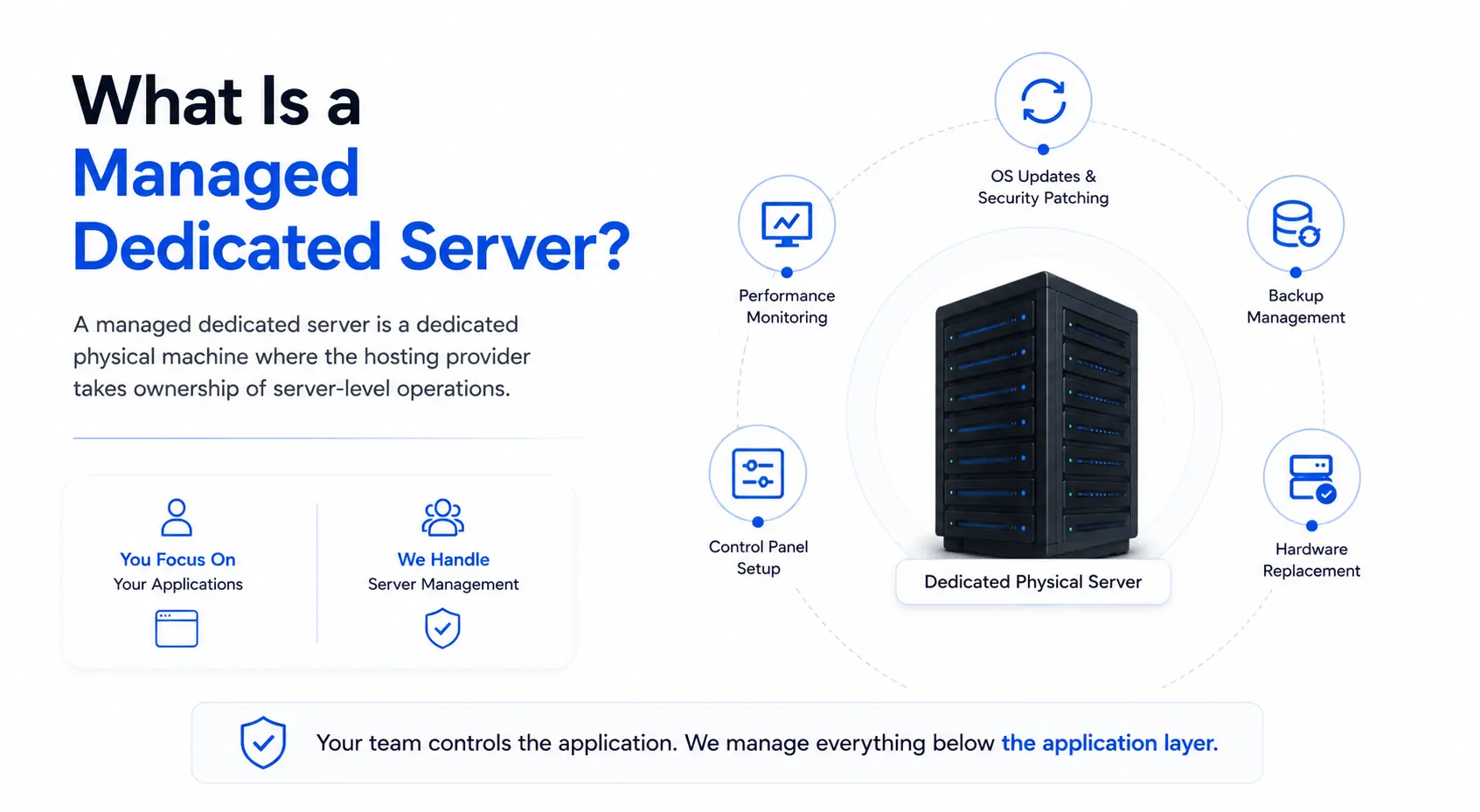
A managed dedicated server is a dedicated physical machine where the hosting provider takes ownership of server-level operations. This includes OS updates, security patching, performance monitoring, backup management, control panel setup, and hardware replacement. Your team controls the application. The provider manages everything below the application layer.
Businesses that choose managed dedicated server hosting get the full performance of isolated physical hardware without the overhead of running a server administration team. The provider applies OS patches on a scheduled cycle, monitors CPU and memory usage around the clock, and replaces failed hardware under a defined SLA. If something breaks at the server level, the provider owns the fix.
This model suits clients who want the raw power of a bare metal server without the internal cost of maintaining one. It removes a staffing dependency, transfers security responsibility to a specialized team, and delivers predictable all-in monthly costs.

Responsibilities the Provider Handles
On a managed dedicated server, the hosting provider typically covers:
- OS installation and updates — kernel patches, security fixes, and system upgrades on a scheduled cycle
- Control panel setup — pre-installed cPanel, Plesk, or DirectAdmin configured and maintained
- Server monitoring — 24/7 tracking of CPU utilization, RAM, disk I/O, and network throughput
- DDoS mitigation — network-layer protection that intercepts malicious traffic before it reaches the server OS
- Firewall configuration — rulesets built and maintained by the provider’s security team
- Backup scheduling — automated backup jobs with defined retention and recovery testing
- Hardware diagnostics and replacement — failed drives, failed RAM, and failing CPUs replaced under the provider’s SLA
- 24/7/365 incident response — the provider’s engineers respond to server-level failures, not your team at 3 a.m.
Responsibilities You Retain on the Application Layer
Managed hosting does not mean hands-off at every level. Your team still owns:
- Application-layer software selection, installation, and configuration
- Database tuning and query optimization
- Your own codebase and deployment pipeline
- User access management and application-level permissions
- Business logic and application performance benchmarks
The managed model eliminates the internal server administration workload below the application layer. Your engineers focus on the product. The provider focuses on the machine.

What Is an Unmanaged Dedicated Server?
An unmanaged dedicated server, also called a self-managed server, is a dedicated physical machine where your team owns all server administration. The provider supplies the hardware, power, cooling, and network connectivity. You handle OS selection, security hardening, patch cycles, backup strategy, server monitoring, and incident response at every hour of the day.
Unmanaged dedicated server hosting grants your team full root access from the moment the server is provisioned. You choose the operating system, install the control panel or skip it entirely, configure every firewall rule, and manage every software update. No management layer sits between your engineers and the metal. That freedom carries real value for teams who know how to use it and real risk for teams that don’t.
Teams who need maximum control at a lower base price often choose this path, especially when they already run infrastructure-as-code pipelines or need configurations no managed provider allows. For a broader look at how dedicated infrastructure compares to virtualized hosting, see our guide to VPS hosting as an entry point.

Responsibilities That Belong to Your Team
On an unmanaged dedicated server, your team owns:
- OS selection and installation — any Linux distribution, Windows Server, or custom build
- Security hardening — firewall rules (iptables, ufw), SSH key authentication, port lockdowns, fail2ban configuration, and intrusion detection system setup
- Patch management — OS-level and kernel-level security updates, applied on your own schedule
- Backup strategy — local backup jobs, remote replication, and recovery testing designed and run by your team
- Server monitoring — tools like Prometheus, Zabbix, Nagios, or Datadog installed and configured by your engineers
- Incident response — if the OS crashes at 2 a.m., your team diagnoses and fixes it
- Control panel installation — cPanel, Plesk, DirectAdmin, or CLI-only management, your call
What the Provider Still Covers
Even on an unmanaged server, the hosting provider maintains:
- Physical hardware maintenance and component replacement
- Network connectivity, BGP routing, and upstream failover
- Power, cooling, and physical security in the data center
- Network-layer DDoS mitigation (protection at the infrastructure level, not the OS level)
- Initial OS provisioning at deployment
Managed vs Unmanaged Dedicated Server: Side-by-Side Comparison
The core difference between a managed and unmanaged dedicated server is administrative ownership. Both models run on identical physical hardware. The separation point is who patches the OS, who monitors the server, and who responds when something breaks.
| Feature | Managed Dedicated Server | Unmanaged Dedicated Server |
|---|---|---|
| OS Patching | Provider-scheduled, automatic | Client responsibility |
| Security Hardening | Provider-configured | Client builds from scratch |
| Server Monitoring | 24/7 provider-managed | Client installs and runs own tools |
| Backup Management | Provider-scheduled (or add-on) | Client designs and runs |
| Control Panel | Pre-installed (cPanel, Plesk, DirectAdmin) | Client installs if needed |
| Root Access | Available (some restrictions may apply) | Full root from day one |
| Technical Support | 24/7 full server-level support | Hardware and network layer only |
| Incident Response | Provider-owned with defined SLA | Client team owns all response |
| Monthly Cost | Higher (admin layer included) | Lower base price |
| Best Fit | Teams without a dedicated sysadmin | In-house IT or DevOps teams |
Full RACI Ownership Table
RACI defines who is Responsible, Accountable, Consulted, or Informed for each task. In the dedicated server context, the ownership model is binary: the provider handles it, or your team handles it. The table below maps 12 server-level responsibilities across both models.
| Responsibility | Managed Server | Unmanaged Server |
|---|---|---|
| Physical hardware maintenance | Provider | Provider |
| Network connectivity and BGP routing | Provider | Provider |
| Power and cooling | Provider | Provider |
| OS installation and initial provisioning | Provider | Provider |
| OS security patching | Provider | Client |
| Kernel updates | Provider | Client |
| Control panel installation | Provider | Client |
| Firewall configuration | Provider | Client |
| DDoS mitigation (network layer) | Provider | Provider |
| Server monitoring and alerting | Provider | Client |
| Backup scheduling and storage | Provider (or add-on) | Client |
| Application-layer software | Client | Client |
The bolded rows show where the models separate. Below the bold rows, both models share the same provider coverage at the infrastructure layer. The application layer belongs to the client in both cases.
Cost Comparison: Managed vs Unmanaged Dedicated Server
Managed dedicated servers cost 30–60% more than equivalent unmanaged configurations at the base server price. An unmanaged server at $150/month may run $220–$350/month with a full management layer included. However, the true cost of an unmanaged server includes engineering labor, monitoring tools, backup storage, control panel licensing, and incident recovery time that never appear on the server invoice.
The mistake most buyers make is comparing the managed server invoice to the unmanaged server invoice. The right comparison is managed server total cost versus the total cost of operating an unmanaged server at the standard your workload actually requires.
Line Items That Make Up Each Model’s True Cost
Managed dedicated server costs:
- Base server hardware (CPU, RAM, storage, bandwidth)
- Management fee covering OS patching, monitoring, backups, support
- Control panel license (typically included)
- Any application-layer add-ons your team chooses
Unmanaged dedicated server true costs
- Base server hardware (same hardware, lower invoice)
- Internal engineering time for patching, monitoring, incident response (typically 10–40 hours/month depending on server count and complexity)
- Server monitoring tool licenses (Datadog, Zabbix, or similar: $30–$200/month)
- Backup storage and management tools ($20–$100/month)
- Control panel license if needed (cPanel: ~$20–$45/month; Plesk: ~$15–$60/month)
- Incident recovery cost when an unpatched vulnerability or misconfiguration causes downtime
TCO Scenarios by Business Type
| Business Profile | Unmanaged True Cost/Month | Managed Server Cost/Month | Better Model |
|---|---|---|---|
| SaaS startup (no sysadmin) | $150 server + $900+ engineer time | $250–$350 all-in | Managed |
| E-commerce (part-time IT) | $150 server + $450 IT overhead | $250–$400 with monitoring | Managed |
| Enterprise with DevOps team | $150–$300 server | $400–$600 (often redundant) | Unmanaged |
| Streaming platform (24/7 critical) | $150 + high downtime risk | $350–$500 with full SLA | Managed |
| Developer/agency (expert team) | $150–$250 with IaC pipeline | $300–$450 (extra overhead) | Unmanaged |
The Hidden Cost of an Unmanaged Server
Unmanaged server pricing looks lower on paper. The gap closes fast once you account for real operational cost.
A SaaS company with $50,000 monthly recurring revenue and one part-time engineer managing the server faces a calculation that the invoice does not capture. That engineer’s time spent on patching, monitoring, and incident response is time not spent on the product. A single security incident from an unpatched vulnerability can cost more in recovery and lost revenue than 12 months of managed hosting fees.
For teams without a dedicated system administrator, the unmanaged model routinely costs more than managed hosting, even before a single incident occurs. Businesses that need dedicated IP infrastructure alongside their server can also evaluate IPv4 and IPv6 leasing as a separate line item that applies to both management models.
Atal Networks runs dedicated server infrastructure across 213+ data centers in 196 countries. We configure managed and unmanaged setups on the same Dell hardware with Intel Xeon processors, NVMe SSD storage, and RAID, backed by a 99.99% uptime SLA and 100% network SLA.
36,000+ businesses served. No hidden fees. No overselling. 24/7/365 real engineer support.
Security: What Each Model Requires
A managed dedicated server includes active security management from your hosting provider: OS-level patches, network-layer DDoS mitigation, firewall configuration, and intrusion detection setup. An unmanaged server requires your team to build and maintain every security layer from the ground up. According to the NIST National Vulnerability Database, Linux servers averaged 6–8 publicly disclosed security advisories per month in 2026. Missing a single critical patch can expose a server to privilege escalation or remote code execution.

What a Managed Server Secures by Default
On a managed dedicated server, the provider’s security stack typically covers:
- OS security patches applied on a scheduled cycle, usually within 48–72 hours of a critical advisory release
- Kernel updates tested and deployed by the provider’s infrastructure team
- Firewall ruleset built and maintained, with updates pushed as new threat patterns emerge
- Network-layer DDoS mitigation that absorbs volumetric attacks before they reach the server OS
- Intrusion detection — the provider monitors for anomalous access patterns and alerts your team
- SSL/TLS configuration for web-facing services, maintained and renewed by the provider
Security Stack Your Team Must Build on an Unmanaged Server
An unmanaged server arrives with root access and a clean OS installation. Your team builds security from that point forward:
- Patch management pipeline — tracking the NIST NVD advisory feed, testing patches, and applying them on a defined schedule
- Firewall build — iptables or ufw rulesets, or a hardware firewall configured for your specific traffic patterns
- SSH hardening — key-based authentication only, non-standard port, fail2ban for brute-force protection
- Intrusion detection system — Wazuh, OSSEC, or a commercial equivalent installed, configured, and tuned for your environment
- Log aggregation and alerting — a pipeline that collects OS, application, and network logs and fires alerts on anomalies
- Backup verification — scheduled restores tested regularly, not just scheduled backups written and forgotten
This is a real engineering workload. For a team without a security-focused system administrator, these tasks fall to developers or general IT staff who are not specializing in infrastructure security.
The Real Risk of a Missed Patch
A missed kernel patch does not stay theoretical. Privilege escalation vulnerabilities in the Linux kernel — such as those in the Dirty COW class or recent io_uring exploits tracked in the NIST CVE database — allow an attacker with limited access to gain full root control. An unmanaged server without a patch management process is exposed to every published CVE until someone on your team applies the fix.
DDoS mitigation operates at the network layer on both managed and unmanaged servers at Atal Networks. This protection catches volumetric attacks before they reach your server’s OS. The OS-level security gap on an unmanaged server is a separate concern, and it belongs entirely to your team. For VPN and proxy operators who require advanced network-layer configurations alongside server-level security, our VPN proxy server solutions include DDoS-protected infrastructure purpose-built for that workload.
Performance on Managed vs Unmanaged Servers
The underlying server hardware delivers identical raw performance in both the managed and unmanaged models. An Intel Xeon processor, NVMe SSD storage array, RAID configuration, and 10Gbps port perform the same whether a provider engineer manages the OS or your team does. Hardware throughput, storage IOPS, and network bandwidth do not change based on the management model.
The performance difference between the two models comes from how well the server is configured and maintained over time, not from the hardware itself. The Intel Xeon server platform that powers both managed and unmanaged configurations delivers the same silicon-level throughput regardless of who administers the software layer above it.
Where Managed Configurations Protect Performance Over Time
A managed server does not deliver more raw performance than an unmanaged server on the same hardware. It protects against performance degradation over time through consistent operational discipline:
- Proactive monitoring catches resource bottlenecks, disk saturation, and memory pressure before they affect application response times
- Scheduled OS updates include performance-relevant fixes alongside security patches — kernel scheduler updates, NVMe driver improvements, and networking stack patches all affect real-world throughput
- Hardware replacement SLA means a degrading NVMe drive or a failing RAID array gets addressed before it causes data loss or I/O slowdowns
- Control panel tooling simplifies software stack configuration for teams without deep Linux administration experience, reducing misconfiguration-related performance issues
Where Unmanaged Configurations Enable Deeper Tuning
An experienced team gains performance headroom on an unmanaged server that a managed environment may restrict:
- No monitoring agent overhead — managed servers often run provider-side monitoring agents that consume CPU and memory; an unmanaged server runs only what your team installs
- Custom kernel builds — teams running high-performance networking, specialized GPU workloads, or latency-sensitive applications can compile custom kernels tuned for specific hardware
- Bare OS installations — unmanaged servers support minimal OS builds with no unnecessary packages, reducing attack surface and memory footprint simultaneously
- Full networking stack control — advanced BGP configurations, custom TCP/IP tuning, and non-standard routing protocols are available without any management layer to negotiate with
The Right Choice for Your Business: 5-Criteria Decision Scorecard
Score your situation across five criteria. Each criterion earns 1 to 3 points. A total score of 0–7 favors a managed dedicated server. A score of 8–12 suggests evaluating semi-managed options. A score of 13–15 means your team has the depth to run an unmanaged server cost-effectively.
| Criteria | 1 Point | 2 Points | 3 Points |
|---|---|---|---|
| Technical staffing | No dedicated sysadmin | Part-time or shared IT support | Full-time sysadmin or DevOps engineer |
| Budget priority | Need fixed all-in pricing | Can absorb some admin overhead | Cost optimization is the primary goal |
| Uptime criticality | Downtime causes direct revenue loss | Some tolerance for short delays | Dev, test, or flexible-window workloads |
| Customization depth | Standard OS and application stack | Some custom config needed | Custom kernel, bare OS, or IaC pipeline |
| Infrastructure bandwidth | Team focused 100% on the product | Some capacity for server tasks | Infrastructure is a core function |
Score 0–7: Choose managed. The admin overhead and incident risk cost more than the management fee.
Score 8–12: Evaluate semi-managed options or a managed plan that includes full root access. Many providers, including Atal Networks, configure options that bridge both models.
Score 13–15: Choose unmanaged. Your team has the technical depth and the cost savings are real.
This scorecard reflects what we see across 36,000+ clients. Teams that underestimate their score and choose unmanaged servers spend the first 90 days discovering the gap between server cost and server operation cost. Teams that overestimate their score and choose managed hosting occasionally find they are paying for services their DevOps team already handles internally. For clients who need complete physical infrastructure control alongside raw hardware power, our bare metal servers support both models on identical enterprise-grade hardware.
Not sure which model fits your workload? Our engineers have deployed both configurations across 15+ years and 36,000+ clients. We configure your server to your workload — managed or unmanaged — in under 24 hours, across your choice of 213+ data center locations.
Talk to an Atal Networks Engineer →
24/7/365 real engineer support. No hidden fees. 196 countries covered.
How to Migrate Between Managed and Unmanaged Servers
Switching between a managed and unmanaged dedicated server typically requires migrating to a new server instance rather than changing a setting on your existing machine. The management model is baked into the provisioning configuration from day one. Plan the migration carefully to avoid data loss or service interruption.
Moving from Unmanaged to Managed (8 Steps)
Teams that outgrow in-house server management, experience a security incident on an unmanaged server, or lose their system administrator typically move to managed hosting. The process is straightforward when planned.
- Audit your existing server. Document all installed software, running services, open ports, cron jobs, custom firewall rules, and any non-standard OS configuration. This runbook is your migration map.
- Define what the managed provider covers. Confirm root access terms, patch cycle timing, backup scope, and monitoring coverage before signing. Not all managed plans cover the same set of responsibilities.
- Request a new managed server provisioned to your hardware specifications. Match or exceed current CPU, RAM, storage, and bandwidth to avoid a performance regression during migration.
- Replicate your application stack and data to the new managed instance. Test the application fully on the new server before any DNS changes.
- Reduce your DNS TTL to 300 seconds at least 24 hours before the planned cutover. This shortens propagation time when you switch the records.
- Run both servers in parallel. Validate full application behavior, database connections, third-party API integrations, and SSL certificate status on the managed instance.
- Cut DNS to the managed server during a low-traffic window, with rollback to the unmanaged server ready if any issue surfaces.
- Monitor the managed server for 48–72 hours before decommissioning the original unmanaged instance.
Moving from Managed to Unmanaged
The reverse migration follows the same DNS and parallel-run process with one critical difference: your team takes over all OS-level responsibility from day one on the new unmanaged server.
Before the cutover:
- Install your monitoring stack (Prometheus, Zabbix, or Datadog) on the unmanaged instance and confirm alerting works correctly
- Set up your firewall ruleset and verify it against your traffic requirements
- Establish a patch management cycle and assign internal ownership to a named engineer
- Configure your backup jobs and run a test restore before the server carries production traffic
The most common failure in managed-to-unmanaged migrations is teams that plan the technical migration well and forget to plan the operational handoff. The server moves cleanly. Three weeks later, no one has applied the kernel patch released after the cutover date. If your team needs to scale IP resources across multiple server locations during or after a migration, our IPv4 and IPv6 leasing service handles subnet allocation independent of your management model choice.

Atal Networks Dedicated Servers: Available in Both Models
Atal Networks operates dedicated server infrastructure across 213+ data centers in seven global regions: North America, Europe, Asia, Middle East, Africa, Oceania, and South America. Every server in our fleet runs on Dell hardware with Intel Xeon processors, NVMe SSD storage, and RAID redundancy. Our network uses BGP multihoming through Simply Transit with 10Gbps ports and a 100% network SLA.
We have served 36,000+ businesses across 196 countries since our founders Adam and Izak started building hosting infrastructure at 16 years old. Over 15+ years of deployments, we have configured dedicated servers for e-commerce operations running high-SKU Magento installations, SaaS companies with customer-facing uptime SLAs, streaming platforms that cannot tolerate service gaps, and AI and ML teams that need custom kernel builds and bare hardware access.
For clients who need raw compute isolation without any hypervisor layer, our bare metal servers deliver direct hardware access on the same enterprise infrastructure. Clients who need a smaller, virtualized starting point can start with our VPS plans and scale to a dedicated server when the workload demands it. Businesses running proxy or VPN infrastructure can combine dedicated servers with our VPN proxy server solutions and IPv4/IPv6 leasing for a complete infrastructure stack. For physical hardware placement in our facilities, colocation services are also available in the US and Sweden.
Both management models run on the same physical infrastructure:
- Dell hardware — enterprise-grade servers with documented reliability at production scale
- Intel Xeon processors — consistent multi-threaded performance for database, compute, and application workloads
- NVMe SSD storage — fast random I/O for databases, caching layers, and high-frequency file operations
- RAID configuration — storage redundancy against single-drive failure
- 10Gbps ports — full-bandwidth connectivity with no throttling
- BGP-multihomed network — routing redundancy through multiple upstream providers
- DDoS protection — network-layer mitigation included on all servers
- ISO-certified, Tier-4 data centers — physical security, redundant power, and cooling at enterprise standards
- 99.99% uptime SLA, 100% network SLA — backed by contract
Payment methods accepted: crypto, PayPal, credit card, and bank transfer. No hidden fees. No overselling.
Deploy your dedicated server today and get up to 70% off. Choose your management model, pick your data center region from 213+ locations across 196 countries, and go live in under 24 hours.
Deploy Your Dedicated Server →
100% network SLA. DDoS protection. NVMe SSD. RAID. 10Gbps ports. Real engineer support, 24/7/365.
Frequently Asked Questions
What is the difference between a managed and unmanaged dedicated server?
A managed dedicated server includes provider-handled server administration: OS patching, security updates, monitoring, and backups. An unmanaged dedicated server gives your team full root access and full responsibility for all server operations above the hardware and network layer. Both run on identical physical hardware. The difference is who manages the software environment and who responds when something breaks.
Is a managed dedicated server worth the extra cost?
For teams without a dedicated Linux system administrator, yes. The management fee is almost always less than the combined cost of internal IT time, monitoring tool licenses, backup infrastructure, and the financial risk of a security incident from an unpatched server. For teams with strong in-house DevOps capability, an unmanaged server often delivers better value by removing an unnecessary service layer.
Can I get root access on a managed dedicated server?
Most managed hosting providers offer root access, though some may restrict specific kernel-level changes to protect server stability and SLA coverage. At Atal Networks, confirm root access terms directly with our team before purchasing. Ask for written confirmation of any restrictions before signing a managed hosting agreement with any provider.
What does the hosting provider cover on an unmanaged server?
On an unmanaged server, the provider manages the physical hardware, power, cooling, and network connectivity, including BGP routing and network-layer DDoS mitigation. The provider replaces failed hardware components. All OS-level configuration, security hardening, patch management, monitoring, backup design, and incident response belongs to your team.
How much more does a managed dedicated server cost?
Managed plans typically cost 30–60% more than the base unmanaged server price. A server at $150/month unmanaged may run $220–$350/month with full management included. The premium varies by the scope of management: monitoring-only plans cost less than fully managed plans that include OS patching, backups, a control panel, and 24/7 incident response.
Can I switch from unmanaged to managed hosting later?
Yes. Switching requires migrating to a new managed server instance rather than changing a setting on your existing server. Plan the migration with DNS TTL reduction, parallel testing, and a confirmed rollback path to avoid service interruption. A well-planned migration takes 24–72 hours. An unplanned one takes longer and risks downtime.
What technical skills do I need to run an unmanaged dedicated server?
Running an unmanaged dedicated server requires solid Linux (or Windows Server) administration skills, experience with firewall configuration (iptables, ufw, or hardware firewall), OS and kernel patch management, backup system design, and server monitoring setup. A qualified system administrator or DevOps engineer with production deployment experience should own the server day-to-day.
Does a managed server perform better than an unmanaged server?
The underlying hardware delivers identical raw throughput in both models. Managed servers benefit from consistent patch cycles and proactive monitoring that prevent performance degradation over time. Unmanaged servers allow experienced administrators to tune the kernel, networking stack, and storage configuration more aggressively for specific workloads, which can outperform a standard managed configuration in expert hands.